The Z.ai official website is z.ai. Z.ai is the company behind the GLM models and was formerly known as Zhipu AI. Its free chat app is at chat.z.ai, the developer platform where you log in and create API keys starts at z.ai/model-api, and the documentation is at docs.z.ai. Everything else hangs off those addresses, and the full list is below.
GLM is popular, so lookalike sites, copied apps and fake “status pages” show up in search results. Use the table on this page as your bookmark list. Each link comes from Z.ai’s own pages, docs, blog posts or code repositories.

Z.ai official website: every real link
Here is every official Z.ai address you are likely to need, grouped by task. Bookmark the rows you use. If a link you found elsewhere is not on a z.ai domain or one of the code hosts listed here, treat it with suspicion.
| What you need | Official link | Notes |
|---|---|---|
| Company homepage | z.ai | Products, pricing, contact |
| Company history | z.ai/company | Milestones since 2019 |
| Chat app | chat.z.ai | Free web chat with GLM models |
| Developer platform (register or log in) | z.ai/model-api | API account entry point |
| API keys | z.ai/manage-apikey/apikey-list | Create and delete keys |
| Billing and top-up | z.ai/manage-apikey/billing | Balance and recharge |
| Your rate limits | z.ai/manage-apikey/rate-limits | Per account and per model |
| API pricing | z.ai/pricing | Pay-as-you-go prices |
| GLM Coding Plan | z.ai/subscribe | Lite, Pro, Max and team seats |
| Your Coding Plan usage | z.ai/manage-apikey/subscription | Quota progress, cancel |
| Contact | z.ai/contact | Sales and support |
| Documentation | docs.z.ai | Guides and API reference |
| Quick start | docs.z.ai quick start | First API call |
| API reference | docs.z.ai API reference | Endpoints and parameters |
| Error codes | docs.z.ai error codes | HTTP and business codes |
| Coding Plan docs | docs.z.ai/devpack | Tool setup guides |
| Release notes | docs.z.ai release notes | New models and changes |
| Blog | z.ai/blog (GLM-5.3 post) | Model announcements |
| ZCode (desktop agent app) | zcode.z.ai | Official agentic IDE |
| AutoClaw | autoclaw.z.ai | Official agent product |
| Security Disclosure Ledger | cvd.z.ai | Public record of vulnerability disclosures |
| GitHub | github.com/zai-org | Code, READMEs, GLM-5 repo |
| Hugging Face | huggingface.co/zai-org | Open weights and model cards |
| ModelScope | ZhipuAI on ModelScope | Weight mirror |
| Discord | Z.ai Discord invite | Community, linked from z.ai |
| X | x.com/Zai_org | News and launches |
| Older developer platform | bigmodel.cn and open.bigmodel.cn | Separate account system |
Three email addresses appear in official Z.ai documents. License questions about the GLM-5.3 License go to glmlicense@z.ai. Questions about the privacy policy go to user_feedback@z.ai. Everything else goes through the contact page. The legal texts are on the site too: chat.z.ai publishes its terms of service and privacy policy, and the API platform’s privacy policy sits in the docs.
Official API endpoints
These are not websites you open in a browser, but they are the addresses your code or coding tool talks to. Any tutorial that gives a different host for “the Z.ai API” is out of date or wrong.
| Endpoint | Base URL |
|---|---|
| General API (OpenAI-compatible) | https://api.z.ai/api/paas/v4 |
| Coding Plan, OpenAI-compatible tools | https://api.z.ai/api/coding/paas/v4 |
| Coding Plan, Claude Code and Goose | https://api.z.ai/api/anthropic |
| OpenAI Responses protocol (Codex) | https://api.z.ai/api/v1 |
| Image generation | https://api.z.ai/api/paas/v4/images/generations |
The Z.ai GLM API quickstart shows how to call each one with curl, Python and Node.
Official model documentation and weights
Every current GLM model has an official docs page on docs.z.ai with its model ID, context window, parameters and code samples. Where weights are open, the official repository sits under zai-org on Hugging Face. When a blog post or video contradicts one of these pages, trust the docs page: Z.ai updates it when a model changes.
| Model | Official docs page | Official weights |
|---|---|---|
| GLM-5.3 | docs.z.ai/guides/llm/glm-5.3 | zai-org/GLM-5.3 (FP8), GLM-5.3-BF16 |
| GLM-5.3-Flash | docs.z.ai/guides/vlm/glm-5.3-flash | zai-org/GLM-5.3-Flash, GLM-5.3-Flash-BF16 |
| GLM-5.2 | docs.z.ai/guides/llm/glm-5.2 | zai-org/GLM-5.2, GLM-5.2-FP8 |
| GLM-5.1 | docs.z.ai/guides/llm/glm-5.1 | zai-org on Hugging Face (BF16 and FP8) |
| GLM-5 | docs.z.ai/guides/llm/glm-5 | zai-org/GLM-5 |
| GLM-5-Turbo | docs.z.ai/guides/llm/glm-5-turbo | Not published (API only) |
| GLM-4.7-Flash | docs.z.ai/guides/llm/glm-4.7-flash | zai-org/GLM-4.7-Flash |
| GLM-4.5-Air | docs.z.ai/guides/llm/glm-4.5-air | zai-org/GLM-4.5-Air |
| GLM-Image | docs.z.ai/guides/image/glm-image | zai-org/GLM-Image |
Model announcements appear first on the Z.ai blog and in the docs release notes, then on X and Discord. The site’s GLM models compared page summarises every model in one table if you only need the headline numbers.
Z.ai login: where to sign in
“GLM login” searches lead to two different places, and picking the wrong one is the most common login problem. Choose by what you want to do.
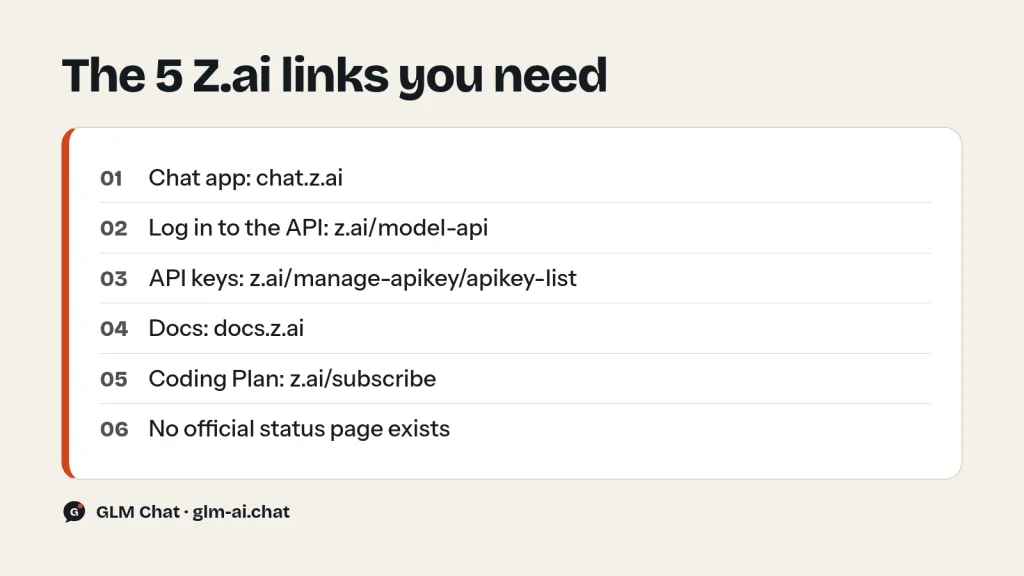
- To chat with GLM in a browser: sign in at chat.z.ai. This is Z.ai’s consumer chat app, and it is free.
- To use the API, top up or buy the Coding Plan: register or log in at z.ai/model-api. From there you reach the API Keys page, billing, rate limits and your subscription.
- To set up a coding tool: log in to the platform, create a key at z.ai/manage-apikey/apikey-list, subscribe at z.ai/subscribe, then follow a tool guide such as GLM in Claude Code.
You do not need any account to try GLM right now. The free GLM chat on this site runs without sign-up and lets you switch between GLM-5.3-Flash, GLM-5.3, GLM-5.2 and older models.
If you cannot sign in, work through the checks in GLM not working: 12 fixes. The login fix and the browser fix in that guide cover blank pages, redirect loops and payment failures, such as card top-ups that fail because Z.ai does not support 3DS verification.
Is there a Z.ai status page?
No. Z.ai does not publish a public status page, and the address status.z.ai does not resolve. Any site that calls itself “the official Z.ai status page” is not one. It is at best a third-party monitor and at worst a page built to collect clicks or credentials.
To find out whether Z.ai is up, send one small request to the free glm-4.7-flash model and read the HTTP status, check the Discord and X links in the table above, and try chat.z.ai. The 30-second Z.ai status check gives you the exact curl command and explains each possible result.
bigmodel.cn vs z.ai accounts
Z.ai operates two developer platforms. z.ai is the platform these guides cover, with the API at api.z.ai, prices in USD and the GLM Coding Plan at z.ai/subscribe. bigmodel.cn (open.bigmodel.cn) is Z.ai’s older, separate developer platform.
The two use separate account systems, which has practical consequences:
- An account on one does not log you in to the other.
- A key created on bigmodel.cn will not authenticate against api.z.ai, and the reverse is also true. A 401 error after “copying the key from the docs” often has this cause.
- Balances, resource packages and subscriptions are tied to the platform where you bought them.
You will still see bigmodel.cn addresses inside legitimate z.ai material. The z.ai website loads its scripts from static.bigmodel.cn, and the Claude Code setup script in Z.ai’s Coding Plan docs is downloaded from cdn.bigmodel.cn. That is normal and does not mean you have left Z.ai. What matters is where you type your password and where you create your key: for everything described on this site, that is z.ai.
ChatGLM official: what happened to the ChatGLM name
People searching for “ChatGLM official” are usually looking for today’s GLM. ChatGLM was the company’s 2023 conversational model line. According to Z.ai’s company history, ChatGLM, a 100-billion-parameter conversational model, was released on March 15, 2023. Its open-source sibling ChatGLM-6B has been downloaded more than 20 million times. ChatGLM also launched as a consumer product that August.
Since then the company has renamed itself Z.ai, and its flagship models carry the plain GLM name: GLM-4 in January 2024, GLM-4.5 in July 2025, and the GLM-5 line in 2026. The current flagship is GLM-5.3, with the cheaper multimodal GLM-5.3-Flash beside it. Today, Z.ai’s chat app is chat.z.ai.
The official ChatGLM weights are still published under Z.ai’s Hugging Face organization: zai-org/chatglm-6b, zai-org/chatglm2-6b and zai-org/chatglm3-6b, plus variants such as chatglm3-6b-128k. Copies under other names are mirrors or fine-tunes, not originals. Some of Z.ai’s research code, such as the slime training framework its blog links to, lives in the THUDM organization on GitHub. For the full story of the company, read Zhipu AI (Z.ai): the company behind GLM. For the license of every model, from ChatGLM’s successors to GLM-5.3, see Is GLM open source?
How to spot fake GLM and Z.ai sites
A fake site usually wants one of three things: your password, your API key or your card details. Run these checks before you type any of them.
- Read the domain from right to left. The real one ends in
z.aiexactly: z.ai, chat.z.ai, docs.z.ai, api.z.ai, zcode.z.ai, autoclaw.z.ai, cvd.z.ai. Names like “z.ai-login.com”, “zai-chat.net” or “glm-z.ai.example” are not Z.ai. - Only enter your Z.ai password on z.ai pages. No other site needs it. Third-party tools ask for an API key, never your account password.
- Create keys only on z.ai/manage-apikey/apikey-list. Paste a key only into software you trust, such as your own code, Claude Code, Cline or another tool listed in Z.ai’s docs. Delete any key you have pasted somewhere doubtful.
- Buy the Coding Plan only at z.ai/subscribe. Official prices for individuals are $18, $80 and $168 per month for Lite, Pro and Max. “Lifetime GLM plans”, resold keys and “unlimited GLM” offers are not Z.ai products.
- Download weights from zai-org. Official open weights are at huggingface.co/zai-org (for example
zai-org/GLM-5.2andzai-org/GLM-5.3-Flash) and in the ZhipuAI organization on ModelScope. Code is at github.com/zai-org. - Ignore “official status pages”. None exists (see above).
- Check the stock claim if a site uses it. Z.ai’s listed company trades on the HKEX Main Board under stock code 2513. It listed on January 8, 2026 as Knowledge Atlas Technology and renamed itself Z.AI Co., Ltd. in July 2026. Investment pitches that quote other tickers or “pre-IPO GLM shares” are not from Z.ai.
Other services can legitimately offer GLM models without being Z.ai. OpenRouter, for example, lists GLM models such as z-ai/glm-5.2 under its own account system and prices. That is fine as long as you know whose account and whose bill you are using. GLM Chat, this site, passes your messages to Z.ai’s API to generate replies and needs no account or key from you. The GLM pricing page compares Z.ai’s own prices with OpenRouter’s listings.
Z.ai official links FAQ
What is the official Z.ai website?
It is z.ai. The chat app is chat.z.ai, the developer platform starts at z.ai/model-api, and the docs are at docs.z.ai.
Is chat.z.ai the official GLM chat?
Yes. chat.z.ai is Z.ai’s own free web chat with GLM models, and Z.ai’s model announcements link to it. New flagships such as GLM-5.2 and GLM-5.3 are available there.
Is Z.ai the same company as Zhipu AI?
Yes. Z.ai is the company formerly known as Zhipu AI (Zhipu). It was founded in 2019, grew out of Tsinghua University research, and develops the GLM model family.
Where do I log in to the Z.ai API?
Register or log in at z.ai/model-api, then create a key at z.ai/manage-apikey/apikey-list. The general API base URL is https://api.z.ai/api/paas/v4.
Does Z.ai have a desktop app?
Z.ai’s official desktop agent app is ZCode, available from zcode.z.ai. It is built for coding with the GLM Coding Plan. AutoClaw, at autoclaw.z.ai, is another official Z.ai agent product.
Where are the official GLM weights?
On Hugging Face under zai-org, on ModelScope under ZhipuAI, and with code and READMEs on GitHub under zai-org. The GLM models overview lists which models have open weights.
Does Z.ai have a Discord or X account?
Yes. The z.ai website links a Discord community and the X account x.com/Zai_org. Both are the quickest places to see whether other users are reporting the same problem as you.
Can I use my bigmodel.cn account on z.ai?
No. bigmodel.cn and z.ai use separate account systems, so accounts, keys and balances do not transfer between them.
How do I contact Z.ai?
Use the contact page at z.ai/contact for sales and support. Privacy questions go to user_feedback@z.ai, and GLM-5.3 License questions go to glmlicense@z.ai. For billing problems, include your account email and the time of the failed payment. For API errors, include the model ID and the error id that Z.ai returned.
Want to skip the accounts entirely? Chat with GLM-5.3 for free on this site, or read the GLM release timeline to see what each model added.