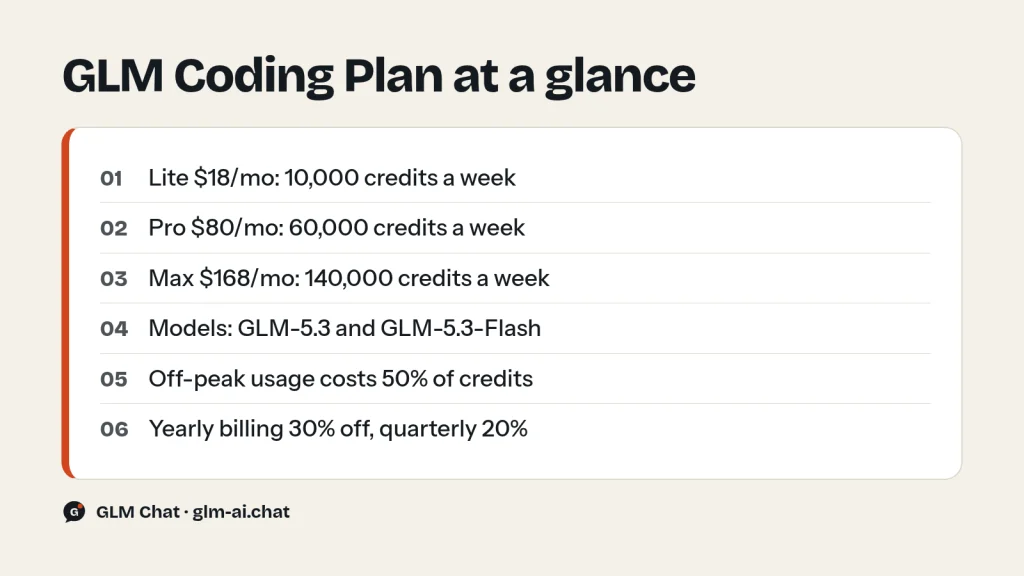
The GLM Coding Plan is Z.ai’s flat-rate subscription for AI coding tools. It costs $18 (Lite), $80 (Pro) or $168 (Max) per month, gives you a fixed number of credits every 5 hours and every week, and lets you run GLM-5.3 and GLM-5.3-Flash inside supported agents such as Claude Code, Cline, OpenCode, Cursor, ZCode and OpenClaw. It is not a general API key: the quota only works inside those tools, and it never draws from your pay-as-you-go balance.
Since July 30, 2026 the plan runs on credits instead of prompt counts. Every request is converted to credits from its input, cached-input and output tokens, and requests made outside weekday peak hours cost half. This guide walks through the tiers, the credit formula with worked numbers, the break-even point against the regular API, the tools you can use it in, and the billing rules that catch people out. Z.ai (formerly Zhipu AI) publishes all of these figures on its subscription page and in its Coding Plan docs.
GLM Coding Plan pricing: Lite vs Pro vs Max
All three individual tiers include the same models and the same four MCP tools. What changes is how many credits you get, how fast generation is, and how you are treated when the service is busy. Monthly billing is the list price; quarterly billing takes 20% off and yearly billing takes 30% off.
| Tier | Monthly price | Yearly (per month) | 5-hour credits | Weekly credits |
|---|---|---|---|---|
| Lite | $18 | $12.60 | 2,000 | 10,000 |
| Pro | $80 | $56 | 12,000 | 60,000 |
| Max | $168 | $117.60 | 28,000 | 140,000 |
Quarterly billing at 20% off works out to $14.40, $64 and $134.40 per month for Lite, Pro and Max. On yearly billing you pay $151.20, $672 or $1,411.20 for the year. Pro carries 6x the Lite allowance and Max 14x, so the per-credit price actually drops as you move up: Lite costs $1.80 per 1,000 weekly credits at the monthly price, Pro about $1.33 and Max $1.20.
What each tier adds
- Lite: described by Z.ai as built for lightweight iteration on a small repo. Includes rolling access to the latest flagship models, support for 20+ agent tools and default data privacy.
- Pro: everything in Lite, 6x the Lite usage, a curated selection of MCP tools, faster generation speeds and priority access to the latest flagship models. Aimed at day-to-day development on a mid-sized repo.
- Max: everything in Pro, 14x the Lite usage, first access to new flagship models and dedicated resources during peak times. Aimed at advanced users on mid-to-large repos.
Concurrency also scales with the tier. Z.ai does not publish fixed numbers; its usage policy says limits adjust with available resources, with the general order Max > Pro > Lite. Its recommendation is one project at a time on Lite, one or two parallel projects on Pro, and two or more on Max. Concurrency is raised dynamically during off-peak hours.
Which models the plan includes (and how routing works)
Every tier gets the same two models: GLM-5.3, Z.ai’s flagship coding model, and GLM-5.3-Flash, the smaller, natively multimodal model that consumes about a third as many credits. Z.ai’s FAQ is blunt about it: only these two models can be called on the plan.
Older model names still work because the plan reroutes them:
- Requests for
glm-5.2orglm-5.1are automatically routed to GLM-5.3. See the GLM-5.2 page if you set up your tool when 5.2 was current. - Requests for
glm-4.7are routed to GLM-5.3-Flash. - GLM-5.3-FlashX, the faster paid Flash variant, is not available on the plan yet. It is API-only.
Both plan models have a 1M-token context window and 128K maximum output. GLM-5.3 is text-only; GLM-5.3-Flash accepts images, video and files as input. On the plan, preserved thinking is on by default at the Coding Plan endpoint, which keeps the model’s reasoning across turns in agent loops. For the details of effort levels, read our GLM thinking mode guide.
Which one should you pick? Use GLM-5.3 for hard refactors, multi-file changes and long agent runs where one wrong step is expensive. Use GLM-5.3-Flash for routine edits, quick questions, screenshots of UI bugs and anything where you want the allowance to last. Many people map the “big” slots in their tool to GLM-5.3 and the “small” slot to GLM-5.3-Flash, which is exactly what Z.ai’s manual Claude Code configuration does.
How GLM Coding Plan credits work
Each model request is converted to credits with one formula:
credits = (input tokens × input multiplier
         + cached input tokens × cached input multiplier
         + output tokens × output multiplier) / 10,000
MCP tool calls are billed per call instead: number of calls × the tool’s multiplier. The multipliers are the same for individual and team plans.
| Product | Input | Cached input | Output |
|---|---|---|---|
| GLM-5.3 | 6.9 | 1.7 | 24 |
| GLM-5.3-Flash (incl. vision MCP) | 2.3 | 0.56 | 8 |
| Web Search MCP | — | — | 1.2 per call |
| Web Reader MCP | — | — | 1.2 per call |
| Zread MCP | — | — | 1.2 per call |
Three things follow from this table. First, output is the expensive part: one output token on GLM-5.3 costs about 3.5x an uncached input token and 14x a cached one. Second, cache hits matter enormously in coding agents, which resend the same repository context on every step. Third, GLM-5.3-Flash costs exactly one third of GLM-5.3 on input and output, which is where Z.ai’s “3x the quota” claim for Flash comes from.
How the limits reset
- 5-hour credits refresh dynamically: credits you spend come back 5 hours after you spent them.
- Weekly credits start counting when you subscribe and reset every 7 days from that point, not on a fixed weekday.
- When either limit runs out, the tool stops getting responses until credits come back. The plan never falls back to charging your account balance.
You can see tokens consumed by pricing type and the number of tool calls on the billing page of the Z.ai console (z.ai/manage-apikey/billing), and quota progress on the subscription page.
Credits math: worked examples
The numbers below use the official multipliers and simple arithmetic. Real sessions vary, but these shapes are typical of agent work: a large, mostly cached context and a short reply.
Example 1: one agent step on GLM-5.3
A coding agent sends 100,000 tokens of context, of which 95,000 are a cache hit and 5,000 are new, and gets back 2,000 output tokens.
- Uncached input: 5,000 × 6.9 = 34,500
- Cached input: 95,000 × 1.7 = 161,500
- Output: 2,000 × 24 = 48,000
- Total: 244,000 / 10,000 = 24.4 credits at peak, 12.2 credits off-peak
On Lite, a 2,000-credit 5-hour window covers about 82 of these steps at peak rates or about 164 off-peak. The 10,000 weekly credits cover about 410 steps at peak or about 820 off-peak. On Pro the weekly figure is about 2,460 steps at peak, and on Max about 5,740.
Example 2: the same step on GLM-5.3-Flash
- Uncached input: 5,000 × 2.3 = 11,500
- Cached input: 95,000 × 0.56 = 53,200
- Output: 2,000 × 8 = 16,000
- Total: 80,700 / 10,000 = 8.07 credits at peak, about 4.04 off-peak
Same work, roughly a third of the credits. If a task does not need the flagship, switching the model is the single biggest lever you have on how long your allowance lasts.
Example 3: a 40-step task on GLM-5.3
Suppose a feature takes an agent 40 model calls, each averaging 60,000 input tokens (57,000 cached, 3,000 new) and 1,500 output tokens. Each call costs (3,000 × 6.9 + 57,000 × 1.7 + 1,500 × 24) / 10,000 = 15.36 credits, so the whole task costs about 614 credits at peak and about 307 off-peak. A Lite 5-hour window fits roughly three such tasks at peak rates and six off-peak.
Example 4: MCP calls
Ten web searches through the Web Search MCP cost 10 × 1.2 = 12 credits. That is small next to model usage, but an agent that searches on every step adds up. Z.ai describes the off-peak 50% discount as applying to model usage, so budget MCP calls at the full rate.
Peak and off-peak hours
Model usage during off-peak hours is charged at 50% of the standard credit rate. That doubles your effective allowance if you can shift work.
- Peak hours: Monday to Friday, 14:00–18:00 UTC+8.
- Off-peak: every other hour on weekdays, and all day on Saturday and Sunday.
- Work out the matching four-hour window in your own time zone once, then plan heavy agent runs, refactors and batch jobs around it.
The off-peak rate only changes how many credits a request consumes. It does not change the 5-hour or weekly credit totals themselves. Off-peak hours also come with dynamically higher concurrency, so parallel sub-agents run more smoothly then.
Estimated weekly token allowance
Z.ai publishes an estimate of how many tokens each tier covers per week. The range runs from all usage at peak rates (low number) to all usage off-peak (high number). The estimate depends heavily on the cache hit rate, which is typical of coding agents that resend the same context.
| Model | Lite | Pro | Max |
|---|---|---|---|
| GLM-5.3 | 48–97M | 290–580M | 676–1,352M |
| GLM-5.3-Flash | 146–292M | 877–1,755M | 2,047–4,095M |
At a 98% cache hit rate Z.ai’s table rises to 52–104M tokens for GLM-5.3 on Lite and 158–317M for GLM-5.3-Flash. Z.ai also claims that by making full use of off-peak discounts you can save up to 92% compared with pay-as-you-go calls to the standard GLM-5.3 API. Treat the table as a ceiling for well-cached agent work, not a promise for every workload: a chat-style session with little caching burns credits much faster.
Is the GLM Coding Plan worth it vs the API?
The honest answer depends on two things: which model you use, and whether your usage fits inside a supported coding tool. Here is the math.
What a credit is worth on GLM-5.3
Compare the plan multipliers with the pay-as-you-go prices of GLM-5.3 ($1.40 input, $0.26 cached input, $4.40 output per 1M tokens). One million uncached input tokens costs 690 credits or $1.40; cached input costs 170 credits or $0.26; output costs 2,400 credits or $4.40. So at peak rates roughly 490 to 650 credits buy the same GLM-5.3 usage as $1 on the API, and off-peak half as many.
| Tier | Price/month | Break-even credits | API value of one full week |
|---|---|---|---|
| Lite | $18 | about 8,900–11,800 | about $15–20 |
| Pro | $80 | about 39,400–52,300 | about $92–122 |
| Max | $168 | about 82,800–109,900 | about $214–284 |
Read it this way: if you use roughly one week’s worth of Lite credits on GLM-5.3 in a month, Lite has already paid for itself compared with the API. Pro and Max break even inside their first week of full use. Every week you use fully after that is value the API would have charged for. In Example 1 terms, Lite breaks even at about 445 of those agent steps per month, since each one costs $0.0405 on the API.
GLM-5.3-Flash changes the picture
GLM-5.3-Flash is already cheap on the API at $0.15 input, $0.03 cached and $0.50 output per 1M tokens. At plan multipliers, 1,500 to 1,900 credits equal $1 of Flash API usage. A full week of Lite credits spent only on Flash is worth about $5–7 at API prices at peak rates, or about $11–13 off-peak. If you only ever use Flash, the plan’s value comes mostly from off-peak hours and the included MCP tools (plus promotions such as the Flash usage campaign), not from the raw token discount.
When the API is the better choice
- You are building an app, a backend job or a script. The plan quota cannot be used for general API calls; use a regular key and the GLM API quickstart.
- Your tool is not on the supported list. Using the plan elsewhere breaks the usage rules and can get benefits restricted.
- Your usage is light and bursty: a few sessions a month cost less than $18 on the API, especially on GLM-5.3-Flash or the free GLM-4.7-Flash.
- You need GLM-5.3-FlashX, GLM-5-Turbo or an older model that the plan does not serve directly.
For everything else, meaning daily work in Claude Code, Cline, OpenCode or a similar agent, the plan is the cheaper way to run GLM-5.3. Compare the full price list on our GLM pricing page, and see how prompt caching changes API bills in the context caching guide.

Supported tools
The plan is strictly limited to officially supported tools and products. All supported tools share the same quota under your subscription. Z.ai’s tool list splits them into two groups.
| Group | Tools |
|---|---|
| Coding agents | ZCode, Claude Code, Claude for IDE, Codex, OpenCode, Pi, Cursor, Cline, TRAE, Qoder, Droid, Kilo Code, Roo Code, Crush, Goose, Eigent |
| General-purpose agents | AutoClaw, OpenClaw, Hermes Agent, SillyTavern |
| Also named on z.ai/subscribe | WorkBuddy, TraeWork, CodeBuddy, TraeCode |
General-purpose agents are served on a best-effort basis. Under high load their requests may be rate-limited temporarily, and coding agents get priority. ZCode is Z.ai’s own agentic coding app and AutoClaw its own general agent; both are central to the current Flash promotion.
Step-by-step setup guides on this site:
- How to use GLM in Claude Code: settings.json, model mapping, 1M context and effort levels.
- How to use GLM in Cline: the OpenAI Compatible provider in VS Code.
- GLM with OpenClaw: onboarding, model switching and which GLM model to run.
How to subscribe and connect a tool
- Register or log in on the Z.ai developer platform at z.ai/model-api.
- Open z.ai/subscribe, pick Individual or Team, choose Lite, Pro or Max and a billing cycle.
- Create an API key. Individual users create it from the plan overview linked to the API Keys page (z.ai/manage-apikey/apikey-list). Team members get a separate Team Plan Key from the team plan page; it is not interchangeable with other Z.ai keys.
- Set the right base URL for your tool’s protocol (table below). This is the step most failed setups get wrong.
- Choose
glm-5.3orglm-5.3-flashas the model and start coding.
| Protocol | Base URL | Used by |
|---|---|---|
| Anthropic Messages | https://api.z.ai/api/anthropic | Claude Code, Goose |
| OpenAI Chat Completions | https://api.z.ai/api/coding/paas/v4 | Cline, OpenCode, Kilo Code and other OpenAI-compatible tools |
| OpenAI Responses | https://api.z.ai/api/v1 | Codex |
For Claude Code, Codex, OpenCode, Crush and Factory Droid, Z.ai’s Coding Tool Helper does the configuration for you. It needs Node.js 18 or newer:
npx @z_ai/coding-helperThe wizard asks for a UI language, the plan, your API key and the tools to manage, installs missing tools, loads the plan into them and can set up the MCP servers. Run coding-helper doctor if something looks wrong afterwards.
The four included MCP tools
- Vision Understanding MCP: lets text-only agents read screenshots, UI mockups, diagrams and short videos. It is billed at GLM-5.3-Flash rates.
- Web Search MCP: live web search for current docs and API changes.
- Web Reader MCP: fetches full web pages and extracts structured content.
- Zread MCP: searches the docs, directory structure and code of open-source GitHub repositories.
Z.ai says it offers the Vision, Web Search and Web Reader MCP servers only through the plan. If you need search on the regular API instead, see our GLM web search API guide.
GLM Coding Plan for teams
The Team Plan is a self-service version for companies and dev teams, sold per seat with a minimum of two seats and no upper limit. Each member gets their own seat and quota; seats cannot be shared.
| Seat | Price | Annual (per month) | 5-hour credits | Weekly credits |
|---|---|---|---|---|
| Standard | $88 per seat/month | from $79.20 | 15,000 | 66,000 |
| Premium | $188 per seat/month | from $169.20 | 35,000 | 155,000 |
- Management: central seat, role and permission management, per-member usage analytics, centralized billing and invoicing.
- Overage: admins can enable on-demand overage so a seat keeps working after its quota runs out, with per-member spending limits. Z.ai lists overage at a limited-time 10% discount from the API list price.
- Privacy: code, prompts and conversations are excluded from model training by default.
- Premium only: early access to new flagship models and priority resources during peak hours.
- Rules: Standard and Premium seats cannot be mixed in one purchase, Standard cannot be upgraded to Premium, and seats can be added mid-cycle (prorated) but not removed until the cycle ends. The buying admin does not occupy a seat unless they assign one to themselves.
One person can hold an individual plan and team seats at the same time. The same credit formula, multipliers and peak hours apply to both.
Current promotions (dated)
Two promotions are running as of September 24, 2026. Both are time-limited, so check the dates.
- All-day off-peak rate, September 25 – October 7, 2026: every hour is charged at the 50% off-peak credit rate, including weekday peak hours.
- GLM-5.3-Flash usage campaign, September 3 – October 7, 2026 (extended from September 20): every day from 23:00 to 09:00 the next morning (UTC+8), paid plan users get unlimited GLM-5.3-Flash with zero quota consumption in ZCode (version 3.10 or later) and AutoClaw, and doubled quota in other supported agents. It applies only to GLM-5.3-Flash, and if you have already hit your 5-hour or weekly limit you have to wait for the reset to join in.
- Invite friends, earn credits: an invited friend gets 10% off their first plan order; the inviter earns credits worth 10% of the friend’s actual payment, paid out once three friends have subscribed, plus an extra 10% for every 30 friends. Z.ai advertises this as up to 20% back. Credits offset Z.ai purchases and API fees but cannot be withdrawn.
Z.ai also occasionally hands out quota reset cards during campaigns. A 5-hour or weekly reset card restores the consumed quota to full immediately; a weekly card also restores the 5-hour quota. Cards expire if unused.
Legacy plans and the July 30, 2026 switch to credits
Before July 30, 2026 the plan counted prompts instead of credits. The last prompt-based version (Legacy Plan V2) allowed roughly 80 prompts per 5 hours and 400 per week on Lite, 400 and 2,000 on Pro, and 1,600 and 8,000 on Max, with each prompt estimated at 15–20 model calls. The console’s plan page shows “Legacy Plan V1” or “Legacy Plan V2” if you still have one.
- Legacy V1 and V2 keep their price, limits and calculation method until the current billing cycle ends. Legacy weekend usage is also charged at off-peak rates all day.
- V2 subscribers can keep auto-renewing and can switch immediately if they upgrade to a higher tier of the credits plan; the unused value of the old plan is applied to the new price.
- V1 subscribers and old team plans can move to the credits plan only after the current plan expires.
- Legacy users who qualified for the April 2026 migration offer keep their 50% migration discount for its original validity period, and it applies to the credits plan.
Plans are never switched automatically. If you want the credits plan, you have to subscribe or switch yourself.
Cancellation, refunds, upgrades and billing
- No refunds: once purchased, a subscription cannot be refunded, even if you did not use it.
- Cancel before renewal: plans auto-renew. Z.ai’s FAQ says to cancel at least 24 hours before the next billing date; its usage policy says at least 3 days. Cancel 3 days ahead to be safe. After cancelling, the plan stays active until the paid period ends.
- Same-tier upgrades (for example Lite monthly to Lite yearly) start after the current plan ends, so the periods stack: Lite monthly plus Lite yearly gives 13 months.
- Cross-tier upgrades (for example Lite to Pro) apply immediately. The unused value of your old plan is converted to account balance, prorated, and offsets the price difference.
- Payment order: renewals use your bonus credits first, then your cash balance, then your linked card or PayPal. A small minimum charge applies to cards.
- Where: manage the subscription and cancel it on the subscription page of the Z.ai console (z.ai/manage-apikey/subscription).
Rules that can get your plan restricted
- No account sharing: benefits belong to the subscriber only. Multi-user access is prohibited.
- Supported tools only: using the plan in unsupported tools or scenarios can restrict benefits.
- Risk control: violations can trigger rate limiting or account freezing, and accounts with more than three violations may be banned. Flagged accounts see a notice on the plan overview page and can appeal there.
If a supported tool starts returning errors, the most common causes are covered in our GLM API rate limits and error codes guide and the GLM not working troubleshooting page. Want to try the models before paying? GLM-5.3 and GLM-5.3-Flash are both available in our free GLM chat, no sign-up needed, or you can chat with GLM-5.3 directly.
GLM Coding Plan FAQ
How much does the GLM Coding Plan cost?
Lite is $18 per month, Pro $80 and Max $168 on monthly billing. Quarterly billing is 20% off and yearly billing 30% off, which brings the yearly rate to $12.60, $56 and $117.60 per month. Team seats cost $88 (Standard) or $188 (Premium) per seat per month.
Which models are included in the GLM Coding Plan?
All tiers include GLM-5.3 and GLM-5.3-Flash. Requests for GLM-5.2 and GLM-5.1 are routed to GLM-5.3, and requests for GLM-4.7 are routed to GLM-5.3-Flash. GLM-5.3-FlashX is not on the plan.
Can I use my Coding Plan API key in my own app?
No. The plan quota only works inside officially supported coding and agent tools, and API calls outside the plan are not available to it. For your own software, use a pay-as-you-go key on the general API at https://api.z.ai/api/paas/v4.
What happens when I run out of credits?
Requests stop until your 5-hour credits refresh (5 hours after you spent them) or your weekly credits reset. The plan never charges your account balance. Team admins can enable paid overage for seats.
Why do I get “1113 Insufficient Balance” after subscribing?
Almost always because the tool is pointed at the wrong base URL or is not a supported tool. Claude Code and Goose must use https://api.z.ai/api/anthropic, other OpenAI-compatible tools https://api.z.ai/api/coding/paas/v4, and only GLM-5.3 and GLM-5.3-Flash can be called.
When are peak hours on the GLM Coding Plan?
Monday to Friday, 14:00–18:00 UTC+8. All other hours, including all weekend, are off-peak and consume credits at half the rate. From September 25 to October 7, 2026 every hour is charged at the off-peak rate.
Can I get a refund on the GLM Coding Plan?
No. Subscriptions are non-refundable once purchased. Cancel auto-renewal at least 3 days before the next billing date to be safe; the plan stays active until the end of the period you paid for.
Is the GLM Coding Plan worth it compared with the API?
For daily GLM-5.3 use inside a coding agent, yes: by our arithmetic from Z.ai’s multipliers, each tier breaks even within about one week of full use at peak rates. If you mostly use GLM-5.3-Flash, only code occasionally, or need the model inside your own app, the pay-as-you-go API is often the better deal.