GLM-5.3-Flash (often searched as GLM 5.3 Flash) is Z.ai’s low-cost, natively multimodal model, released on August 26, 2026. It reads text, images, video and files, writes text, and keeps a 1M-token context window with up to 128K output tokens. It is a mixture-of-experts model with 320B total and 18B active parameters, its weights are open under the MIT license, and the API costs $0.15 per million input tokens and $0.50 per million output tokens. Z.ai (formerly Zhipu AI) says it beats GLM-5.2 on coding and agent benchmarks at one-tenth of the price.
Is it free? It depends on where you use it. GLM-5.3-Flash is the default model in GLM Chat, so you can talk to it here for free with no sign-up, and upload images too. On the Z.ai API it is not free: it is a paid model, just a very cheap one. The GLM models that are actually free on the Z.ai API are GLM-4.7-Flash, GLM-4.5-Flash and GLM-4.6V-Flash. Chat with GLM-5.3-Flash now to try it before you write a line of code.
This guide covers what the model is good at, how it compares with GLM-5.3, GLM-5.2 and GLM-4.7-Flash, the ox-alpha story, the faster GLM-5.3-FlashX variant, working API code (including image input), the open weights, and how it fits into the GLM Coding Plan with 3x the quota of GLM-5.3.
What GLM-5.3-Flash is good at
GLM-5.3-Flash is the first model in the GLM-5 series that sees. Every earlier GLM-5 model (GLM-5, GLM-5.1, GLM-5.2, GLM-5.3) is text-only. That single change shapes almost everything the model is useful for, because Z.ai trained the vision directly into the coding loop instead of bolting it on.
Visual coding: build it, render it, look at it, fix it
For front-end work, games and 3D scenes, the thing you ship is not the code; it is what the user sees. Z.ai built data pipelines so the model renders its own output, inspects the result, spots layout or visual problems and revises the code. In practice that means you can hand it a set of page screenshots and ask for a working Next.js and TypeScript recreation, then have it compare its own screenshots against the references and fix differences in spacing, typography and cropping. Z.ai’s documentation also shows it building Godot game prototypes, editable Blender scenes and parametric CAD parts with build123d, each time rendering and checking its own work.
Office documents, charts and reports
Because it can read what a page looks like, GLM-5.3-Flash is strong at deliverables where layout matters: PPTX decks, PDF reports, DOCX files and XLSX models. Z.ai’s recommended workflow is to let it create the file, render every page, and fix text overflow, misalignment and overlapping elements before handing it over. The same ability helps with reading charts, dashboards and documents. On Z.ai’s published vision benchmarks it scores 62.4 on OfficeQA Pro and 89.4 on CharXiv Reasoning with tools.
Browser and computer use
In Z.ai’s ZCode app the model drives Browser Use and Computer Use: it clicks through web pages, checks them visually and operates desktop apps. Z.ai reports 59.1 on OSWorld 2.0, ahead of every other model in its launch table, which makes it a sensible default for agents that have to work through real interfaces rather than clean APIs.
Everyday coding and agent work at a low price
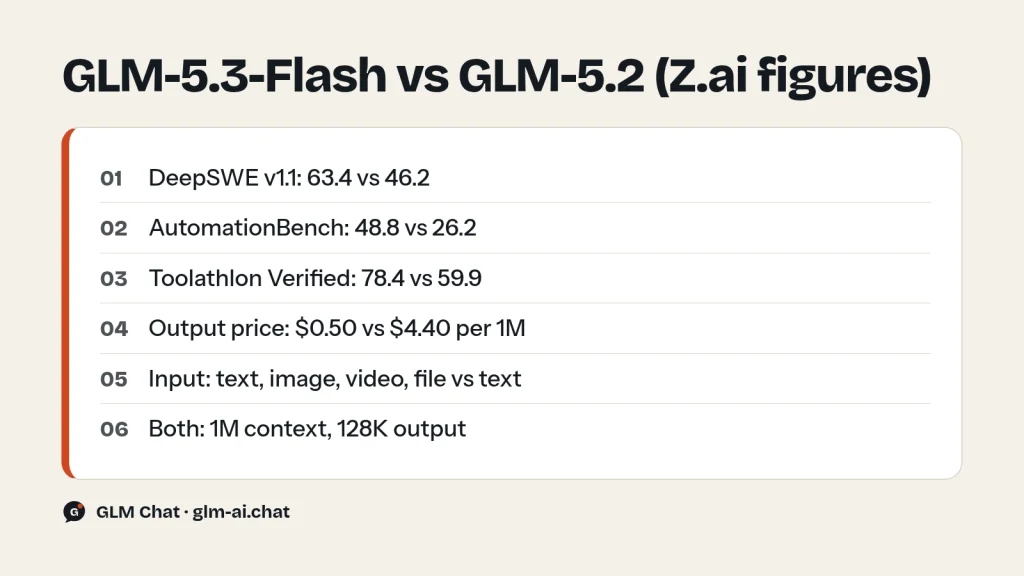
Even on plain text tasks, Z.ai’s numbers put GLM-5.3-Flash above GLM-5.2: 63.4 vs 46.2 on DeepSWE v1.1 and 48.8 vs 26.2 on AutomationBench. On Z.ai Code Bench v1.0 at max effort it scores 29.0, next to Claude Opus 4.8 at 29.5. Artificial Analysis scored it 57 on its Intelligence Index v4.1.1 at $0.045 per task (discounted), which Z.ai describes as a level previously available only at roughly 10x the cost. If you run agents all day, that price gap matters more than a few benchmark points.
Where it is not the best pick
For the hardest long-horizon coding, cybersecurity and exploitation work, GLM-5.3 is still Z.ai’s strongest model, and it costs about nine times more on output. If you need an API model that costs nothing at all, use GLM-4.7-Flash. And if your prompts are short and you only need a quick text answer, the reasoning that GLM-5.3-Flash always performs adds tokens you pay for; set reasoning_effort to low to keep that in check.
We tested it: 5 tasks
Here is how GLM-5.3-Flash handles our five standard tasks. Each tested model goes through the same fixed battery three times, with the same settings as the public chat: temperature 0.7, a 2,048-token output cap, and the lightest reasoning setting the model allows. For GLM-5.3-Flash, where thinking is always on, that means reasoning_effort set to low. The harness records the full answer, latency and token counts, and an editor scores each answer from 0 to 2.
- Python: a function that removes duplicate rows from a large CSV, streaming the file with constant memory apart from the set of seen keys, with selectable key columns and the header preserved.
- JavaScript: a
debounce(fn, wait, { leading, trailing })function with acancel()method, plus unit tests for Node’s built-in test runner. - PHP refactor: a deliberately messy 60-line function with copy-pasted loops, magic discount numbers, unescaped HTML and SQL built by string concatenation, to be rewritten as clean PHP 8 without changing behaviour.
- Explanation: transformer attention for a complete beginner in about 150 words.
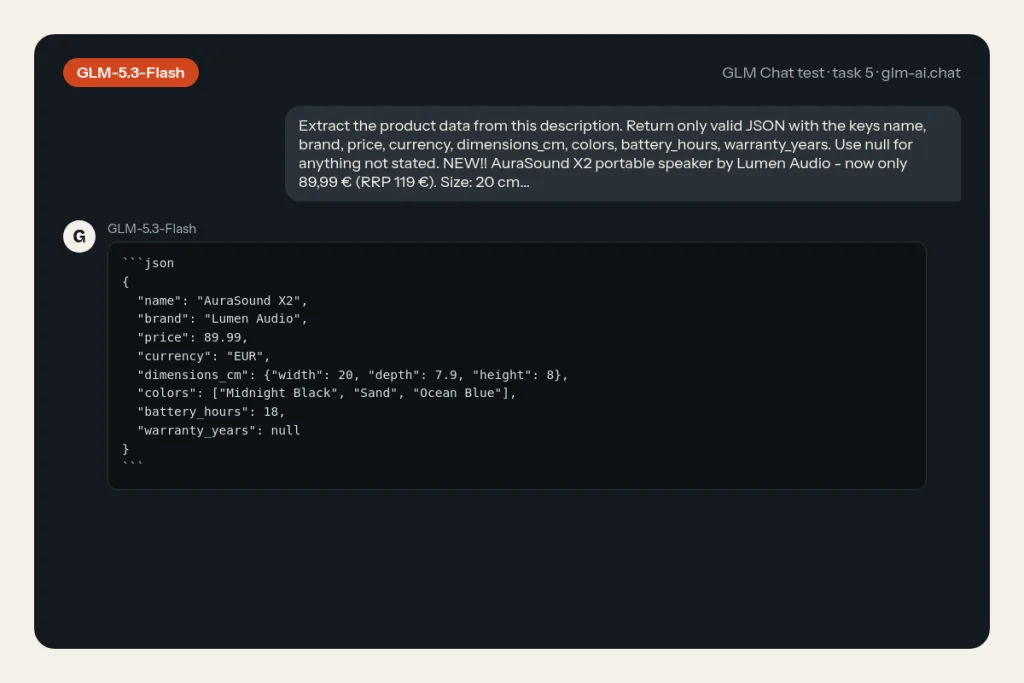
- Extraction: a messy product description turned into strict JSON with fixed keys, units converted to centimetres and
nullfor anything not stated.
Our test in GLM Chat
| Task | Median score | Median latency | Median output tokens | Why (across runs) |
|---|---|---|---|---|
| Python: stream-safe CSV dedupe | 2 / 2 (runs: 2, 2, 2) | 12.0 s | 544 | Streams with csv, keeps the header and first occurrence, key columns work in every run. |
| JavaScript: debounce with options + tests | 0 / 2 (runs: 2, 0, 0) | 24.0 s | 1,144 | Fails our debounce behaviour checks (2/3 runs); its own tests fail (1/3 runs). |
| PHP: refactor a messy 60-line function | 1 / 2 (runs: 0, 1, 1) | 18.6 s | 692 | Output not escaped (3/3 runs); SQL not parameterised (3/3 runs); changes the function’s behaviour (1/3 runs). |
| Explain attention to a beginner | 2 / 2 (runs: 2, 1, 2) | 7.0 s | 222 | Passes every check in most runs; no queries/keys/values (1/3 runs). |
| Extract JSON from a messy description | 2 / 2 (runs: 2, 2, 2) | 3.0 s | 130 | Every field correct and units converted in every run. |
| Total | 7 / 10 |
Scoring is strict. A 2 means correct and complete: the code runs, every constraint is met and there are no factual errors. A 1 means usable with a small fix. A 0 means wrong, invented data, or a broken output format. The maximum is 10 per model. Each task probes something different: the CSV task shows whether the model respects memory constraints instead of loading everything with pandas; the debounce task catches models that mishandle the leading-plus-trailing case or write tests that do not actually run with node --test; the PHP task checks whether a refactor keeps the VIP discount logic intact while fixing escaping and switching to parameterised SQL.
For a Flash-tier model, look closely at the last two tasks. The explanation task rewards precision under a tight word budget (queries, keys, values and weights explained correctly in 120 to 180 words), and the extraction task punishes any invented value. Cheap models often lose points there by padding or guessing. Remember that these runs use the light low reasoning setting; on the API you can raise it to high or max for harder work.
GLM-5.3-Flash vs GLM-5.3, GLM-5.2 and GLM-4.7-Flash
The short version: GLM-5.3-Flash replaces GLM-5.2 for most workloads, sits one step below GLM-5.3, and is the paid, multimodal big brother of the free GLM-4.7-Flash. The table puts the numbers side by side.
| Spec | GLM-5.3-Flash | GLM-5.3 | GLM-5.2 | GLM-4.7-Flash |
|---|---|---|---|---|
| Released | Aug 26, 2026 | Aug 14, 2026 (API Aug 18) | Jun 16, 2026 | Jan 19, 2026 |
| Parameters | 320B total / 18B active | 744B / 40B | 744B / 40B | 30B-A3B |
| Input | Text, image, video, file | Text | Text | Text |
| Context / output | 1M / 128K | 1M / 128K | 1M / 128K | 200K / 128K |
| API price (in / out per 1M) | $0.15 / $0.50 | $1.40 / $4.40 | $1.40 / $4.40 | Free |
| Thinking control | Always on; effort low / high / max | Always on; effort low / high / max | Effort high / max; none or minimal skips thinking | Can be turned off |
| Weights | MIT | GLM-5.3 License | MIT | MIT |
GLM-5.3-Flash vs GLM-5.3
These two launched twelve days apart and share the “5.3” number, but they are different models. GLM-5.3 reuses the GLM-5.2 base model with better post-training; GLM-5.3-Flash starts from a newly trained, smaller base with a new attention design. GLM-5.3 is the stronger coder on Z.ai’s charts, and it has a custom license with an extra condition for very large Model-as-a-Service providers, while GLM-5.3-Flash stays on plain MIT (see which GLM models are open source). Choose GLM-5.3 when a failed run costs more than the tokens; choose GLM-5.3-Flash when you need vision, volume, or both.
GLM-5.3-Flash vs GLM-5.2
Z.ai’s own launch table shows GLM-5.3-Flash ahead of GLM-5.2 on every coding and agent row it reports, at roughly one-tenth of the API price. GLM-5.2 still offers one thing Flash cannot: you can make it skip thinking entirely by sending reasoning_effort as none or minimal. Unless you rely on that, GLM-5.3-Flash is the better buy.
GLM-5.3-Flash vs GLM-4.7-Flash (and why there is no “GLM-5-Flash”)
People searching for “GLM 5 Flash” usually mean this model. Z.ai’s model list has no plain glm-5-flash ID: the Flash model of the GLM-5 generation is glm-5.3-flash. The previous Flash model, GLM-4.7-Flash, is much smaller (30B total, 3B active), text-only, limited to 200K context, and free on the API. It remains the right choice for zero-cost prototypes and for running on a single workstation. GLM-5.3-Flash is the upgrade when you need vision, a 1M window or much stronger agent performance.
Which GLM model should you pick instead?
| If GLM-5.3-Flash is not quite right because… | Pick | Price in / out per 1M |
|---|---|---|
| You need the strongest coding and long-horizon results | GLM-5.3 | $1.40 / $4.40 |
| You need the same model with lower latency | GLM-5.3-FlashX | $0.37 / $1.25 |
| You want some turns with no reasoning at all | GLM-5.2 (effort none or minimal) | $1.40 / $4.40 |
| You want thinking fully switchable on a 744B model | GLM-5.1 or GLM-5 | $1.40 / $4.40 or $1.00 / $3.20 |
| Your budget is zero, or it must run on one machine | GLM-4.7-Flash | Free |
| You need to generate images, not read them | GLM-Image | $0.015 per image |
For everything else, including most chat, coding help, document work and agents that need to look at a screen, GLM-5.3-Flash is the sensible starting point: test it first and move up only when a real task fails.
Z.ai’s benchmark table for GLM-5.3-Flash
These are the figures Z.ai published at launch. Treat them as the vendor’s own measurements; the site’s own results live in the test block above.
| Benchmark | GLM-5.3-Flash | GLM-5.2 | Opus 4.8 | GPT-5.6 Terra | Gemini 3.7 Flash |
|---|---|---|---|---|---|
| Terminal Bench 2.1 | 84.3 | 81.0 | 85.0 | 87.4 | 85.8 |
| DeepSWE v1.1 | 63.4 | 46.2 | 58.0 | 69.6 | 65.3 |
| NL2Repo | 56.3 | 48.9 | 69.7 | – | – |
| Toolathlon Verified | 78.4 | 59.9 | 76.2 | 74.9 | – |
| AutomationBench v1.0.6 | 48.8 | 26.2 | 41.0 | 37.2 | 52.3 |
| Agents’ Last Exam | 26.3 | 20.4 | 27.0 | 28.0 | – |
| HLE w/ Tools | 55.3 | 54.7 | 57.9 | – | – |
| GDPval-AA v2 | 1773 | 1504 | 1582 | 1571 | 1527 |
| OfficeQA Pro | 62.4 | – | 48.9 | – | – |
| CharXiv Reasoning w/ Tools | 89.4 | – | 89.9 | 88.0 | 88.7 |
| BabyVision | 53.4 | – | 46.8 | 61.6 | 70.9 |
| MMVU | 80.5 | – | 67.4 | 75.8 | 82.3 |
| OSWorld 2.0 | 59.1 | – | 54.8 | 50.2 | 47.9 |
| Vision2Web | 77.8 | – | 76.1 | 67.5 | 76.5 |
Read the table honestly: GLM-5.3-Flash wins clearly on agent and office tasks (Toolathlon, AutomationBench, GDPval-AA, OfficeQA Pro, OSWorld 2.0), trails frontier closed models on repository-scale coding such as NL2Repo, and is mid-pack on pure visual puzzles like BabyVision. Z.ai’s evaluation notes say most runs used temperature 1.0 and top_p 0.95, with long context budgets, so short-context everyday use can feel different.
The ox-alpha story and the architecture behind it
Before launch, Z.ai released GLM-5.3-Flash anonymously under the name ox-alpha (also written “OX Alpha”) on OpenCode and OpenRouter to gather user feedback. It quickly became the most popular model of that week. If you saw ox-alpha in a model picker in August 2026 and liked it, GLM-5.3-Flash is the same model under its real name.
A new base model, built for cheap inference
GLM-5.3-Flash does not reuse an older GLM base. Z.ai trained a new one on a 30-trillion-token multimodal corpus and redesigned the architecture around cost. Compared with the GLM-4.5 series it has a similar total size (320B vs 355B) but nearly halves the active parameters (18B vs 32B) and the layer count (45 vs 92). Three design choices do most of the work:
- Hybrid linear and sparse attention. A first for the GLM series. Linear attention models local dependencies through a running state; sparse attention uses a lightweight indexer to pull in the relevant global context. The result keeps precise long-context recall while cutting serving cost.
- IndexPool. To keep the indexer cheap at 1M tokens, Z.ai compresses four indexer key vectors into one through weighted pooling.
- Manifold-Constrained Hyper-Connections (mHC). A change to the residual connections that Z.ai says improves scaling efficiency.
Z.ai’s measured effect: compared with GLM-5.3, GLM-5.3-Flash uses 3.0x less attention compute and a 4.4x smaller KV cache (the docs give 3.01x and 4.44x). It has the lowest attention compute of all the models Z.ai compared, although its KV cache is still slightly larger than two competing open models, which Z.ai openly flags as room for improvement. The smaller KV cache is why a 1M-token window is affordable at Flash prices.
How the base model compares
| Base model | GLM-4.5-Base | GLM-5-Base | GLM-5.3-Flash-Base |
|---|---|---|---|
| Active / total params | 32B / 355B | 40B / 744B | 18B / 320B |
| MMLU | 86.1 | 88.3 | 88.1 |
| BBH | 86.2 | 87.4 | 86.6 |
| HellaSwag | 87.1 | 88.1 | 87.1 |
| LiveCodeBench-Base | 28.1 | 34.4 | 37.6 |
| SimpleQA | 30.0 | 36.0 | 33.5 |
On the serving side, Z.ai built a dedicated inference engine for this architecture on top of SGLang, using W8A8 quantization, hybrid INT8/FP8/BF16 cache quantization and an Encode-Prefill-Decode setup that schedules image encoding, prompt prefill and token generation as separate worker pools. Z.ai says GLM-5.3 itself, running as an infrastructure agent, helped engineers optimize the kernels that serve its smaller sibling, and that end-to-end serving performance improved 3x over the first baseline.
GLM 5.3 Flash pricing and free access
Here is exactly what you pay, and where you pay nothing.
| Model | Input | Cached input | Output |
|---|---|---|---|
| GLM-5.3-Flash | $0.15 | $0.03 | $0.50 |
| GLM-5.3-FlashX | $0.37 | $0.075 | $1.25 |
| GLM-5.3 | $1.40 | $0.26 | $4.40 |
| GLM-5.2 | $1.40 | $0.26 | $4.40 |
| GLM-4.7-FlashX | $0.07 | $0.01 | $0.40 |
| GLM-4.7-Flash | Free | Free | Free |
What a real workload costs
Take 1,000 requests, each with 2,000 input tokens and 500 output tokens. That is 2M input and 0.5M output tokens in total.
- GLM-5.3-Flash: 2 x $0.15 + 0.5 x $0.50 = $0.30 + $0.25 = $0.55
- GLM-5.3-FlashX: 2 x $0.37 + 0.5 x $1.25 = $0.74 + $0.625 = about $1.37
- GLM-5.3 or GLM-5.2: 2 x $1.40 + 0.5 x $4.40 = $2.80 + $2.20 = $5.00
Remember that thinking is always on for GLM-5.3-Flash, and reasoning tokens are billed as output. A request that “returns 500 tokens” can bill more once reasoning is counted, so check the usage fields in each response and lower reasoning_effort when the task is easy. Repeated prompt prefixes (system prompts, long documents) are billed at the cached rate of $0.03 per million when they hit the cache; see the GLM context caching guide. Full price tables for every model are on the GLM pricing page.
Free ways to use GLM-5.3-Flash
- GLM Chat (this site). GLM-5.3-Flash is the default chip in the free GLM chat. No account is needed. You get 40 messages per day on paid models, up to 8,000 characters per message, and you can upload JPEG, PNG or WebP images up to 4 MB. The chat runs it at the lightest reasoning setting for quick replies.
- Z.ai’s own chat app. Z.ai’s GLM-5 README invites you to try GLM-5.3 and GLM-5.3-Flash at z.ai, and chat.z.ai is its free web chat.
- Your own hardware. The weights are MIT-licensed, so self-hosting costs nothing in license fees, only hardware (see the weights section below).
What is not free: the Z.ai API (paid at $0.15 / $0.50) and OpenRouter, which lists z-ai/glm-5.3-flash at the same $0.15 / $0.50 and z-ai/glm-5.3-flashx at $0.37 / $1.25. OpenRouter prices change often, so confirm them on the OpenRouter model page. If you need an API that costs nothing, call glm-4.7-flash instead.
GLM-5.3-FlashX: the faster variant
glm-5.3-flashx is the same model family served for speed: Z.ai quotes about 200 tokens per second. It costs $0.37 in, $0.075 cached and $1.25 out, roughly 2.5x the Flash price. It is available only through the API; there are no separate FlashX weights, and it is not yet available on the GLM Coding Plan. Use FlashX for latency-sensitive products such as live assistants, autocomplete-style tools or voice front-ends where a second of waiting hurts more than the extra cost. For batch jobs and background agents, plain Flash is the better deal.
GLM-5.3-Flash on the GLM Coding Plan: 3x the quota
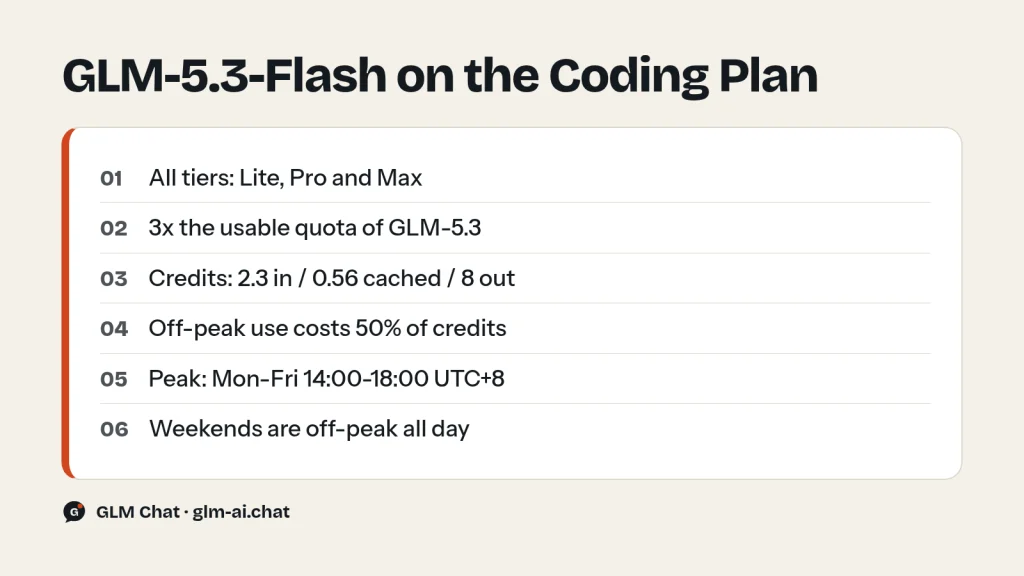
Every GLM Coding Plan tier (Lite $18, Pro $80, Max $168 per month) includes GLM-5.3-Flash with three times the usable quota of GLM-5.3. That follows directly from the credit multipliers Z.ai publishes: GLM-5.3-Flash consumes 2.3 per input token, 0.56 per cached token and 8 per output token, against 6.9, 1.7 and 24 for GLM-5.3. Credits used = (input x input multiplier + cached x cached multiplier + output x output multiplier) / 10,000.
Worked example: one agent step with 100,000 input tokens (95,000 of them cached) and 2,000 output tokens.
- GLM-5.3-Flash: (5,000 x 2.3 + 95,000 x 0.56 + 2,000 x 8) / 10,000 = (11,500 + 53,200 + 16,000) / 10,000 = 8.07 credits
- GLM-5.3: (5,000 x 6.9 + 95,000 x 1.7 + 2,000 x 24) / 10,000 = (34,500 + 161,500 + 48,000) / 10,000 = 24.4 credits
A Lite plan gives 2,000 credits per 5 hours, so that is roughly 247 such steps on GLM-5.3-Flash versus about 81 on GLM-5.3 at the standard (peak) rate. Off-peak use costs 50% of the standard credits; peak hours are Monday to Friday, 14:00 to 18:00 UTC+8, and weekends are off-peak all day. Z.ai estimates a Lite plan at 146 to 292 million GLM-5.3-Flash tokens per week at a 95% cache-hit rate. The plan also routes requests for GLM-4.7 to GLM-5.3-Flash automatically. Setup steps for Claude Code are in our GLM in Claude Code guide.
Using GLM-5.3-Flash via API
The model ID is glm-5.3-flash (or glm-5.3-flashx for the fast variant). It uses Z.ai’s OpenAI-compatible Chat Completions endpoint at https://api.z.ai/api/paas/v4/chat/completions. Get a key on the API Keys page, store it in an environment variable, and never paste it into code you share. If this is your first GLM call, the GLM API quickstart walks through keys, base URLs and SDKs.
Three parameters matter for this model:
thinking: only{"type": "enabled"}is accepted. Thinking cannot be disabled. Sendingdisabledis the wrong way to save tokens; lower the effort instead.reasoning_effort:low,highormax. The default ismax, and any other value falls back tomax. Uselowfor chat and simple extraction,maxfor hard coding.- Z.ai’s recommended settings:
temperature1,top_p0.95,reasoning_effortmax, andthinking.clear_thinkingset tofalsefor agents (it keeps earlier reasoning in context). For plain chat, the model card recommendsclear_thinkingtrue. For streaming, enable bothstreamandtool_stream.
curl
curl -X POST "https://api.z.ai/api/paas/v4/chat/completions" \
  -H "Content-Type: application/json" \
  -H "Authorization: Bearer $ZAI_API_KEY" \
  -d '{
    "model": "glm-5.3-flash",
    "messages": [
      {"role": "system", "content": "You are a concise senior engineer."},
      {"role": "user", "content": "Give me five checks to run before merging a database migration."}
    ],
    "thinking": {"type": "enabled"},
    "reasoning_effort": "low",
    "temperature": 1.0,
    "top_p": 0.95,
    "max_tokens": 4096
  }'
Python with the OpenAI SDK
Install the SDK with pip install --upgrade 'openai>=1.0', point it at Z.ai’s base URL, and pass the GLM-specific fields through extra_body.
import os
from openai import OpenAI

client = OpenAI(
    api_key=os.environ["ZAI_API_KEY"],
    base_url="https://api.z.ai/api/paas/v4/",
)

stream = client.chat.completions.create(
    model="glm-5.3-flash",
    messages=[
        {"role": "user", "content": "Write a regex that matches ISO 8601 dates and explain it."}
    ],
    temperature=1.0,
    top_p=0.95,
    max_tokens=4096,
    stream=True,
    extra_body={
        "thinking": {"type": "enabled", "clear_thinking": True},
        "reasoning_effort": "high",
    },
)

for chunk in stream:
    delta = chunk.choices[0].delta
    reasoning = getattr(delta, "reasoning_content", None)
    if reasoning:
        print(reasoning, end="", flush=True)   # the model's thinking
    if delta.content:
        print(delta.content, end="", flush=True)  # the final answer
While streaming, reasoning text arrives in delta.reasoning_content and the answer in delta.content. The stream ends with data: [DONE]. If a stream stops early, check finish_reason, which is where Z.ai reports abnormal termination during SSE streaming.
Sending images (URL or base64 data URL)
To send an image, make content a list of parts and add one image_url part per image. Z.ai recommends a public URL; a base64 data URL works too. Multiple images are allowed. The API reference lists a limit of under 5 MB per image and at most 6000 x 6000 pixels, in JPG, JPEG or PNG format.
import base64
import os
from openai import OpenAI

client = OpenAI(
    api_key=os.environ["ZAI_API_KEY"],
    base_url="https://api.z.ai/api/paas/v4/",
)

with open("checkout-page.png", "rb") as f:
    b64 = base64.b64encode(f.read()).decode("ascii")

response = client.chat.completions.create(
    model="glm-5.3-flash",
    messages=[
        {
            "role": "user",
            "content": [
                {"type": "image_url",
                 "image_url": {"url": f"data:image/png;base64,{b64}"}},
                {"type": "image_url",
                 "image_url": {"url": "https://example.com/reference-design.png"}},
                {"type": "text",
                 "text": "Compare my page (first image) with the design (second image). "
                         "List every visual difference, then give the CSS fixes."},
            ],
        }
    ],
    extra_body={"thinking": {"type": "enabled"}, "reasoning_effort": "high"},
)

print(response.choices[0].message.content)
The same request in curl uses identical JSON: a content array holding {"type": "image_url", "image_url": {"url": "..."}} objects followed by a {"type": "text", "text": "..."} part.
Practical tips for image prompts
- Prefer URLs to base64. Z.ai recommends image URLs; they keep the request body small, and base64 inflates the payload by about a third.
- Say which image is which. When you send several images, refer to them by order in the text part (“first image: my build, second image: the design”) so comparisons are unambiguous.
- Crop to what matters. A tight screenshot of the broken component gets a sharper diagnosis than a full-page capture with the problem in one corner.
- Ask for a checkable output. “List each difference with the CSS property to change” is easier to verify than “what do you think of this page?”.
- Close the loop. The model is at its best when it can see the result of its own fix, so send a fresh screenshot after applying changes and ask it to confirm or correct.
Video and file input
Video uses a video_url part ({"type": "video_url", "video_url": {"url": "..."}}); the reference lists MP4, MKV and MOV up to 200 MB. Documents use a file part with a file_url, a file_id from Z.ai’s file upload API, or base64 file_data in the form data:<MIME>;base64,<DATA>. Supported formats include PDF, TXT, Word, JSONL, XLSX and PPTX, with a 50 MB limit per file. You cannot mix file parts with image or video parts in the same request.
GLM-5.3-Flash also supports function calling, JSON output with response_format set to {"type": "json_object"}, streaming tool calls and context caching. See GLM function calling and structured output for full tool loops, GLM thinking mode for how effort levels change cost, and GLM API rate limits and error codes if a request fails.
Downloading the weights
GLM-5.3-Flash is open-weights under the MIT license, which allows commercial use, modification and redistribution. Z.ai publishes two precisions:
| Repository | Size | Precision | Mirror |
|---|---|---|---|
| zai-org/GLM-5.3-Flash | 320B-A18B | FP8 | ModelScope ZhipuAI/GLM-5.3-Flash |
| zai-org/GLM-5.3-Flash-BF16 | 320B-A18B | BF16 | ModelScope ZhipuAI/GLM-5.3-Flash-BF16 |
Supported serving and tooling, per Z.ai’s model card: SGLang (cookbook), vLLM (recipes), TokenSpeed, Transformers (the glm5_next architecture), KTransformers (tutorial) and an Unsloth guide. For fine-tuning, the GLM-5 series supports Slime (v0.3.0+) and ms-swift (v4.4.0+). Keep the default max reasoning effort if you want to reproduce Z.ai’s benchmarks, and pass clear_thinking=true in the chat template for chat use.
Hardware reality: memory for the weights alone is roughly parameter count times bytes per parameter. At FP8 (1 byte) that is about 320 GB; at BF16 (2 bytes) about 640 GB. That is our estimate for weights only; KV cache and activations come on top, although the 4.4x smaller KV cache helps a lot at long context. In practice this is a multi-GPU server model, not a laptop model. Only 18B parameters are active per token, so it generates quickly once loaded, but all 320B must sit in memory. If you want something that fits on one workstation, GLM-4.7-Flash (30B total) is the realistic local choice.
GLM-5.3-Flash FAQ
Is GLM-5.3-Flash free?
It is free to use in GLM Chat, where it is the default model, and in Z.ai’s own web chat. On the Z.ai API it is a paid model at $0.15 per million input tokens and $0.50 per million output tokens. The GLM models that are free on the API are GLM-4.7-Flash, GLM-4.5-Flash and GLM-4.6V-Flash.
What is GLM-5.3-Flash’s context window?
1M tokens of context with up to 128K output tokens (131,072 as a max_tokens value). The hybrid attention design and 4.4x smaller KV cache are what make that window cheap to serve.
What was ox-alpha?
ox-alpha (also written OX Alpha) was the anonymous name Z.ai used to test GLM-5.3-Flash on OpenCode and OpenRouter before launch. It became the most popular model of that week. It is the same model now sold as glm-5.3-flash.
What is the difference between GLM-5.3-Flash and GLM-5.3-FlashX?
FlashX is the high-speed API version, quoted at about 200 tokens per second, and costs $0.37 in and $1.25 out per million tokens instead of $0.15 and $0.50. FlashX is API-only and not yet on the GLM Coding Plan. Plain Flash is the one with downloadable weights.
Can I turn off thinking on GLM-5.3-Flash?
No. Thinking is always on and thinking.type only accepts enabled. To make it faster and cheaper, set reasoning_effort to low. The other levels are high and max (the default).
Is there a GLM-5-Flash model?
Not under that name. Z.ai’s model list has no glm-5-flash; the Flash model of the GLM-5 series is GLM-5.3-Flash. The previous generation’s Flash model is GLM-4.7-Flash, which is free on the API.
Is GLM-5.3-Flash better than GLM-5.2?
On Z.ai’s published numbers, yes, across all six coding and agent benchmarks it reports (for example 63.4 vs 46.2 on DeepSWE v1.1), and it adds image, video and file input. It costs about one-tenth as much. GLM-5.2 keeps the option to skip thinking entirely, which some latency-sensitive setups still want.
Can I use GLM-5.3-Flash in Claude Code or Cline?
Yes, through the GLM Coding Plan. In Claude Code, set the model to glm-5.3-flash[1m] for the full 1M window with CLAUDE_CODE_AUTO_COMPACT_WINDOW set to 1000000. In Cline, use the OpenAI-compatible provider with base URL https://api.z.ai/api/coding/paas/v4, enter glm-5.3-flash as a custom model, and tick image support. Step-by-step setup is in our GLM in Cline guide.
The quickest way to judge GLM-5.3-Flash is to throw your own screenshots and prompts at it. Chat with GLM-5.3-Flash now, free and without an account, or compare it with every other model on the GLM models overview.