GLM function calling follows the OpenAI tool-calling pattern. You send a tools array of functions described in JSON Schema, the model replies with tool_calls (a function name plus JSON arguments), your code runs the function, and you send the result back as a role: "tool" message with the matching tool_call_id. The model then writes its final answer. Structured output works through JSON mode: set response_format to {"type": "json_object"} and describe the shape you want in the prompt.
This guide covers both, with code that runs as written: the tool schema, the one tool_choice value Z.ai supports, a complete multi-round loop in Python, several tool calls in one response, streaming tool arguments with tool_stream, how thinking interacts with tools, and a validation-and-retry strategy that makes JSON output dependable. Z.ai (formerly Zhipu AI) documents these features on docs.z.ai; everything below matches its request formats. New to the API? Start with the GLM API quickstart to get a key and a first request working.
Which GLM models support function calling
All current GLM text models accept the tools parameter on the chat completions endpoint, including glm-5.3, glm-5.2, glm-5.1, glm-5, glm-4.7, glm-4.7-flash, glm-4.6 and the GLM-4.5 series. On the vision side, Z.ai’s API reference limits tools to the GLM-5.3-Flash series, the GLM-4.6V series and autoglm-phone-multilingual. Two related features have narrower support:
| Feature | Parameter | Supported on |
|---|---|---|
| Function calling | tools, tool_choice | GLM text models; GLM-5.3-Flash series and GLM-4.6V series for vision |
| Streaming tool arguments | tool_stream: true | GLM-5.3, GLM-5.2, GLM-5.1, GLM-5, GLM-4.7, GLM-4.6 |
| JSON mode | response_format: {"type": "json_object"} | Text models only |
| Built-in web search | tools: [{"type": "web_search", ...}] | Chat completions; $0.01 per use |
Which model should run your agent? For demanding multi-step tool use, GLM-5.3 is the flagship. For high-volume tool calls where cost matters, GLM-5.3-Flash costs $0.15 input and $0.50 output per 1M tokens and also accepts images. To prototype for free, GLM-4.7-Flash supports tools at zero cost per token.
Defining tools: the schema
Each entry in tools has type: "function" and a function object with three fields. Z.ai’s reference marks all three as required:
name: letters, digits, underscores and dashes only (pattern^[a-zA-Z0-9_-]+$), 1 to 64 characters.description: what the function does and when to use it. The model reads this to decide whether to call it, so write it for the model, not for a colleague.parameters: a JSON Schema object describing the arguments. Usetype,properties,required,enumand per-fielddescription.
You can pass up to 128 functions in one request. Here are two well-specified tools used throughout this guide:
tools = [
    {
        "type": "function",
        "function": {
            "name": "get_order_status",
            "description": "Look up the current status of a customer order by its order ID. Use it whenever the user asks where an order is.",
            "parameters": {
                "type": "object",
                "properties": {
                    "order_id": {"type": "string", "description": "Order ID, for example A1001"}
                },
                "required": ["order_id"],
            },
        },
    },
    {
        "type": "function",
        "function": {
            "name": "calculate_shipping",
            "description": "Calculate the shipping cost for a parcel from its weight.",
            "parameters": {
                "type": "object",
                "properties": {
                    "weight_kg": {"type": "number", "description": "Parcel weight in kilograms"},
                    "express": {"type": "boolean", "description": "True for express delivery", "default": False},
                },
                "required": ["weight_kg"],
            },
        },
    },
]
The same request in raw HTTP, if you are not using Python. Note the tool_choice value and that the body is plain Chat Completions JSON:
curl -X POST "https://api.z.ai/api/paas/v4/chat/completions" \
  -H "Content-Type: application/json" \
  -H "Authorization: Bearer $ZAI_API_KEY" \
  -d '{
    "model": "glm-5.3",
    "messages": [{"role": "user", "content": "Where is order A1001?"}],
    "tools": [{
      "type": "function",
      "function": {
        "name": "get_order_status",
        "description": "Look up the current status of a customer order by its order ID.",
        "parameters": {
          "type": "object",
          "properties": {"order_id": {"type": "string", "description": "Order ID, for example A1001"}},
          "required": ["order_id"]
        }
      }
    }],
    "tool_choice": "auto",
    "reasoning_effort": "low"
  }'
If the model decides to call the tool, choices[0].message.tool_calls[0] holds an id, type: "function" and a function object with name and arguments, and finish_reason is tool_calls. Your next request repeats the conversation, adds that assistant message, and adds a tool message such as {"role": "tool", "tool_call_id": "<id from the call>", "content": "{\"status\": \"shipped\"}"}.
Schema design rules that improve tool choice
Z.ai’s best-practice list for tools comes down to three principles: single responsibility (each function does one thing), clear naming, and complete descriptions. In practice that means:
- Use
enumfor any argument with a fixed set of values, such as units or operation types. It removes a whole class of invalid arguments. - Put formats and examples in the parameter description (“Date in YYYY-MM-DD format”, “Order ID, for example A1001”).
- Mark only truly mandatory fields as
requiredand document defaults for the rest. - Prefer several narrow tools over one tool with a mode switch. A
get_order_statusand acancel_orderare easier for the model to pick correctly than a singlemanage_order. - Keep the tool list relevant to the conversation. Every definition is part of the prompt, so 100 unused tools cost input tokens on every call.
Besides function, the chat completions reference defines two other tool types: web_search, which lets the model search the web during the call, and retrieval, which answers from a knowledge base by knowledge_id. Web search is covered in the GLM web search API guide.
tool_choice: only auto is supported
Z.ai’s reference is explicit: tool_choice controls how the model selects a function, the default is auto, and only auto is supported. You cannot force a specific function, force “some tool”, or pass none the way some other APIs allow. Code ported from elsewhere that sends "required" or {"type": "function", "function": {"name": ...}} needs changing.
The workarounds are simple:
- To prevent tool calls on a turn, leave
toolsout of that request. - To make one tool very likely, send only that tool and state in the system prompt when it must be used.
- To guarantee structured data without a tool, use JSON mode instead (covered below).
- To catch a missed call, check
finish_reason:tool_callsmeans the model wants a function run,stopmeans it answered directly.
The full GLM function calling loop in Python
A real agent does not stop after one tool call. The model may call a tool, read the result, call another, and only then answer. The loop below handles any number of rounds, several calls per round, malformed arguments and unknown function names. It uses the OpenAI Python SDK pointed at Z.ai; install it with pip install --upgrade 'openai>=1.0' and set ZAI_API_KEY.
import json
import os
from openai import OpenAI
client = OpenAI(
    api_key=os.environ["ZAI_API_KEY"],
    base_url="https://api.z.ai/api/paas/v4/",
)
MODEL = "glm-5.3"
# Stand-in data so the example runs without a database
ORDERS = {
    "A1001": {"status": "shipped", "eta_days": 2},
    "A1002": {"status": "processing", "eta_days": 5},
}
def get_order_status(order_id: str) -> dict:
    order = ORDERS.get(order_id.strip().upper())
    if order is None:
        return {"error": f"No order with id {order_id}"}
    return {"order_id": order_id.strip().upper(), **order}
def calculate_shipping(weight_kg: float, express: bool = False) -> dict:
    cost = (4.0 + 1.5 * weight_kg) * (2 if express else 1)
    return {"weight_kg": weight_kg, "express": express, "cost": round(cost, 2)}
FUNCTIONS = {"get_order_status": get_order_status, "calculate_shipping": calculate_shipping}
tools = [
    {"type": "function", "function": {
        "name": "get_order_status",
        "description": "Look up the current status of a customer order by its order ID.",
        "parameters": {"type": "object",
                       "properties": {"order_id": {"type": "string", "description": "Order ID, for example A1001"}},
                       "required": ["order_id"]}}},
    {"type": "function", "function": {
        "name": "calculate_shipping",
        "description": "Calculate the shipping cost for a parcel from its weight.",
        "parameters": {"type": "object",
                       "properties": {"weight_kg": {"type": "number", "description": "Parcel weight in kilograms"},
                                      "express": {"type": "boolean", "description": "True for express delivery"}},
                       "required": ["weight_kg"]}}},
]
def as_text(arguments) -> str:
    # The docs describe arguments as a JSON string; accept an object too
    return arguments if isinstance(arguments, str) else json.dumps(arguments)
def run_tool(name: str, arguments) -> dict:
    fn = FUNCTIONS.get(name)
    if fn is None:
        return {"error": f"Unknown function {name}"}
    try:
        args = json.loads(as_text(arguments) or "{}")
        return fn(**args)
    except (json.JSONDecodeError, TypeError) as exc:
        return {"error": f"Bad arguments for {name}: {exc}"}
def run(user_text: str, max_rounds: int = 6) -> str:
    messages = [
        {"role": "system", "content": "You are a support assistant. Use the tools for order and shipping questions."},
        {"role": "user", "content": user_text},
    ]
    for _ in range(max_rounds):
        response = client.chat.completions.create(
            model=MODEL,
            messages=messages,
            tools=tools,
            tool_choice="auto",
            extra_body={"reasoning_effort": "low"},
        )
        msg = response.choices[0].message
        if not msg.tool_calls:
            return msg.content
        # 1) Keep the assistant turn, with its reasoning, before the tool results
        messages.append({
            "role": "assistant",
            "content": msg.content or "",
            "reasoning_content": getattr(msg, "reasoning_content", None) or "",
            "tool_calls": [
                {"id": tc.id, "type": "function",
                 "function": {"name": tc.function.name, "arguments": as_text(tc.function.arguments)}}
                for tc in msg.tool_calls
            ],
        })
        # 2) Answer every tool call, matched by id
        for tc in msg.tool_calls:
            result = run_tool(tc.function.name, tc.function.arguments)
            messages.append({
                "role": "tool",
                "tool_call_id": tc.id,
                "content": json.dumps(result, ensure_ascii=False),
            })
    raise RuntimeError("Stopped after too many tool rounds")
print(run("Where is order A1001, and what would express shipping cost for a 3 kg parcel?"))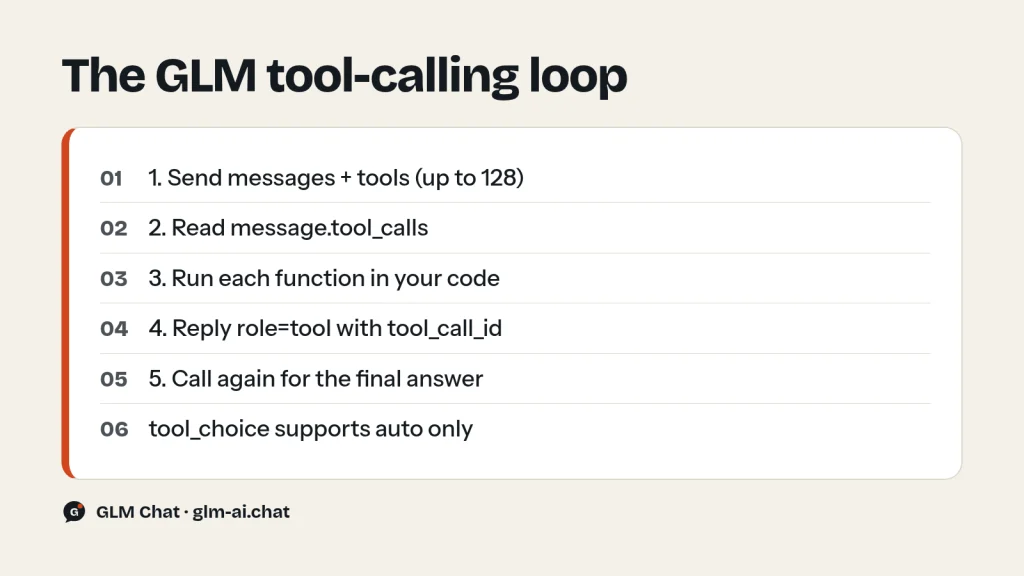
What each part of the loop does
- First call. The model sees the tools and the question. If it needs data, it returns
tool_callsandfinish_reason: "tool_calls"instead of an answer. - Assistant turn. You append the model’s message exactly as a history entry: its
content, itstool_callswith theirids, and itsreasoning_content. Without this entry, the tool results that follow have nothing to attach to. - Tool results. For every call you append a
role: "tool"message whosetool_call_idmatches the call’sid, with the result serialised as a string. JSON is the clearest format for the model to read. - Next call. Send the whole history again with the same
tools. The model either calls more functions or writes the final answer. - Safety valve.
max_roundsstops a confused model from looping forever and running up a bill.
Errors go back to the model as results, not exceptions. When the arguments are malformed or a lookup fails, returning {"error": "..."} lets the model correct itself or explain the problem to the user, which is usually better than crashing the request.
Several tool calls in one response
tool_calls is an array, and a single assistant message can contain more than one entry. The question in the example above (“where is my order, and what would shipping cost?”) can produce both a get_order_status and a calculate_shipping call in the same response. Z.ai’s examples always loop over the whole array, and so should you:
- Run every call in the list, not just the first one.
- Send one
role: "tool"message per call, each with its owntool_call_id. - Independent calls can run concurrently in your own code, for example with a thread pool. Collect the results, then append one tool message per call with its ID.
Z.ai’s documentation does not describe a switch to turn multiple calls per response on or off, so write your handler for a list from day one. In streaming mode, each call in the list is identified by its index, as shown in the next section.
Streaming tool calls with tool_stream
Normally, when you stream a response that ends in a tool call, the arguments arrive only once they are complete. With tool_stream: true (together with stream: true), GLM streams the function name and argument fragments as they are generated, alongside reasoning_content and content. Z.ai supports it on GLM-5.3, GLM-5.2, GLM-5.1, GLM-5, GLM-4.7 and GLM-4.6. It is off by default.
Use it when you want to show progress in a UI (“looking up order A1002…”) or start preparing work before the arguments finish. The rule for handling it: collect fragments per index and concatenate function.arguments until the stream ends. This snippet reuses client and tools from the loop above:
stream = client.chat.completions.create(
    model="glm-5.3",
    messages=[{"role": "user", "content": "Where is order A1002?"}],
    tools=tools,
    stream=True,
    extra_body={"tool_stream": True, "reasoning_effort": "low"},
)
reasoning, content, calls = "", "", {}
for chunk in stream:
    if not chunk.choices:
        continue
    delta = chunk.choices[0].delta
    if getattr(delta, "reasoning_content", None):
        reasoning += delta.reasoning_content
    if delta.content:
        content += delta.content
    for tc in delta.tool_calls or []:
        slot = calls.setdefault(tc.index, {"id": None, "name": "", "arguments": ""})
        if tc.id:
            slot["id"] = tc.id
        if tc.function and tc.function.name:
            slot["name"] = tc.function.name
        if tc.function and tc.function.arguments:
            slot["arguments"] += tc.function.arguments
            print(f"[{slot['name']}] {slot['arguments']}", flush=True)
for index, call in sorted(calls.items()):
    print(index, call["id"], call["name"], json.loads(call["arguments"] or "{}"))
Do not parse the argument string until the stream has finished; a partial fragment is not valid JSON. Once complete, the collected calls feed into the same tool-execution step as the non-streaming loop. Z.ai’s migration guide recommends testing specifically for “parameter completeness in tool streams” after you switch it on.
Thinking and tools: preserve reasoning_content
GLM models think between tool calls. Z.ai calls this interleaved thinking, and it has been on by default since GLM-4.5: the model reasons, calls a tool, reads the result, reasons again and decides what to do next. The docs give one instruction for it: when using interleaved thinking with tools, thinking blocks should be explicitly preserved and returned together with the tool results. That is why the loop above stores reasoning_content in the assistant message before appending tool results.
Two related settings matter for agents:
- Preserved thinking keeps reasoning from earlier assistant turns in context. It is on by default on the Coding Plan endpoint and off by default on the standard API. Turn it on by adding
"clear_thinking": falseinside thethinkingobject. You must then send every historicalreasoning_contentback complete, unmodified and in the original order; Z.ai warns that edited or reordered blocks can degrade performance and cache hit rates. - Turn-level thinking (since GLM-4.7) lets each request in a session switch thinking on or off. Use it to skip reasoning on quick tool-execution turns and keep it for turns that must decide what to do with tool results. On GLM-5.3 and GLM-5.3-Flash thinking cannot be disabled, so lower
reasoning_efforttolowinstead.
To enable preserved thinking with the OpenAI SDK, pass the thinking object through extra_body. In an agent, add tools=tools and keep appending each assistant turn with its reasoning_content, exactly as the loop above does:
import os
from openai import OpenAI
client = OpenAI(api_key=os.environ["ZAI_API_KEY"], base_url="https://api.z.ai/api/paas/v4/")
messages = [{"role": "user", "content": "Plan the steps to move a small web app to a new server."}]
response = client.chat.completions.create(
    model="glm-4.7",
    messages=messages,
    extra_body={"thinking": {"type": "enabled", "clear_thinking": False}},
)
msg = response.choices[0].message
messages.append({
    "role": "assistant",
    "content": msg.content,
    "reasoning_content": getattr(msg, "reasoning_content", None) or "",
})
print(msg.content)
For plain chat without tools, leave clear_thinking at its default of true: old reasoning is dropped automatically, which keeps context short and cheap. The GLM thinking mode guide covers each mode and the per-model reasoning_effort values.
GLM structured output with JSON mode
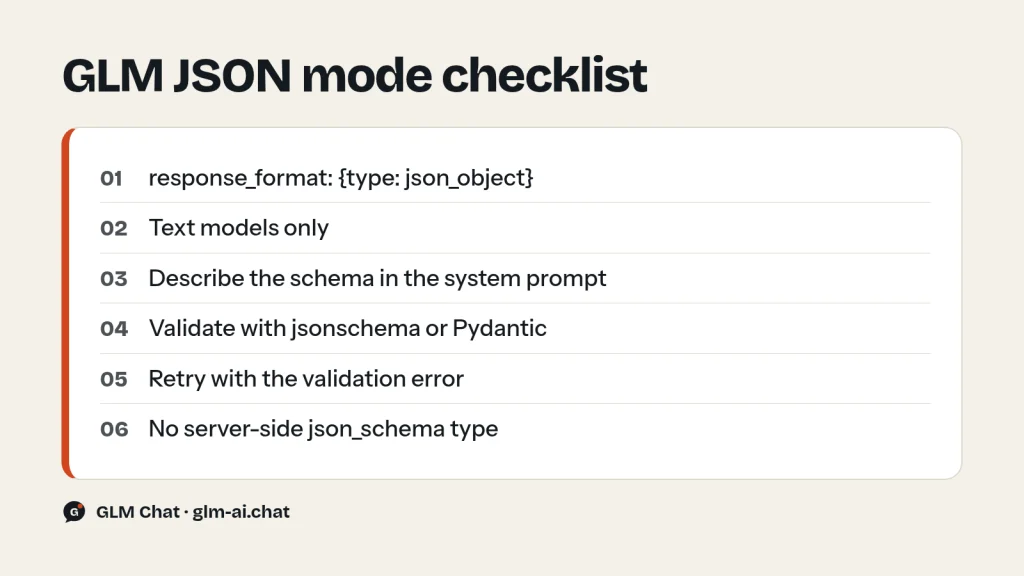
When you need data rather than an action, skip tools and use GLM JSON mode. Set response_format to {"type": "json_object"} and the model returns a JSON object in message.content. The field accepts two values, text (the default) and json_object, and only text models support it.
JSON mode guarantees JSON, not your JSON. The model decides the keys unless you tell it, so Z.ai’s own examples always describe the expected structure in the system message. A minimal example:
import json
import os
from openai import OpenAI
client = OpenAI(api_key=os.environ["ZAI_API_KEY"], base_url="https://api.z.ai/api/paas/v4/")
response = client.chat.completions.create(
    model="glm-4.7-flash",
    messages=[
        {"role": "system", "content": (
            "You are a sentiment analysis expert. Return only a JSON object in this format: "
            '{"sentiment": "positive|negative|neutral", "confidence": 0.0, "keywords": ["..."]}'
        )},
        {"role": "user", "content": "The weather is really nice today, I am feeling very happy!"},
    ],
    response_format={"type": "json_object"},
    extra_body={"thinking": {"type": "disabled"}},
)
result = json.loads(response.choices[0].message.content)
print(result["sentiment"], result["confidence"], result["keywords"])
The official list of models that support structured output includes glm-5, glm-4.7, glm-4.6 and glm-4.5, and the reference applies response_format to all text models. Note what is missing: there is no json_schema type, so you cannot hand the API a schema and have it enforced server-side. Enforcement is your job, and it is not hard.
Schema validation strategy for reliable JSON
Z.ai recommends multi-layer validation (schema checks plus business-logic checks) and a fallback plan. A pattern that works well in production:
- Put the JSON Schema itself in the system prompt, along with rules such as “use null for anything not stated”.
- Call with
response_format: {"type": "json_object"}. - Parse with
json.loadsand validate with thejsonschemapackage. - On failure, send the invalid output back with the validation error and ask for a corrected object. Two or three attempts are plenty.
- After schema validation, run business checks the schema cannot express (a price that must be positive, a date that must be in the future).
Install the validator with pip install jsonschema. The extractor below uses the free glm-4.7-flash with thinking off, which suits simple extraction well:
import json
import os
from jsonschema import ValidationError, validate
from openai import OpenAI
client = OpenAI(api_key=os.environ["ZAI_API_KEY"], base_url="https://api.z.ai/api/paas/v4/")
SCHEMA = {
    "type": "object",
    "properties": {
        "name": {"type": "string"},
        "brand": {"type": ["string", "null"]},
        "price": {"type": ["number", "null"]},
        "colors": {"type": "array", "items": {"type": "string"}},
        "battery_hours": {"type": ["number", "null"]},
        "warranty_years": {"type": ["number", "null"]},
    },
    "required": ["name", "brand", "price", "colors", "battery_hours", "warranty_years"],
    "additionalProperties": False,
}
SYSTEM = (
    "Extract product data. Return only a JSON object that matches this JSON Schema. "
    "Use null for anything the text does not state. Do not invent values.\n"
    + json.dumps(SCHEMA)
)
def clean(raw: str) -> str:
    # Drop anything outside the outermost braces, such as code fences
    start, end = raw.find("{"), raw.rfind("}")
    return raw[start:end + 1] if start != -1 and end > start else raw
def extract(text: str, attempts: int = 3) -> dict:
    messages = [{"role": "system", "content": SYSTEM}, {"role": "user", "content": text}]
    for _ in range(attempts):
        response = client.chat.completions.create(
            model="glm-4.7-flash",
            messages=messages,
            response_format={"type": "json_object"},
            extra_body={"thinking": {"type": "disabled"}},
        )
        raw = response.choices[0].message.content or ""
        try:
            data = json.loads(clean(raw))
            validate(instance=data, schema=SCHEMA)
            return data
        except (json.JSONDecodeError, ValidationError) as exc:
            problem = exc.message if isinstance(exc, ValidationError) else str(exc)
            messages.append({"role": "assistant", "content": raw})
            messages.append({"role": "user", "content": f"That output was invalid: {problem}. Return the corrected JSON object only."})
    raise ValueError("No valid JSON after retries")
print(extract("The Aurora X2 speaker by Lumen Audio sells for 129.99, comes in black or sand, and runs 18 hours per charge."))
Three details make this robust. The schema lists every key as required but allows null, so the model must decide explicitly whether a value is present rather than silently omitting it. additionalProperties: false catches invented keys. And the retry message quotes the exact validation error, which gives the model something concrete to fix. If you use Pydantic, the same pattern works with Model.model_validate_json(raw) in place of jsonschema.
Z.ai also warns that strict JSON output can make responses feel less natural in complex scenarios. Keep JSON mode for machine-read output, and let user-facing replies stay free text.
Function calling or JSON mode: which to use
| You need to… | Use | Why |
|---|---|---|
| Fetch live data or take an action | Function calling | The model chooses when to call and with what arguments |
| Extract fields from text into a fixed shape | JSON mode | One call, no loop, validated in your code |
| Classify or score input | JSON mode | Small object with an enum field |
| Let the model pick among several actions | Function calling | Each action is a separate tool |
| Search the web during a reply | Built-in web_search tool | No function of your own needed |
| Force a specific function every time | JSON mode with that function’s schema | tool_choice only supports auto |
The last row is a useful trick. Because you cannot force a tool, a JSON-mode call whose system prompt contains the function’s parameter schema gives you guaranteed arguments; you then call the function yourself.
Keep tool calls safe
Function calling lets model output trigger real code, so treat every argument as untrusted input. Z.ai’s docs flag this twice: they ask for security validation and permission control around any external API or database a tool touches, and they point out that function calling involves code execution. A short checklist:
- Validate arguments before acting. Check types, lengths and allowed values in your function, even when the schema already declares them. The model can still send an order ID with stray characters or a negative weight.
- Never pass raw SQL or shell text through a tool. Expose narrow operations (
get_order_status) rather than general ones (run_query), and use parameterised queries inside them. - Check permissions per user. The model does not know who is allowed to see which order. Resolve the current user in your code and enforce access there.
- Confirm destructive actions. For refunds, deletions or payments, have the tool return a confirmation request and let the user approve before the action runs.
- Log every call. Record the function name, arguments, result and the request that triggered it. It is the only way to debug an agent after the fact.
- Bound the loop. Cap rounds per request and total tool calls per session, as the
max_roundsguard in the loop above does.
A tool that returns a structured error ({"error": "Order not found"}) is safer than one that raises, because the model can explain the problem instead of retrying blindly. Keep error messages factual and free of internal details such as stack traces or connection strings, since the model may repeat them to the user.
Common function-calling errors and fixes
- HTTP 400, code 1210 or 1214: a parameter is invalid. Common causes are a
tool_choiceother thanauto, a function name with spaces or dots, more than 128 tools, or aresponse_formattype other thantextorjson_object. The message names the field. - Code 1213: a required parameter is missing. For tool messages, check that
tool_call_idandcontentare both present. - The model answers without calling the tool: sharpen the tool description, say in the system prompt when the tool must be used, and send fewer, more relevant tools.
- Arguments are not valid JSON: catch the parse error and return it to the model as the tool result; it will usually retry with fixed arguments.
finish_reason: "length": the output hitmax_tokens, possibly mid-argument. Raise the limit or reduce reasoning effort.- Tool result ignored: make sure the
tool_call_idmatches the call’sidexactly and that the assistant message withtool_callscomes before the tool messages. - Thinking disabled on GLM-5.3: GLM-5.3 and GLM-5.3-Flash reject
thinking: {"type": "disabled"}. Usereasoning_effort: "low"instead.
Rate limits and all other error codes are covered in GLM API rate limits and error codes. For tool-heavy agent frameworks built on GLM, see GLM with OpenClaw, and compare per-call costs on the GLM pricing page.
GLM function calling FAQ
Does GLM support function calling?
Yes. Pass a tools array of JSON Schema function definitions to the chat completions endpoint. The model returns tool_calls with a function name and arguments; you run the function and send the result back as a role: "tool" message. The format matches OpenAI-style tool calling.
Which GLM models support tool calling?
All current text models, including GLM-5.3, GLM-5.2, GLM-5.1, GLM-5, GLM-4.7, GLM-4.7-Flash, GLM-4.6 and the GLM-4.5 series. For image input with tools, use the GLM-5.3-Flash series or the GLM-4.6V series. Streaming tool arguments (tool_stream) work on GLM-5.3, 5.2, 5.1, 5, 4.7 and 4.6.
Does GLM support tool_choice required or a named function?
No. Only tool_choice: "auto" is supported. To make a call very likely, send only the tool you want and instruct the model in the system prompt. To guarantee structured arguments, use JSON mode with that function’s schema and call the function yourself.
Does GLM have a JSON mode?
Yes. Set response_format to {"type": "json_object"} on a text model and describe the expected structure in the system message. The response content is then a JSON object you can parse with json.loads.
Does GLM support JSON Schema structured outputs?
Not as a server-side feature: response_format accepts only text and json_object. Put your schema in the prompt, validate the result with a library such as jsonschema or Pydantic, and retry with the validation error when it fails.
Can GLM call several functions in one response?
Yes, tool_calls is a list and can hold more than one call. Run each one and send a separate tool message per call with its own tool_call_id. When streaming with tool_stream, group argument fragments by each call’s index.
How many tools can I pass to GLM?
Up to 128 functions per request. Function names may use letters, digits, underscores and dashes, up to 64 characters. Fewer, well-described tools give better tool selection and cost fewer input tokens.
Do I need to send reasoning_content back with tool results?
For agent loops, yes. Z.ai’s docs say thinking blocks should be preserved and returned together with tool results, so include the assistant message’s reasoning_content in history before the tool messages. With preserved thinking (clear_thinking: false), send all earlier reasoning back complete and in order. You can try tool-free prompts first in the free GLM chat.