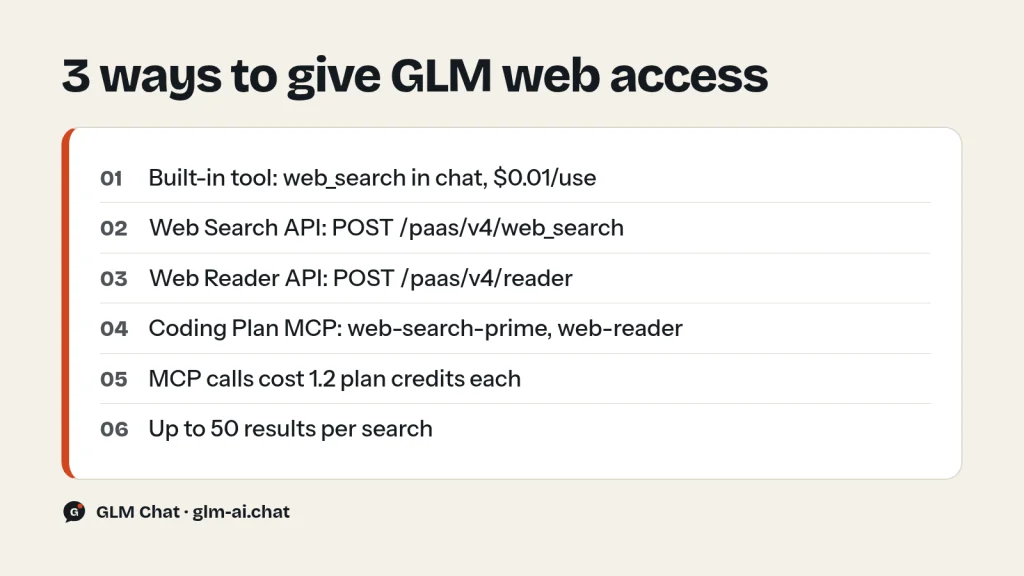
The GLM web search API gives Z.ai’s models live internet access in three ways. The simplest is a built-in web_search tool: add it to a Chat Completions request and GLM searches, reads the results and answers with cited sources, for $0.01 per use plus normal tokens. The second is the standalone Web Search API (POST /paas/v4/web_search), which returns structured results (title, link, summary, site name, date) for you to use however you like. The third is the Web Reader API (POST /paas/v4/reader), which fetches a full page as markdown or text. GLM Coding Plan subscribers also get the same abilities as MCP servers for Claude Code, Cline and other agents.
Pick the built-in tool when you want grounded answers with one request. Pick the Web Search and Web Reader APIs when you want control over which queries run, which pages get read and what goes into the prompt. This guide covers every documented parameter for each option, with working curl and Python code, a complete search-and-read agent loop, pricing math and fixes for common errors.
Three ways to add Z.ai web search to GLM
Z.ai (formerly Zhipu AI) describes its search stack as a set of AI search tools: a basic Web Search API that returns raw structured results, and Web Search in Chat, which combines retrieval with GLM’s generation to give up-to-date, verifiable answers. Web Reader adds full-page extraction. The official references are the Web Search guide, the Web Search API reference, the Web Reader API reference and the Web Search MCP server page. Here’s how the options compare:
| Option | Endpoint | You get | Best for |
|---|---|---|---|
| Built-in web_search tool | POST /paas/v4/chat/completions | A finished answer, plus the sources if you ask for them | Q&A bots, news summaries, quick grounding |
| Web Search API | POST /paas/v4/web_search | Up to 50 structured results | Your own RAG pipeline, agents, dashboards |
| Web Reader API | POST /paas/v4/reader | Full page content, title, metadata | Reading a specific URL in depth |
| Web Search / Web Reader MCP | api.z.ai/api/mcp/… | Tools inside your coding agent | Coding Plan users in Claude Code, Cline and others |
The built-in web_search tool in Chat Completions
Add an entry of type web_search to the tools array of an ordinary chat request. The API runs the search itself and passes the results to the model, and the model writes its answer from them. You don’t have to run a tool loop yourself. According to the Chat Completions API reference, this tool is part of the text-model request (GLM-5.3, GLM-5.2, GLM-4.7 and so on). The multimodal request used by GLM-5.3-Flash accepts only function tools. For Flash, use the function-calling pattern later in this guide.
web_search tool parameters
| Parameter | Type | Default | What it does |
|---|---|---|---|
| enable | boolean | false | Turns search on. Set it to true. |
| search_engine | string | search_pro_jina | Required. Search engine code (see the note below). |
| search_query | string | none | Forces a search with this exact query. |
| count | integer | 10 | Number of results, 1 to 50. |
| search_domain_filter | string | none | Only return results from this domain, e.g. www.example.com. |
| search_recency_filter | string | noLimit | oneDay, oneWeek, oneMonth, oneYear or noLimit. |
| content_size | string | medium | Summary length per page: medium (400–600 characters) or high (about 2,500). |
| result_sequence | string | after | Whether search results appear before or after the model response. |
| search_result | boolean | false | Return the search results in the response. |
| require_search | boolean | false | Force the answer to be based on the search results. |
| search_prompt | string | built-in prompt | Custom instructions for how the model processes results. |
A note on search_engine: the API reference lists search_pro_jina as the default and only value for the in-chat tool. The worked example in Z.ai’s Web Search guide passes search-prime, the engine code used by the standalone Web Search API. Start with the reference value. If you get a 400 invalid-parameter error, try the other one.
The default search_prompt tells the model to synthesise the results, treat {{current_date}} as its only time reference, drop contradictory data and state the answer directly without citing sources. If you want inline citations, write your own prompt. Z.ai’s example uses a {{search_result}} placeholder and asks the model to cite the source date.
curl example
curl -X POST "https://api.z.ai/api/paas/v4/chat/completions" \
  -H "Content-Type: application/json" \
  -H "Authorization: Bearer your-api-key" \
  -d '{
    "model": "glm-5.3",
    "messages": [
      {"role": "user", "content": "Summarise the most important open-source AI model releases from the past week, with dates."}
    ],
    "tools": [{
      "type": "web_search",
      "web_search": {
        "enable": true,
        "search_engine": "search_pro_jina",
        "search_result": true,
        "count": 8,
        "search_recency_filter": "oneWeek",
        "content_size": "medium"
      }
    }],
    "thinking": {"type": "enabled"},
    "reasoning_effort": "low"
  }'
Python example with sources
With search_result: true, the response has a top-level web_search array next to choices. Each item has title, content (summary), link, media (site name), icon, refer (an index such as ref_1) and publish_date. The model’s text can refer to those refer ids, so you can turn them into links in your UI.
import os
import requests

payload = {
    "model": "glm-5.3",
    "messages": [{
        "role": "user",
        "content": "What are the latest GLM model releases? List each with its date.",
    }],
    "tools": [{
        "type": "web_search",
        "web_search": {
            "enable": True,
            "search_engine": "search_pro_jina",
            "search_result": True,
            "count": 5,
            "search_recency_filter": "oneMonth",
            "search_prompt": (
                "Answer from {{search_result}} only. After each fact, cite its "
                "source as [ref_n] and give the publication date."
            ),
        },
    }],
    "thinking": {"type": "enabled"},
    "reasoning_effort": "low",
}

resp = requests.post(
    "https://api.z.ai/api/paas/v4/chat/completions",
    headers={"Authorization": f"Bearer {os.environ['ZAI_API_KEY']}"},
    json=payload,
    timeout=120,
)
resp.raise_for_status()
data = resp.json()

print(data["choices"][0]["message"]["content"])
print("\nSources:")
for item in data.get("web_search", []):
    print(item.get("refer"), "|", item.get("title"), "|", item.get("link"), "|", item.get("publish_date"))
print("\nUsage:", data.get("usage"))
Two settings change the model’s behaviour a lot. require_search: true makes the model answer from the search results instead of its own training data, which is what you want for news or prices. search_query forces a specific query, which is useful when your UI already knows what to look up and you don’t want the model to rephrase it.
The standalone GLM Web Search API
Z.ai describes the Web Search API as a search engine built for large language models. It keeps the usual crawling and ranking, adds intent recognition, and returns results in a format that’s easy to feed to an LLM: page titles, URLs, summaries, site names and icons, plus the publication date when available. No model runs, so you get data, not an answer.
| Parameter | Required | Notes |
|---|---|---|
| search_engine | Yes | search-prime (Z.ai’s premium search engine), the only listed value |
| search_query | Yes | The text to search for |
| count | No | 1 to 50 results, default 10 |
| search_domain_filter | No | Limit results to one whitelisted domain |
| search_recency_filter | No | oneDay, oneWeek, oneMonth, oneYear, noLimit (default) |
| request_id | No | Your own unique ID, 6 to 64 characters |
| user_id | No | End-user ID, 6 to 128 characters. Don’t put personal data in it. |
curl -X POST "https://api.z.ai/api/paas/v4/web_search" \
  -H "Content-Type: application/json" \
  -H "Authorization: Bearer your-api-key" \
  -d '{
    "search_engine": "search-prime",
    "search_query": "GLM-5.3 release notes",
    "count": 5,
    "search_recency_filter": "oneMonth"
  }'
The response contains id, created and a search_result array. Each item has the same fields as the in-chat results: title, content, link, media, icon, refer and publish_date. With the official Python SDK (pip install zai-sdk), the call looks like this:
from zai import ZaiClient

client = ZaiClient(api_key="your-api-key")

response = client.web_search.web_search(
    search_engine="search-prime",
    search_query="GLM-5.3 release notes",
    count=5,                          # 1-50, default 10
    search_domain_filter="docs.z.ai", # only this domain
    search_recency_filter="noLimit",
)
print(response)
If you’d rather work with plain JSON, call the endpoint with requests and build a compact context block for your prompt:
import os
import requests

r = requests.post(
    "https://api.z.ai/api/paas/v4/web_search",
    headers={"Authorization": f"Bearer {os.environ['ZAI_API_KEY']}"},
    json={"search_engine": "search-prime", "search_query": "GLM-5.3-Flash benchmarks", "count": 5},
    timeout=60,
)
r.raise_for_status()

context = "\n\n".join(
    f"[{i}] {x.get('title')} ({x.get('publish_date') or 'no date'})\n{x.get('link')}\n{x.get('content')}"
    for i, x in enumerate(r.json().get("search_result", []), start=1)
)
print(context)
The Web Reader API: fetch a full page
Search summaries are short: 400–600 characters at the default size. When the model needs the whole page, such as documentation, a changelog or a long article, send the URL to Web Reader. It parses the page and returns the main content with the title, description and metadata.
| Parameter | Default | What it does |
|---|---|---|
| url | (required) | The page to fetch |
| timeout | 20 | Request timeout in seconds |
| no_cache | false | Set to true to skip the cache and fetch a fresh copy |
| return_format | markdown | Output format, e.g. markdown or text |
| retain_images | true | Keep images in the content |
| no_gfm | false | Disable GitHub Flavored Markdown |
| keep_img_data_url | false | Keep inline image data URLs |
| with_images_summary | false | Add a summary of the page’s images |
| with_links_summary | false | Add a summary of the page’s links |
curl -X POST "https://api.z.ai/api/paas/v4/reader" \
  -H "Content-Type: application/json" \
  -H "Authorization: Bearer your-api-key" \
  -d '{
    "url": "https://docs.z.ai/guides/overview/pricing",
    "return_format": "markdown",
    "retain_images": false,
    "with_links_summary": true
  }'
The page is in reader_result.content, with reader_result.title, description, url and a metadata object (keywords, meta description, viewport). Set retain_images to false for text-only pipelines. Image markup costs input tokens and rarely helps the answer.
Build a search-and-read agent with function calling
For full control, and for GLM-5.3-Flash, whose request only accepts function tools, expose the two APIs as functions and let the model decide when to search and which pages to open. This loop runs on GLM-5.3-Flash at low effort, so it’s cheap enough to use freely. It stops when the model answers without calling a tool, or after six rounds.
import json
import os
import requests
from openai import OpenAI

API_KEY = os.environ["ZAI_API_KEY"]
BASE = "https://api.z.ai/api/paas/v4"
HEADERS = {"Authorization": f"Bearer {API_KEY}"}
client = OpenAI(api_key=API_KEY, base_url=BASE + "/")


def web_search(query):
    r = requests.post(f"{BASE}/web_search", headers=HEADERS, timeout=60,
                      json={"search_engine": "search-prime", "search_query": query, "count": 5})
    r.raise_for_status()
    return [{"title": x.get("title"), "link": x.get("link"),
             "date": x.get("publish_date"), "summary": x.get("content")}
            for x in r.json().get("search_result", [])]


def read_page(url):
    r = requests.post(f"{BASE}/reader", headers=HEADERS, timeout=60,
                      json={"url": url, "return_format": "markdown", "retain_images": False})
    r.raise_for_status()
    page = r.json().get("reader_result", {})
    return {"title": page.get("title"), "url": page.get("url"),
            "content": (page.get("content") or "")[:20000]}


TOOLS = [
    {"type": "function", "function": {
        "name": "web_search",
        "description": "Search the web. Returns titles, links, dates and short summaries.",
        "parameters": {"type": "object", "properties": {"query": {"type": "string"}},
                       "required": ["query"]}}},
    {"type": "function", "function": {
        "name": "read_page",
        "description": "Fetch the main content of one web page as markdown.",
        "parameters": {"type": "object", "properties": {"url": {"type": "string"}},
                       "required": ["url"]}}},
]
FUNCTIONS = {"web_search": lambda a: web_search(a["query"]),
             "read_page": lambda a: read_page(a["url"])}

messages = [
    {"role": "system", "content": "Use the tools to find current facts. Cite every link you rely on."},
    {"role": "user", "content": "What is the newest GLM model and what does it cost on the API?"},
]

for _ in range(6):
    resp = client.chat.completions.create(
        model="glm-5.3-flash",
        messages=messages,
        tools=TOOLS,
        extra_body={"thinking": {"type": "enabled"}, "reasoning_effort": "low"},
    )
    msg = resp.choices[0].message
    if not msg.tool_calls:
        print(msg.content)
        break
    messages.append({
        "role": "assistant",
        "content": msg.content or "",
        "tool_calls": [{"id": tc.id, "type": "function",
                        "function": {"name": tc.function.name, "arguments": tc.function.arguments}}
                       for tc in msg.tool_calls],
    })
    for tc in msg.tool_calls:
        result = FUNCTIONS[tc.function.name](json.loads(tc.function.arguments))
        messages.append({"role": "tool", "tool_call_id": tc.id,
                         "content": json.dumps(result, ensure_ascii=False)})
Cap the page length, as the code does with 20,000 characters, because every tool result becomes input tokens on every later round. Keep the system prompt and tools identical from round to round so the growing history hits the cache. The GLM context caching guide explains why. For tool schemas, tool_choice and streaming tool calls, see the GLM function calling guide.
Z.ai web search pricing
Z.ai’s pricing page lists Web Search under built-in tools at $0.01 per use. That’s on top of the model’s token charges, and search results add input tokens because they’re passed to the model. In Z.ai’s own Web Search in Chat example, a searched answer used 4,199 prompt tokens and 868 output tokens. Here’s what that request would cost at today’s prices:
| Model | Tokens | Search fee | Total per answer | Per 1,000 answers |
|---|---|---|---|---|
| GLM-5.3 | 4,199 × $1.40 + 868 × $4.40 per 1M ≈ $0.0097 | $0.01 | ≈ $0.0197 | ≈ $19.70 |
| GLM-4.7 | 4,199 × $0.60 + 868 × $2.20 per 1M ≈ $0.0044 | $0.01 | ≈ $0.0144 | ≈ $14.40 |
On cheap models, the $0.01 fee is most of the cost, so don’t search when you don’t have to. Skip the tool for questions the model can answer from its own knowledge, and set count and content_size no higher than you need. The pricing page has no separate line for Web Reader, so check your billing console to see how reader calls are charged on your account. Every other price is on the GLM pricing page.
Web Search and Web Reader MCP servers on the Coding Plan
Every GLM Coding Plan tier (Lite, Pro and Max) includes remote MCP servers for Web Search, Web Reader, Zread and Vision Understanding. They run over HTTP, so there’s nothing to install. The Web Search server exposes one tool, webSearchPrime, and the Web Reader server exposes webReader. Each call costs 1.2 credits from your plan quota. Z.ai’s FAQ says these three MCP tools (Vision, Web Search, Web Reader) are available only through the plan.
In Claude Code, add both with one command each (replace your_api_key with your key):
claude mcp add -s user -t http web-search-prime https://api.z.ai/api/mcp/web_search_prime/mcp --header "Authorization: Bearer your_api_key"

claude mcp add -s user -t http web-reader https://api.z.ai/api/mcp/web_reader/mcp --header "Authorization: Bearer your_api_key"
In Cline (VS Code), add the servers in the extension’s MCP settings. The type is streamableHttp. For other MCP clients such as Roo Code and Kilo Code, Z.ai’s general config uses "type": "streamable-http" with the same URLs and header:
{
  "mcpServers": {
    "web-search-prime": {
      "type": "streamableHttp",
      "url": "https://api.z.ai/api/mcp/web_search_prime/mcp",
      "headers": {
        "Authorization": "Bearer your_api_key"
      }
    },
    "web-reader": {
      "type": "streamableHttp",
      "url": "https://api.z.ai/api/mcp/web_reader/mcp",
      "headers": {
        "Authorization": "Bearer your_api_key"
      }
    }
  }
}
Once connected, just ask in plain language: “search for the latest release notes of this library” or “read this documentation page and summarise the breaking changes”. Z.ai’s docs also have configs for OpenCode and Crush, and note that Goose isn’t supported for these servers right now. Full agent setup is in the GLM in Claude Code guide and the GLM in Cline guide.
Troubleshooting GLM web search
- 401 authentication error. Check the header is exactly
Authorization: Bearer your-api-key, the key is active and your account has balance. MCP servers use the same checks. - 400 invalid parameter (1210 or 1214). Usually a wrong
search_enginecode for that endpoint, acountoutside 1–50, or a recency value with the wrong case (it’soneWeek, notone_week). The GLM API error code guide lists every code. - The model answers without searching. Set
require_search: true, or passsearch_queryto force the lookup. - Empty results. Broaden the query, remove
search_domain_filter, or relaxsearch_recency_filtertonoLimit. - Web Reader returns nothing or errors. Make sure the URL is publicly reachable. Some sites block automated fetching. Raise
timeoutfor slow pages and setno_cache: trueif you need the latest version. - Answers ignore the date. The default search prompt uses the current date as its time reference. If you write your own
search_prompt, include the date yourself.
If the whole API seems to be down, work through the GLM not working checklist. To try the models themselves before you write code, use the free GLM chat or open GLM-5.3 in the chat. Model specs are on the GLM-5.3 and GLM-5.3-Flash pages, and the GLM API quickstart covers keys and base URLs.
GLM web search API FAQ
Can GLM access the internet?
Not by default. A plain chat request uses only the model’s training data and your prompt. Add the built-in web_search tool, call the Web Search or Web Reader APIs yourself, or connect the MCP servers on the Coding Plan to give GLM live web data.
How much does the GLM web search API cost?
Z.ai lists Web Search at $0.01 per use, plus the usual token charges for the model that reads the results. On the Coding Plan, each Web Search or Web Reader MCP call uses 1.2 credits instead.
Which search engine does Z.ai web search use?
The standalone Web Search API takes search-prime, which Z.ai describes as its premium search engine. The Chat Completions reference lists search_pro_jina for the in-chat tool, while the guide’s example uses search-prime there too.
Can I limit results to one website or to recent pages?
Yes. search_domain_filter restricts results to a whitelisted domain such as docs.z.ai, and search_recency_filter limits them to the past day, week, month or year.
Does web search work with GLM-5.3-Flash?
Through function calling, yes. GLM-5.3-Flash’s multimodal request accepts only function tools, so wrap the Web Search and Web Reader APIs as functions, as in the agent loop above. The built-in web_search tool belongs to the text-model request.
How many results can one search return?
Up to 50. count accepts 1 to 50 and defaults to 10. More results mean more input tokens when the model reads them, so start with 5 to 10.