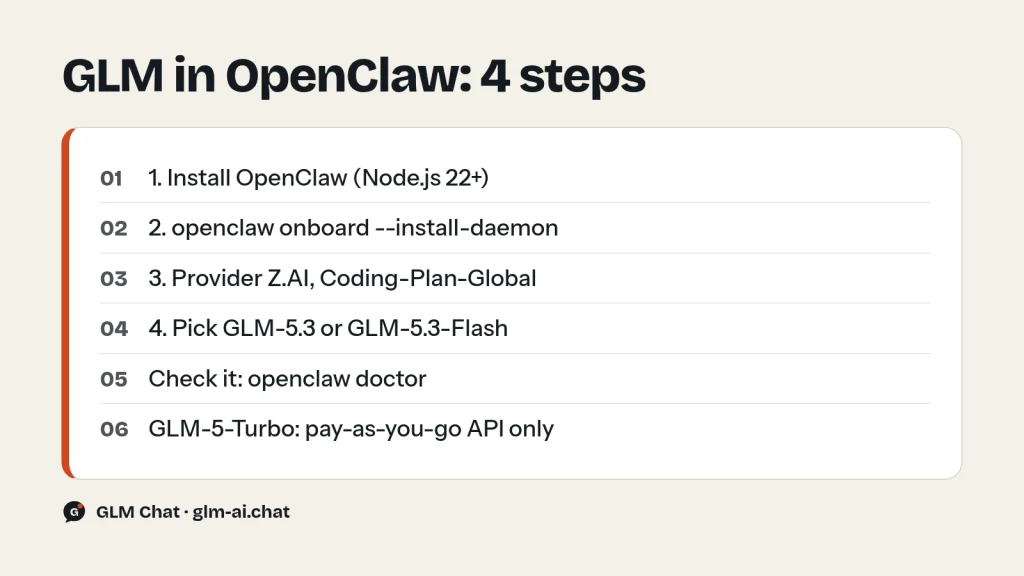
To run GLM in OpenClaw, install OpenClaw (Node.js 22 or newer), run openclaw onboard --install-daemon, choose Z.AI as the model provider, pick the Coding-Plan-Global option and paste your Z.ai API key. The GLM OpenClaw setup then runs on your GLM Coding Plan, which covers two models: GLM-5.3 and GLM-5.3-Flash.
Which one should the agent use? For most OpenClaw work, GLM-5.3-Flash: it is fast, natively multimodal and costs a third of GLM-5.3’s plan credits. Switch to GLM-5.3 for long, tool-heavy chains where reliability matters more than quota. GLM-5-Turbo, the model Z.ai trained specifically for OpenClaw, is a pay-as-you-go API model rather than a plan model. This guide covers the exact install and onboarding steps from Z.ai’s docs, the JSON edits for switching models, failover, skills and the trade-offs between all three models. Z.ai was formerly known as Zhipu AI.
What OpenClaw is and how GLM fits
OpenClaw is an open-source personal AI assistant that runs on your own devices and connects to messaging platforms. You talk to your bot in a terminal UI, a web UI or channels such as Discord and Slack, and it carries out tasks with tools, skills and plugins. The model behind it is configurable, and Z.ai ships a first-class Z.AI provider option in OpenClaw’s setup.
On the Coding Plan, OpenClaw counts as a general-purpose agent, not a coding agent. Z.ai supports it with a secondary scheduling, best-effort strategy: coding agents such as Claude Code get priority, and under high load OpenClaw requests can be queued or rate-limited under fair-use rules. For a personal assistant that mostly runs background tasks, that is usually fine. If you need guaranteed throughput, see the pay-as-you-go option below.
What you need before you start
- Node.js 22 or newer. OpenClaw’s installer requires it.
- A Z.ai account and API key. Register or log in at z.ai/model-api, then create a key on the API Keys page at z.ai/manage-apikey/apikey-list.
- An active GLM Coding Plan from z.ai/subscribe. Lite starts at $18 per month; all tiers include GLM-5.3 and GLM-5.3-Flash.
- A plan for access control. OpenClaw can act on your machine and your accounts. Read OpenClaw’s security documentation before exposing it to any channel.
Step 1: Install OpenClaw
The recommended route is OpenClaw’s official installer script.
On macOS or Linux:
curl -fsSL https://openclaw.ai/install.sh | bashOn Windows (PowerShell):
iwr -useb https://openclaw.ai/install.ps1 | iexIf you prefer a manual global install, use npm or pnpm. With pnpm, approve the native builds OpenClaw depends on:
npm install -g openclaw@latest

# or with pnpm (recommended by the docs)
pnpm add -g openclaw@latest
pnpm approve-builds -g  # approve openclaw, node-llama-cpp, sharp, etc.
Step 2: Run onboarding and choose Z.AI
The configuration wizard usually starts automatically after installation. If it does not, start it yourself:
openclaw onboard --install-daemonIf you set up OpenClaw before and only want to change the model, run openclaw config and select the model configuration instead. Then answer the prompts like this:
I understand this is powerful and inherently risky. Continue?: choose Yes.Onboarding mode: choose Quick Start.Model/auth provider: choose Z.AI.- Choose Coding-Plan-Global as the Z.AI option.
- Paste your Z.ai API key when prompted and press Enter.
- When asked for a model, pick GLM-5.3 or GLM-5.3-Flash. Z.ai’s guide is explicit: these are the models the Coding Plan supports, so do not select other models, to avoid unexpected charges.
Step 3: Pick channels and skills, then hatch your bot
Select channel: choose and configure the channels you want, or skip for now.Configure skills: choose and install the skills you need.- Finish setup.
- When the CLI asks
How do you want to hatch your bot?, choose Hatch in TUI (recommended).
You can now chat with your bot in the terminal. For the browser, open the Web UI (with token) link printed in the terminal. Other channels such as Discord and Slack are configured through OpenClaw’s channel setup docs at docs.openclaw.ai.
Step 4: Verify the install
openclaw doctor         # check for config issues
openclaw status         # gateway status
openclaw dashboard      # open the browser UI
openclaw doctor is the first thing to run whenever something looks off. It catches most configuration mistakes before you start digging through JSON.
Switching OpenClaw to a specific GLM model
If the provider’s model list does not offer the GLM model you want, Z.ai documents a manual method: edit ~/.openclaw/openclaw.json in three places, then restart the gateway. Z.ai’s example uses glm-5.2, which the Coding Plan now routes to GLM-5.3 anyway. The snippets below use glm-5.3 directly so the configured name matches the model that answers.
1. Add the model to the models.providers.zai.models array, after the last existing entry (remember the comma between array items):
{
  "id": "glm-5.3",
  "name": "GLM-5.3",
  "reasoning": true,
  "input": ["text"],
  "cost": {"input": 0, "output": 0, "cacheRead": 0, "cacheWrite": 0},
  "contextWindow": 1000000,
  "maxTokens": 131072
}
The contextWindow of 1,000,000 and maxTokens of 131,072 match GLM-5.3’s 1M context and 128K maximum output. reasoning is true because GLM-5.3 always thinks. The example sets every cost field to zero; plan usage is counted in credits rather than per-token charges.
2. Set the default model under agents.defaults.model. Change "primary": "zai/glm-5" (or whatever is there) to your model and give it a fallback:
"model": {
  "primary": "zai/glm-5.3",
  "fallbacks": ["zai/glm-5.3-flash"]
}
3. Register it under agents.defaults.models:
"models": {
  "zai/glm-5.3": {"alias": "GLM"},
  "zai/glm-5.3-flash": {}
}
Restart the gateway and open the terminal UI to confirm the model:
openclaw gateway restart
openclaw tui
To use GLM-5.3-Flash as the primary model instead, add an entry with "id": "glm-5.3-flash" and "name": "GLM-5.3-Flash", and swap the primary and fallback. Z.ai’s own example lists zai/glm-4.7 as the fallback; on the plan, GLM-4.7 requests are routed to GLM-5.3-Flash, so naming Flash directly does the same thing more clearly.
Which GLM model to use in OpenClaw: GLM-5-Turbo vs GLM-5.3 vs GLM-5.3-Flash
| Model | GLM-5.3-Flash | GLM-5.3 | GLM-5-Turbo |
|---|---|---|---|
| Built for | Fast, cheap multimodal work | Frontier coding and agents | OpenClaw workflows |
| Input | Text, image, video, file | Text | Text |
| Context / output | 1M / 128K | 1M / 128K | 200K / 128K |
| On the Coding Plan | Yes, 3x GLM-5.3’s quota | Yes | Not listed |
| API price | $0.15 / $0.50 | $1.40 / $4.40 | $1.20 / $4.00 on OpenRouter |
| Open weights | Yes, MIT | Yes, GLM-5.3 License | No |
- Default to GLM-5.3-Flash for an always-on assistant. Chat, lookups, summaries, scheduling and light tool use rarely need more, it can read images, and it stretches a plan the furthest: its multipliers are 2.3 / 0.56 / 8 credits per 10,000 input, cached and output tokens against 6.9 / 1.7 / 24 for GLM-5.3.
- Use GLM-5.3 as the primary model if your bot writes and runs code, drives long multi-step jobs, or must not drop a step. Z.ai reports it leads open models on Terminal Bench 3.0 and Agents’ Last Exam (CLI), both agentic benchmarks.
- Consider GLM-5-Turbo if you want the model trained on OpenClaw tasks and are happy to pay per token outside the plan.
GLM-5-Turbo for OpenClaw
GLM-5-Turbo is a variant of GLM-5 that Z.ai describes as a foundation model deeply optimized for the OpenClaw scenario from the training phase onward. Z.ai says it strengthened four abilities that decide whether an OpenClaw task succeeds:
- Tool calling: more stable invocation of external tools and skills across multi-step tasks.
- Instruction following: better decomposition of complex, multi-layered, long-chain instructions, including dividing work among multiple agents.
- Scheduled and persistent tasks: better understanding of time-related requirements and continuity during long-running jobs.
- High-throughput long chains: faster, more stable execution on tasks with heavy data flow and long logic chains.
To measure this, Z.ai built ZClawBench, an end-to-end benchmark of OpenClaw agent tasks spanning environment setup, software development, information retrieval, data analysis and content creation. Z.ai reports that GLM-5-Turbo improves substantially over GLM-5 on it and has published the dataset and full evaluation trajectories. Z.ai also notes that Skills usage in OpenClaw rose from 26% to 45% in a short period, which is why tool and skill reliability was the training focus.
How to get GLM-5-Turbo
- Z.ai API: model ID
glm-5-turboon the general endpointhttps://api.z.ai/api/paas/v4. It has a 200K context and 128K output and supports thinking, streaming, function calling, context caching, structured output and MCP. Z.ai does not list it on its public pricing page. - OpenRouter:
z-ai/glm-5-turbo, listed at $1.20 input and $4.00 output per 1M tokens. OpenRouter prices change; check the model page before you rely on them. - Coding Plan: Z.ai’s subscription page mentions GLM-5-Turbo for agents in its headline, but the plan docs list only GLM-5.3 and GLM-5.3-Flash as callable models, and the OpenClaw guide warns that selecting other models can cause unexpected charges. Treat Turbo as a pay-as-you-go model.
- Weights: not published. It is API-only.
Test Turbo with a plain API call before wiring it into your agent. This is Z.ai’s own basic example; replace your-api-key with a pay-as-you-go key:
curl -X POST "https://api.z.ai/api/paas/v4/chat/completions" \
    -H "Content-Type: application/json" \
    -H "Authorization: Bearer your-api-key" \
    -d '{
        "model": "glm-5-turbo",
        "messages": [
            {
                "role": "user",
                "content": "As a marketing expert, please create an attractive slogan for my product."
            },
            {
                "role": "assistant",
                "content": "Sure, to craft a compelling slogan, please tell me more about your product."
            },
            {
                "role": "user",
                "content": "Z.AI Open Platform"
            }
        ],
        "thinking": {"type": "enabled"},
        "max_tokens": 4096,
        "temperature": 1.0
    }'
Z.ai’s GLM-5-Turbo page points to the OpenClaw guide’s model-switching section, which is the same JSON method shown above. For Turbo, the model entry would use "id": "glm-5-turbo", "contextWindow": 200000 and "maxTokens": 131072. Our GLM API quickstart covers creating a pay-as-you-go key and checking your balance.
Model failover
Failover keeps your bot answering when the primary model is rate-limited, which matters on the Coding Plan because OpenClaw is served best-effort under load. Z.ai’s example configuration in ~/.openclaw/openclaw.json:
{
  "agents": {
    "defaults": {
      "model": {
        "primary": "zai/glm-5.2",
        "fallbacks": ["zai/glm-4.7", "zai/glm-4.6"]
      }
    }
  }
}
On the plan, glm-5.2 resolves to GLM-5.3 and glm-4.7 to GLM-5.3-Flash, so this is effectively “GLM-5.3, then GLM-5.3-Flash”. GLM-4.6 is not among the plan’s models or routes, so keep that third entry only if you also pay per token. The cleanest plan-only version is "primary": "zai/glm-5.3" with "fallbacks": ["zai/glm-5.3-flash"].
Skills and plugins
A skill is a folder with a SKILL.md file. ClawHub is the easiest way to find and install them:
npm i -g clawhub
clawhub search "postgres backups"
clawhub install my-skill-pack
clawhub update --all
Plugins are small code modules that add commands, tools and gateway RPC. List what is loaded, install one (the official Voice Call plugin is Z.ai’s example), then restart the gateway:
openclaw plugins list
openclaw plugins install @openclaw/voice-call
openclaw gateway restart
Every skill that calls the model adds requests. If you connect Z.ai’s Web Search, Web Reader or Zread MCP servers, each call costs 1.2 plan credits on top of model usage. If you only need live search from your own code, the GLM web search API guide covers the pay-as-you-go option.
What running GLM in OpenClaw costs
- Credits, not tokens: plan usage is (input × multiplier + cached input × multiplier + output × multiplier) / 10,000. A step with 100,000 context tokens (95,000 cached) and 2,000 output tokens costs 24.4 credits on GLM-5.3 and 8.07 on GLM-5.3-Flash.
- Limits: Lite gives 2,000 credits per 5 hours and 10,000 per week; Pro 12,000 and 60,000; Max 28,000 and 140,000. OpenClaw shares this quota with every other tool on your plan.
- Peak hours: Monday to Friday, 14:00–18:00 UTC+8. Off-peak usage, including all weekend, costs 50% of the credits.
- Scheduled jobs: an assistant that runs overnight or on weekends benefits most from the off-peak rate. Schedule heavy recurring tasks outside the weekday peak window.
For the full tier comparison and the break-even math against pay-as-you-go, read our GLM Coding Plan guide; all API prices are on the GLM pricing page.
Security basics
Z.ai’s guide carries a clear warning: OpenClaw may involve security risks if it is misconfigured or deployed without proper access controls. Before connecting a public channel, read OpenClaw’s gateway security documentation at docs.openclaw.ai, keep the web UI token private, and never paste your Z.ai API key into a chat channel. Treat the key like a password; if it leaks, revoke it on the API Keys page and create a new one.
Troubleshooting GLM in OpenClaw
Authentication fails
Confirm the key is valid and belongs to the account with the Coding Plan, and that it is set correctly in OpenClaw’s configuration. A 401 with code 1000, 1001 or 1003 means the key is wrong, missing or expired. Re-run openclaw config and select the model configuration to paste it again.
“Model not found” or the wrong model answers
Check the model name format: lowercase with a dot, prefixed by the provider in agent settings, as in zai/glm-5.3. Make sure the same ID appears in models.providers.zai.models and agents.defaults.models, then run openclaw gateway restart.
Error 1113 “Insufficient Balance”
On the plan, this means the request was not matched to your subscription: usually an unsupported model or the wrong endpoint, for example a Z.AI option other than Coding-Plan-Global. Stick to GLM-5.3 and GLM-5.3-Flash.
Slow replies or 429 errors at busy times
OpenClaw is served best-effort, so under high load Z.ai queues and rate-limits it before coding agents. Codes 1302 and 1305 mean rate limiting or temporary overload; 1308, 1310 and 1316–1321 mean a 5-hour or weekly plan limit is used up. Add a fallback model, move heavy jobs off-peak, and see our GLM rate limits and error codes guide.
The bot does not respond at all
Make sure the gateway is running with openclaw status, check network access to Z.ai’s endpoints, and run openclaw doctor. If Z.ai itself seems down, our GLM not working checklist shows how to tell.
Want to feel the difference between the models before choosing one for your bot? Try GLM-5.3-Flash in our free chat and compare it with GLM-5.3, no sign-up needed. For coding agents, see GLM in Claude Code and GLM in Cline.
GLM OpenClaw FAQ
Can I use the GLM Coding Plan in OpenClaw?
Yes. OpenClaw is an officially supported general-purpose agent on the plan. Choose Z.AI as the provider and the Coding-Plan-Global option during onboarding. It is served best-effort, so coding agents get priority under heavy load.
Which GLM model is best for OpenClaw?
GLM-5.3-Flash for most assistants, because it is fast, reads images and uses a third of GLM-5.3’s credits. GLM-5.3 for demanding multi-step or coding work. GLM-5-Turbo is purpose-built for OpenClaw but is a pay-as-you-go API model, not a plan model.
Is GLM-5-Turbo included in the Coding Plan for OpenClaw?
Z.ai’s plan docs list only GLM-5.3 and GLM-5.3-Flash as callable models, and its OpenClaw guide warns against selecting other models to avoid unexpected charges. Use GLM-5-Turbo through the pay-as-you-go API (glm-5-turbo) or OpenRouter (z-ai/glm-5-turbo).
What is ZClawBench?
ZClawBench is Z.ai’s end-to-end benchmark for agent tasks in the OpenClaw ecosystem, covering environment setup, software development, information retrieval, data analysis and content creation. Z.ai has published the dataset and full trajectories, and reports GLM-5-Turbo beats GLM-5 on it.
What Node.js version does OpenClaw need?
Node.js 22 or newer, for both the installer script and the manual npm or pnpm install.
How do I change the GLM model OpenClaw uses?
Run openclaw config and select the model configuration, or edit ~/.openclaw/openclaw.json: add the model to models.providers.zai.models, set agents.defaults.model.primary to zai/<model-id>, register it under agents.defaults.models, then run openclaw gateway restart.
What context window should I set for GLM in OpenClaw?
1,000,000 for GLM-5.3 and GLM-5.3-Flash, with maxTokens of 131,072. GLM-5-Turbo has a 200K context window.