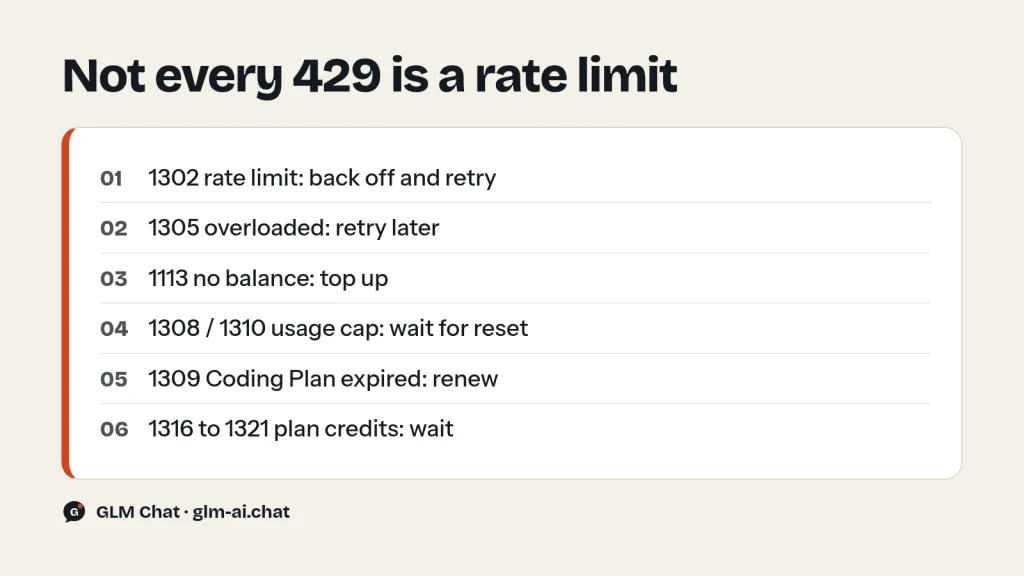
GLM API rate limits are set per account and per model, and they are based on concurrency: how many requests you can have in flight at the same time. Your exact numbers are shown in the Z.ai console at z.ai/manage-apikey/rate-limits. When you go over, the API answers with HTTP 429 and business code 1302. But not every 429 is a rate limit: 1113 means no balance, 1305 means the service is overloaded, and 1308 to 1321 are usage caps, mostly on the GLM Coding Plan. Each needs a different fix.
This page is the complete reference. It lists every error code Z.ai (formerly Zhipu AI) documents, explains the usual causes of HTTP 400, 401 and 429 errors, gives retry-with-backoff code in Python and Node that retries only what can succeed, and covers the credit limits of the Coding Plan. If you have not made a first call yet, the GLM API quickstart gets you there in a few minutes.
How GLM API rate limits work
Z.ai limits concurrency, not a fixed count of requests per minute. Its docs define concurrency as the number of API requests you can start at the same time, set by the platform to keep the service stable and share resources fairly. Three consequences follow:
- Limits are per model. Hitting the ceiling on
glm-5.3does not stop you callingglm-5.3-flashorglm-4.7-flash. Routing light traffic to a smaller model frees up headroom on the flagship. - Long requests hold a slot longer. A call that thinks at maximum effort and writes 20,000 tokens occupies one concurrency slot until it finishes. The same limit allows far more short calls per minute than long ones.
- Limits differ between accounts. Z.ai notes that different users or plans may have different concurrency quotas. That is why this page quotes no numbers: yours are on your console page.
When you exceed the limit, the docs say new requests “may fail or need to wait in queue”. In practice, a failed request comes back as HTTP 429 with code 1302, “Rate limit reached for requests”. If your application needs more concurrency than your account allows, Z.ai’s guidance is to check your account limits or contact platform support.
Where to see your limits and usage
| What | Where |
|---|---|
| Concurrency limits per model | z.ai/manage-apikey/rate-limits |
| Balance, top-ups and billing history | z.ai/manage-apikey/billing (history shows the previous day) |
| API keys | z.ai/manage-apikey/apikey-list |
| Coding Plan quota progress | z.ai/manage-apikey/subscription |
There is no public status page for the Z.ai API; status.z.ai does not resolve. If you suspect an outage rather than a limit, the GLM not working guide has a 30-second check.
How to read a GLM API error
Every error has two layers. The outer layer is the HTTP status code (400, 401, 403, 429 or 500). The inner layer is a Z.ai business code in the JSON body, which says exactly what went wrong. Errors always arrive in this shape:
{
  "error": {
    "code": "1214",
    "message": "Parameter `${field}` is invalid. Please check the documentation."
  }
}
In a real response, the placeholder is replaced by the field name, so the message tells you which parameter to fix. To see both layers from the command line, print the status after the body:
curl -s -w "\nHTTP %{http_code}\n" "https://api.z.ai/api/paas/v4/chat/completions" \
  -H "Content-Type: application/json" \
  -H "Authorization: Bearer $ZAI_API_KEY" \
  -d '{"model": "glm-4.7-flash", "messages": [{"role": "user", "content": "ping"}]}'
Errors during streaming
Streaming changes the rules. Once an SSE stream has started, the HTTP 200 has already been sent, so if inference ends abnormally the API does not return the codes below. It reports the reason in finish_reason on the last chunk instead. The possible values are stop, tool_calls, length, sensitive, model_context_window_exceeded and network_error. Log the final finish_reason of every stream; network_error is worth a retry, sensitive and model_context_window_exceeded are not.
Full GLM API error code table
This is every code in Z.ai’s error reference, with whether a retry can help. “Wait” means retrying immediately will fail again, but the same request works after a reset time.
| HTTP | Code | Meaning | Retry? |
|---|---|---|---|
| 500 | — | Internal error | Yes, with backoff |
| 401 | 1000 | Authentication failed | No |
| 401 | 1001 | No authentication parameter in the header | No |
| 401 | 1003 | Authentication token expired | No, regenerate the token |
| 401 | 1005 | Two-factor authentication required | No |
| 429 | 1113 | Insufficient balance or no resource package | No, top up |
| 500 | 1200 | API call error | Yes, with backoff |
| 400 | 1210 | Invalid API parameter | No |
| 400 | 1211 | Unknown model | No |
| 400 | 1212 | Model does not support this call method | No |
| 400 | 1213 | A required parameter was not received | No |
| 400 | 1214 | A parameter value is invalid | No |
| 400 | 1215 | Two parameters cannot be set together | No |
| 403 | 1220 | No permission to access this API | No |
| 400 | 1221 | This API has been taken offline | No |
| 400 | 1222 | This API does not exist | No |
| 500 | 1230 | API call process error | Yes, with backoff |
| 500 | 1234 | Network error (includes an error ID) | Yes, with backoff |
| 400 | 1261 | Prompt too long | No, shorten it |
| 400 | 1301 | Unsafe or sensitive content detected | No, rephrase |
| 429 | 1302 | Request rate limit reached | Yes, with backoff |
| 429 | 1305 | Service may be temporarily overloaded | Yes, later |
| 429 | 1308 | Usage limit reached; message gives the reset time | Wait |
| 429 | 1309 | GLM Coding Plan expired | No, renew |
| 429 | 1310 | Weekly or monthly limit exhausted | Wait |
| 429 | 1311 | Plan does not include this model | No, change model |
| 429 | 1313 | Fair Usage Policy restriction | No, submit a request |
| 429 | 1314 | Enterprise package expired | No, ask your admin |
| 429 | 1315 | Key limited to enterprise coding package use | No, use the right key |
| 429 | 1316, 1317 | 5-hour / 7-day limit hit; balance too low for extra usage | Wait |
| 429 | 1318 to 1321 | 5-hour / 7-day limit hit; monthly spend limit blocks extra usage | Wait |
Fixing GLM API error 400
A 400 means the request itself is wrong. Retrying the same payload will fail every time, so read the business code and the field named in the message. These are the causes behind almost every GLM API error 400:
1210 and 1214: invalid parameter
The most common triggers, all taken from the limits in Z.ai’s API reference:
- Thinking disabled on GLM-5.3. GLM-5.3 and GLM-5.3-Flash use forced thinking. Sending
"thinking": {"type": "disabled"}makes the request fail. Send"thinking": {"type": "enabled"}with"reasoning_effort": "low"instead. The GLM thinking mode guide has the full per-model rules. - Unsupported
reasoning_effortvalue. GLM-5.3 and GLM-5.3-Flash accept onlylow,highandmax; Z.ai says any other input results in an error. GLM-5.2 is more forgiving and mapsmediumtohigh. - Temperature out of range. GLM accepts
temperaturefrom 0.0 to 1.0. Code migrated from other APIs often sends 1.2 or 1.5. Clamp it.top_pmust be between 0.01 and 1.0. max_tokensabove the model maximum. The ceiling is 131,072 on GLM-5.x, GLM-4.7 and GLM-4.6, 98,304 on the GLM-4.5 series, 32,768 on GLM-4.6V and 16,384 on GLM-4.5V.- Unsupported option values.
tool_choicemust beauto;response_formattype must betextorjson_object;stopsupports one stop word;toolsholds at most 128 functions, with names made of letters, digits, underscores and dashes. - ID fields out of bounds.
request_idmust be 6 to 64 characters and unique;user_idmust be 6 to 128 characters. - Messages with no user turn. The input must not consist of system or assistant messages only.
1211: unknown model
The model value is not a model code the API knows. Model IDs are lowercase with dots: glm-5.3, not GLM-5.3 or glm-5-3. Check for trailing spaces and for display names copied from a web page. Vision-only IDs such as glm-4.6v are valid, but they expect image content parts. The GLM models overview lists every current ID.
1213 and 1215: missing or conflicting parameters
1213 names a required field that did not arrive, most often model, messages, or the tool_call_id on a tool message. 1215 means two fields were set that cannot be combined; the message names both. When building payloads dynamically, log the final JSON before sending it.
1212: call method not supported
The model does not support the way you called it, for example a feature it lacks. Check the model’s capabilities: tool_stream works on GLM-5.3, 5.2, 5.1, 5, 4.7 and 4.6 only, and response_format applies to text models only.
1261: prompt too long
The input exceeds what the model can take. Context windows: 1M tokens on GLM-5.3, GLM-5.3-Flash and GLM-5.2; 200K on GLM-5.1, GLM-5, GLM-4.7, GLM-4.7-Flash and GLM-4.6; 128K on the GLM-4.5 series. The context covers input and output together, so a large max_tokens also eats into it. Fixes in order of effort: trim or summarise old conversation turns, shrink tool definitions and retrieved documents, lower max_tokens, or move to a 1M-context model. Z.ai’s tokenizer endpoint (POST /paas/v4/tokenizer) counts tokens before you send; its reference lists glm-4.6, glm-4.6v and glm-4.5 as supported models, so treat counts for newer models as estimates.
1301: sensitive content
The content filter flagged the input or the generated output. The message asks you to avoid prompts that may generate sensitive content. Rephrase the request; retrying the same text will not help. In a stream, the same event shows up as finish_reason: "sensitive".
Fixing 401 errors
A 401 means authentication failed before the model was involved. Four codes:
- 1000, authentication failed. The key is wrong, deleted or malformed. Check that the header reads
Authorization: Bearer your-api-keywith exactly one space and no quotes or line breaks inside the key. Also check where the key came from: the older bigmodel.cn platform uses a separate account system, so create your key on z.ai for calls to api.z.ai. - 1001, no authentication header. The header never arrived. The usual culprit is an empty environment variable:
echo $ZAI_API_KEYin the same shell that runs your code. Proxies that strip headers can also cause it. - 1003, token expired. You will most likely see this with Z.ai’s optional JWT authentication, where you sign a short-lived token from your key. Generate a fresh token, or switch to plain Bearer key authentication, which does not expire this way.
- 1005, two-factor authentication required. Complete the two-factor step on your Z.ai account, then retry.
One 401 look-alike is really a 403: code 1220 means your key is valid but lacks permission for that specific API.
Fixing 429 errors: which 429 do you have?
HTTP 429 covers several unrelated situations on the GLM API. The business code decides what to do, and generic “retry on 429” logic gets several of them wrong:
| Code | What it really means | What to do |
|---|---|---|
| 1302 | Too many concurrent requests for this model | Back off and retry; cap concurrency |
| 1305 | Z.ai’s service is overloaded | Retry later with longer backoff, or switch model |
| 1113 | No balance or resource package | Top up; on the Coding Plan, check the base URL |
| 1308 | A usage limit was reached | Wait for the reset time in the message |
| 1310 | Weekly or monthly limit exhausted | Wait for the reset time in the message |
| 1309 | Coding Plan expired | Renew at z.ai/subscribe |
| 1311 | Your plan does not include the model | Use a model your plan covers |
| 1313 | Fair Usage Policy restriction | Follow the restore request process |
| 1316 to 1321 | Coding Plan 5-hour or 7-day credits used up | Wait for the reset; check extra-usage settings |
1302 vs 1305: your limit or theirs
Code 1302 is about you: your account has more requests in flight for that model than its limit allows. Slowing down fixes it, and the durable fix is a concurrency cap in your client. Code 1305 is about Z.ai: the service is temporarily overloaded no matter how few requests you send. Retrying helps, but with longer waits, and moving the request to a different model is often faster than waiting.
1113: the 429 that is really a billing error
Code 1113 reads “Insufficient balance or no resource package. Please recharge.” On the pay-as-you-go API, top up on the billing page or test with a free model such as GLM-4.7-Flash. If you just bought a Coding Plan and see 1113, the plan is almost certainly not being used: Z.ai’s FAQ says this happens when the tool is not a supported one or the base URL is wrong. Claude Code and Goose need https://api.z.ai/api/anthropic; other tools need https://api.z.ai/api/coding/paas/v4. The general https://api.z.ai/api/paas/v4 bills your balance, not the plan.
1308 and 1310: usage caps with a reset time
These say “Your limit will reset at” a given time, filled in with the actual reset moment. Parse it from the message and schedule the retry for after that time instead of backing off blindly. 1310 is the weekly or monthly version.
1309, 1311, 1313 and 1316 to 1321: Coding Plan limits
1309 means the plan expired; renew it at z.ai/subscribe. 1311 means the plan does not include the requested model. 1313 means the account’s usage pattern broke the Fair Usage Policy and request frequency is limited until you submit a request to restore access. Codes 1316 to 1321 all mean a 5-hour or 7-day credit limit was reached and extra usage could not cover it, either because the balance was too low (1316, 1317) or because a monthly spend limit blocked it (1318 to 1321). Each message includes the reset time. The Coding Plan section below explains the credit system behind these codes.
Retry with exponential backoff
Z.ai’s best-practice list asks for exponential backoff with sensible timeout and retry limits. The key is to retry only the codes that can succeed on a later attempt: 1302, 1305 and the 500-class errors. Everything else should fail fast so you fix the cause. This Python helper uses requests:
import os
import random
import time
import requests
URL = "https://api.z.ai/api/paas/v4/chat/completions"
HEADERS = {
    "Authorization": f"Bearer {os.environ['ZAI_API_KEY']}",
    "Content-Type": "application/json",
}
RETRYABLE = {"1302", "1305", "1200", "1230", "1234"}
class GLMError(Exception):
    def __init__(self, status, code, message):
        super().__init__(f"HTTP {status} / code {code}: {message}")
        self.status, self.code, self.message = status, code, message
def parse_error(resp):
    try:
        err = resp.json().get("error", {})
    except ValueError:
        err = {}
    return GLMError(resp.status_code, str(err.get("code", "")), err.get("message", resp.text))
def is_retryable(error):
    return error.code in RETRYABLE or error.status == 0 or error.status >= 500
def chat_with_retry(payload, max_attempts=6, base_delay=1.0, max_delay=60.0):
    for attempt in range(1, max_attempts + 1):
        try:
            resp = requests.post(URL, headers=HEADERS, json=payload, timeout=300)
        except (requests.ConnectionError, requests.Timeout) as exc:
            error = GLMError(0, "network", str(exc))
        else:
            if resp.status_code == 200:
                return resp.json()
            error = parse_error(resp)
        if not is_retryable(error) or attempt == max_attempts:
            raise error
        delay = min(max_delay, base_delay * 2 ** (attempt - 1))
        time.sleep(delay * random.uniform(0.5, 1.0))  # jitter spreads retries out
data = chat_with_retry({
    "model": "glm-4.7-flash",
    "messages": [{"role": "user", "content": "Say hello in five words."}],
})
print(data["choices"][0]["message"]["content"])
The jitter matters. Without it, every worker that hit 1302 at the same moment retries at the same moment and hits it again. With the delay doubling from 1 second up to a 60-second cap, six attempts cover roughly a minute of trouble before the error surfaces.
Cap concurrency at the source
Backoff treats the symptom. A worker pool sized to your concurrency limit prevents most 1302 errors in the first place. Set MAX_CONCURRENCY to the value shown for your model on the rate-limits page:
from concurrent.futures import ThreadPoolExecutor
MAX_CONCURRENCY = 3  # replace with your model's limit from z.ai/manage-apikey/rate-limits
def ask(prompt):
    data = chat_with_retry({
        "model": "glm-4.7-flash",
        "messages": [{"role": "user", "content": prompt}],
    })
    return data["choices"][0]["message"]["content"]
prompts = [f"Give one tip about topic {i} in a single sentence." for i in range(20)]
with ThreadPoolExecutor(max_workers=MAX_CONCURRENCY) as pool:
    for answer in pool.map(ask, prompts):
        print(answer)
The same retry logic in Node
For Node 18 and later with built-in fetch. Save as retry.mjs and run with node retry.mjs:
const URL = "https://api.z.ai/api/paas/v4/chat/completions";
const RETRYABLE = new Set(["1302", "1305", "1200", "1230", "1234"]);
const sleep = (ms) => new Promise((resolve) => setTimeout(resolve, ms));
async function chatWithRetry(payload, maxAttempts = 6) {
  for (let attempt = 1; attempt <= maxAttempts; attempt++) {
    let status = 0;
    let code = "network";
    let message = "";
    try {
      const res = await fetch(URL, {
        method: "POST",
        headers: {
          "Authorization": `Bearer ${process.env.ZAI_API_KEY}`,
          "Content-Type": "application/json",
        },
        body: JSON.stringify(payload),
      });
      if (res.ok) return await res.json();
      status = res.status;
      const text = await res.text();
      try {
        const body = JSON.parse(text);
        code = String(body?.error?.code ?? "");
        message = body?.error?.message ?? text;
      } catch {
        code = "";
        message = text;
      }
    } catch (err) {
      message = String(err);
    }
    const retryable = code === "network" || RETRYABLE.has(code) || status >= 500;
    if (!retryable || attempt === maxAttempts) {
      throw new Error(`HTTP ${status} / code ${code}: ${message}`);
    }
    const delay = Math.min(60000, 1000 * 2 ** (attempt - 1));
    await sleep(delay * (0.5 + Math.random() / 2));
  }
}
const data = await chatWithRetry({
  model: "glm-4.7-flash",
  messages: [{ role: "user", content: "Say hello in five words." }],
});
console.log(data.choices[0].message.content);
If you use an SDK instead, the OpenAI client and zai-sdk both accept a max_retries setting; Z.ai’s own configuration example uses 3. Built-in retries do not know Z.ai’s business codes, though, so they may spend attempts on a 1113 or 1310 that waiting a few seconds cannot fix. For production traffic, the explicit helper above is the safer choice.
GLM Coding Plan limits
The GLM Coding Plan does not use the pay-as-you-go limits above. Since July 30, 2026 it runs on credits, with two windows that apply at the same time:
| Plan | Credits per 5 hours | Credits per week | Price (monthly billing) |
|---|---|---|---|
| Lite | 2,000 | 10,000 | $18/month |
| Pro | 12,000 | 60,000 | $80/month |
| Max | 28,000 | 140,000 | $168/month |
- Reset rules. 5-hour credits refresh 5 hours after they are consumed. Weekly credits start with your subscription and reset every 7 days.
- Credit cost. Credits = (input tokens × input multiplier + cached input × cached multiplier + output × output multiplier) / 10,000. GLM-5.3 multipliers are 6.9 / 1.7 / 24; GLM-5.3-Flash multipliers are 2.3 / 0.56 / 8. Web Search, Web Reader and Zread MCP calls cost 1.2 credits each.
- Off-peak discount. Outside peak hours, model usage costs 50% of the standard credit rate. Peak hours are Monday to Friday, 14:00 to 18:00 UTC+8; weekends are off-peak all day. From September 25 to October 7, 2026, all usage is charged at the off-peak rate.
- Concurrency by tier. Plan rate limits follow the order Max > Pro > Lite and are adjusted dynamically. Z.ai recommends Lite for one project at a time, Pro for one or two, and Max for two or more, with higher concurrency during off-peak hours.
- Best-effort tools. General-purpose agents such as OpenClaw run on a secondary, best-effort schedule; under high load, their requests may be queued or rate-limited while coding agents keep priority.
- No overflow into your balance. When the plan quota runs out, calls wait for the next reset. The plan never draws from your account balance, and plan quota cannot be used for general API calls.
Team plans work per seat: a Standard seat gets 66,000 credits a week and a Premium seat 155,000. A seat that exceeds its quota is blocked until the next reset unless the team administrator has enabled on-demand overage in advance. For tiers, pricing and a break-even comparison with the API, read the GLM Coding Plan guide; for tool setup, see GLM in Claude Code and GLM in Cline.
How to stay under the GLM API rate limits
- Cap concurrency in your client at the limit shown on your console page, as in the worker-pool example above.
- Route by difficulty. Limits are per model, so send classification, extraction and short chat to GLM-5.3-Flash or GLM-4.7-Flash and reserve GLM-5.3 for hard tasks.
- Lower reasoning effort where it does not help. A request at
reasoning_effort: "low"finishes sooner and releases its slot sooner. - Set
max_tokensdeliberately so no single request holds a slot for tens of thousands of tokens by accident. - Stream long answers. Streaming does not change the limit, but it avoids client timeouts that make you resend work you already paid for.
- Reuse context. Repeated prompt content can be billed at the cached-input rate, which lowers cost; the context caching guide shows how to read
cached_tokens. - Queue batch jobs. For offline work, a job queue that drains at your concurrency limit is simpler and faster overall than firing everything at once and retrying.
- Ask for more. If you consistently need more concurrency, contact Z.ai support with your use case.
For tool-calling agents, where one user request can fan out into many model calls, the loop guard in the GLM function calling guide also keeps a single runaway conversation from eating your whole limit. Compare the per-model prices on the GLM pricing page before you decide where to route traffic.
GLM API rate limits FAQ
What are the GLM API rate limits?
They are concurrency limits: a maximum number of simultaneous requests per model, set per account. Z.ai shows your current limits at z.ai/manage-apikey/rate-limits. Going over returns HTTP 429 with business code 1302.
What does GLM API error 1302 mean?
“Rate limit reached for requests.” Your account has too many requests in flight for that model. Wait and retry with exponential backoff and jitter, and cap concurrency in your client so it does not recur.
What is the difference between error 1302 and 1305?
1302 is your own concurrency limit; slowing down fixes it. 1305 means Z.ai’s service is temporarily overloaded regardless of your traffic; retry later with longer waits, or send the request to a different model.
Why do I get error 1113 when I have a Coding Plan?
Because the request is not going through the plan. The plan only works in supported coding tools with the plan’s base URL: https://api.z.ai/api/anthropic for Claude Code and Goose, https://api.z.ai/api/coding/paas/v4 for other tools. Calls to the general API endpoint need account balance.
What causes GLM API error 400?
An invalid request. The usual causes are disabling thinking on GLM-5.3 or GLM-5.3-Flash, an unsupported reasoning_effort value, a temperature above 1.0, max_tokens above the model limit, a tool_choice other than auto, an unknown model ID (1211) or a prompt that is too long (1261).
Why does GLM-5.3 reject thinking disabled?
GLM-5.3 and GLM-5.3-Flash use forced thinking, and Z.ai returns an error if thinking.type is set to disabled. For faster answers, keep thinking enabled and set reasoning_effort to low.
How do I increase my Z.ai rate limit?
Check the current values on your rate-limits page, then contact Z.ai platform support with your use case; its docs point there for higher concurrency needs. In the meantime, spread load across models, since limits apply per model.
Is there a Z.ai API status page?
No public one: status.z.ai does not resolve. To tell an outage from a limit, send a minimal request and read the business code, check Z.ai’s Discord and X accounts, or try the free GLM chat on this site.