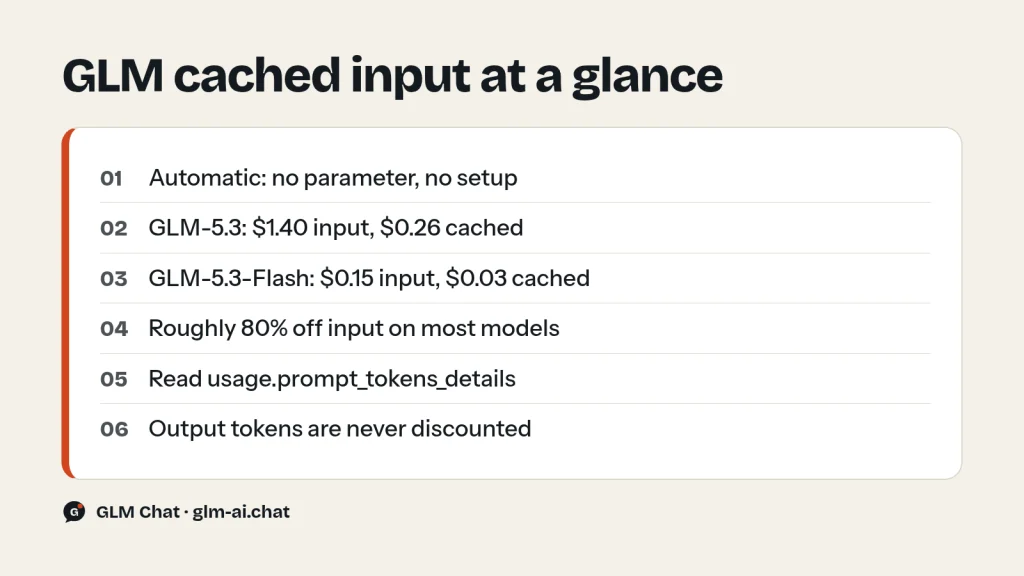
GLM context caching is automatic. When a request repeats content the API has recently processed, such as the same system prompt, the same reference document or the same conversation history, Z.ai reuses its earlier work and bills those tokens at the cached input price. On GLM-5.3 that means $0.26 per 1M tokens instead of $1.40, about 81% off. There’s no parameter to set, no cache object to create and no extra endpoint to call. You’ll see the result in one response field: usage.prompt_tokens_details.cached_tokens.
You don’t switch caching on. Your job is to make your requests easy to cache. This guide shows the cached input price for every GLM model, works through the savings on realistic workloads, explains how to lay out prompts so repeated content actually hits the cache, and gives you code that reads the usage fields and prices each request.
How GLM context caching works
Z.ai (formerly Zhipu AI) describes its context cache as implicit caching. Each time a request arrives, the service looks at the input messages and checks for content that is identical or highly similar to earlier requests. When it finds a match, it reuses the earlier computation instead of processing those tokens again. That has two effects, and both matter:
- Lower cost. Cache-hit tokens are billed at the cached input price, while new tokens and all output tokens are billed at the normal price.
- Faster responses. Less input to process means the first token arrives sooner. Z.ai notes that the request that first establishes a cache entry may be slightly slower.
The official Context Caching guide lists the rules in plain terms. Caching triggers automatically based on content similarity. Identical content has the highest hit rate. Even minor formatting differences can reduce cache effectiveness. Cache entries expire after a time limit, and expired content is processed at full price again. Z.ai doesn’t publish that time limit or the exact matching algorithm, so design for the safe case: make repeated content byte-for-byte identical and send follow-up requests close together.
Caching works on all mainstream models. Z.ai names GLM-5, GLM-4.7, GLM-4.6 and the GLM-4.5 series, and its current pricing page lists a cached input price for every GLM-5.x model too. It pays off most in three situations:
- System prompt reuse: the same instructions sent with every request.
- Repetitive tasks: batch jobs that run the same instructions over many inputs, such as code review, classification or extraction.
- Multi-turn conversations: each turn resends the whole history, so everything before the newest message is repeated content.
GLM cached input prices for every model
Prices are in USD per 1M tokens, from Z.ai’s official pricing page. The discount column compares cached input with normal input for the same model. Z.ai currently lists cached input storage as limited-time free, so today you pay only for cache hits and nothing to keep content cached.
| Model | Input | Cached input | Output | Cached discount |
|---|---|---|---|---|
| GLM-5.3 | $1.40 | $0.26 | $4.40 | 81% |
| GLM-5.2 | $1.40 | $0.26 | $4.40 | 81% |
| GLM-5.1 | $1.40 | $0.26 | $4.40 | 81% |
| GLM-5 | $1.00 | $0.20 | $3.20 | 80% |
| GLM-5.3-Flash | $0.15 | $0.03 | $0.50 | 80% |
| GLM-5.3-FlashX | $0.37 | $0.075 | $1.25 | 80% |
| GLM-4.7 | $0.60 | $0.11 | $2.20 | 82% |
| GLM-4.7-FlashX | $0.07 | $0.01 | $0.40 | 86% |
| GLM-4.6 | $0.60 | $0.11 | $2.20 | 82% |
| GLM-4.5 | $0.60 | $0.11 | $2.20 | 82% |
| GLM-4.5-X | $2.20 | $0.45 | $8.90 | 80% |
| GLM-4.5-Air | $0.20 | $0.03 | $1.10 | 85% |
| GLM-4.5-AirX | $1.10 | $0.22 | $4.50 | 80% |
| GLM-4.6V | $0.30 | $0.05 | $0.90 | 83% |
| GLM-4.6V-FlashX | $0.04 | $0.004 | $0.40 | 90% |
| GLM-4.5V | $0.60 | $0.11 | $1.80 | 82% |
| GLM-4.7-Flash, GLM-4.5-Flash, GLM-4.6V-Flash | Free | Free | Free | n/a |
| GLM-4-32B-0414-128K | $0.10 | not listed | $0.10 | n/a |
A note on the docs: the billing example in Z.ai’s caching guide uses a generic “usually 50% of standard price” discount with made-up numbers. The per-model prices above come from the pricing page and are what you’re actually charged, and they’re far better than 50% on every model that lists one. For the full price list, including image, video and tool prices, see the GLM pricing guide.
Worked savings math
Caching only affects the input side, so your savings depend on two numbers: your cache hit rate (cached tokens ÷ prompt tokens) and how much of your bill is input in the first place. The effective input price is simple to work out:
effective input price = (1 − hit rate) × input price + hit rate × cached price| Cache hit rate | GLM-5.3 | GLM-5.3-Flash | GLM-4.7 |
|---|---|---|---|
| 0% | $1.40 | $0.150 | $0.600 |
| 50% | $0.83 | $0.090 | $0.355 |
| 80% | $0.488 | $0.054 | $0.208 |
| 95% | $0.317 | $0.036 | $0.1345 |
Example 1: a support bot on GLM-5.3
Say every request carries a 6,000-token system prompt (instructions plus a policy handbook), a 500-token user question, and gets a 400-token answer. The bot handles 10,000 requests a day.
- No caching: input 6,500 × 10,000 = 65M tokens × $1.40 = $91.00. Output 400 × 10,000 = 4M tokens × $4.40 = $17.60. Total $108.60 a day.
- System prompt cached: cached 6,000 × 10,000 = 60M tokens × $0.26 = $15.60. New input 500 × 10,000 = 5M × $1.40 = $7.00. Output unchanged at $17.60. Total $40.20 a day.
That’s about 63% off the total bill, or roughly $2,050 over a 30-day month, from making sure the system prompt is identical in every request. (The first request, which fills the cache, adds less than a cent.)
Example 2: long-document Q&A on GLM-5.3-Flash
GLM-5.3-Flash has a 1M-token context, so you can put a whole 200,000-token contract pack or codebase in one prompt. Suppose you ask 30 questions of about 100 tokens each and get 800-token answers.
- No caching: 30 × 200,100 = 6,003,000 input tokens × $0.15 = $0.90. Output 24,000 × $0.50 = $0.012. Total about $0.91.
- Document cached after the first question: first request 200,100 × $0.15 = $0.030. The other 29 requests read 5.8M cached tokens × $0.03 = $0.174, plus 2,900 new tokens (about $0.0004). Output $0.012. Total about $0.22.
That saves 76%, and the gap keeps widening the more questions you ask about the same document. On GLM-5.3 the same session costs about $8.51 uncached versus $1.90 cached.
Example 3: an agent loop
Coding agents resend a growing history on every step: instructions, tool definitions, file contents, earlier tool results. After the first few steps, most of each prompt is content the API has already seen, so hit rates of 80–95% are realistic when the history is only ever appended to. At 95% on GLM-5.3, you pay about $0.32 per 1M input tokens instead of $1.40. Z.ai’s own Coding Plan allowance estimates are calculated at a 95% cache hit rate.
Caching or a cheaper model?
Caching and model choice multiply together, so compare both before you optimise. Even at a 95% hit rate, GLM-5.3 input works out to about $0.32 per 1M tokens, still more than twice GLM-5.3-Flash’s uncached $0.15. And output isn’t discounted at all: $4.40 against $0.50. If Flash handles the task well, switching models cuts the bill further than any cache layout. If the task needs GLM-5.3, caching is how you bring its input cost close to a small model’s. For a workload with long prompts and short answers, get the layout right first. It costs nothing and doesn’t change the model you’re relying on.
How to structure prompts for GLM cached input hits
Z.ai’s best practices come down to four points: use stable system prompt templates, put long documents in the system message, organise conversation history sensibly, and avoid changing content too often. Here’s what that means in practice:
- Put stable content first, variable content last. System instructions, then reference documents, then few-shot examples, then conversation history, then the new user message. Anything that changes per request belongs at the end.
- Keep dynamic values out of the system prompt. A line like “Current time: 14:03:11” or a request ID at the top of the prompt makes every request different from the start. If the model needs the date, put it in the latest user message, or round it to the day.
- Build the prompt from the same template every time. Z.ai warns that minor formatting differences reduce cache effectiveness. Watch for trailing spaces, different line endings, reordered JSON keys and documents serialised in a different order.
- Append, don’t rewrite, conversation history. If you summarise or trim old turns, every request after the change starts a new cache entry. Trim in large, infrequent steps instead of a little each turn.
- Keep tool definitions stable. The
toolsarray is part of the input. Send the same tools in the same order on every step of an agent loop. - Batch related work together. Cache entries expire, so run the 500 reviews that share one system prompt back to back instead of spreading them over the day.
- Use Preserved Thinking in agent loops. Z.ai says keeping earlier reasoning in context (
"clear_thinking": false, with the originalreasoning_contentsent back unchanged) raises cache hit rates. Reordered or edited reasoning blocks lower them. Details are in the GLM thinking mode guide.
Here’s the difference in code. The first layout changes on every call. The second keeps a stable prefix and moves the changing parts to the end:
from datetime import datetime, timezone

HANDBOOK = "Refunds: 30 days with receipt.\nShipping: 3-5 business days.\n"  # your long reference text

# Cache-unfriendly: the timestamp makes every system prompt unique
bad_messages = [
    {"role": "system", "content": f"Now: {datetime.now(timezone.utc).isoformat()}\nYou are a support agent.\n{HANDBOOK}"},
    {"role": "user", "content": "Can I return an opened item?"},
]

# Cache-friendly: identical system prompt, dynamic data moved to the user turn
SYSTEM = "You are a support agent. Answer only from the handbook below.\n\n" + HANDBOOK
today = datetime.now(timezone.utc).strftime("%Y-%m-%d")
good_messages = [
    {"role": "system", "content": SYSTEM},
    {"role": "user", "content": f"(Today is {today}.) Can I return an opened item?"},
]
Reading the usage fields
Every response includes a usage object. cached_tokens is a subset of prompt_tokens: in Z.ai’s own example, 800 of 1,200 prompt tokens came from the cache, so 400 were billed at the normal input price.
{
  "usage": {
    "prompt_tokens": 1200,
    "completion_tokens": 300,
    "total_tokens": 1500,
    "prompt_tokens_details": {
      "cached_tokens": 800
    }
  }
}
To check caching from the command line, send the same request twice and compare the usage blocks. The second call should report a non-zero cached_tokens, as long as your system prompt is long enough to matter. The loop pipes each response through jq, so install it first:
for i in 1 2; do
  curl -s -X POST "https://api.z.ai/api/paas/v4/chat/completions" \
    -H "Content-Type: application/json" \
    -H "Authorization: Bearer $ZAI_API_KEY" \
    -d '{
      "model": "glm-4.7",
      "messages": [
        {"role": "system", "content": "You are a professional data analyst, skilled at explaining data trends and providing business insights."},
        {"role": "user", "content": "How do I analyse user retention?"}
      ],
      "thinking": {"type": "disabled"}
    }' | jq '.usage'
done
In production, log the hit rate and the cost of every request. This Python script uses the OpenAI SDK against Z.ai’s base URL. It sends two questions over the same long system prompt and prices each response from its usage fields:
import os
from openai import OpenAI

client = OpenAI(api_key=os.environ["ZAI_API_KEY"], base_url="https://api.z.ai/api/paas/v4/")

# USD per 1M tokens: (input, cached input, output), from Z.ai's pricing page
PRICES = {
    "glm-5.3": (1.40, 0.26, 4.40),
    "glm-5.3-flash": (0.15, 0.03, 0.50),
    "glm-4.7": (0.60, 0.11, 2.20),
}

def cost_report(model, usage):
    price_in, price_cached, price_out = PRICES[model]
    details = getattr(usage, "prompt_tokens_details", None)
    cached = (details.cached_tokens or 0) if details else 0
    fresh = usage.prompt_tokens - cached
    cost = (fresh * price_in + cached * price_cached + usage.completion_tokens * price_out) / 1_000_000
    hit = cached / usage.prompt_tokens if usage.prompt_tokens else 0.0
    return (f"prompt={usage.prompt_tokens} cached={cached} ({hit:.0%}) "
            f"output={usage.completion_tokens} cost=${cost:.5f}")

# Stand-in for a long, stable document; replace with your own text
HANDBOOK = "\n".join(f"Policy {i}: orders in category {i} ship within {i % 5 + 1} days." for i in range(1, 400))
SYSTEM = "Answer using only this handbook. Be brief.\n\n" + HANDBOOK
MODEL = "glm-5.3-flash"

for question in ["How fast does category 12 ship?", "How fast does category 250 ship?"]:
    resp = client.chat.completions.create(
        model=MODEL,
        messages=[
            {"role": "system", "content": SYSTEM},
            {"role": "user", "content": question},
        ],
        extra_body={"thinking": {"type": "enabled"}, "reasoning_effort": "low"},
    )
    print(resp.choices[0].message.content.strip())
    print(cost_report(MODEL, resp.usage))
With streaming, the usage object (including prompt_tokens_details) arrives only in the last chunk, so keep a reference to it while you loop. The GLM API quickstart has a complete streaming example. For account-level totals, Z.ai’s billing console shows how many tokens were used under each pricing type.
Context caching on the GLM Coding Plan
The GLM Coding Plan counts usage in credits instead of dollars, and cached input is discounted there too. The formula is (input × input multiplier + cached input × cached multiplier + output × output multiplier) ÷ 10,000.
| Model | Input multiplier | Cached multiplier | Credits per 1M input (fresh / cached) |
|---|---|---|---|
| GLM-5.3 | 6.9 | 1.7 | 690 / 170 |
| GLM-5.3-Flash | 2.3 | 0.56 | 230 / 56 |
Z.ai’s weekly allowance table for the plan, from 48–97M tokens a week on Lite with GLM-5.3 up to 2,047–4,095M on Max with GLM-5.3-Flash, assumes a 95% cache hit rate. If your agent keeps its prompt prefix stable, you’ll get close to those figures. If it rewrites history every turn, you’ll get far less. Preserved Thinking is on by default on the Coding Plan endpoint, which helps: earlier reasoning stays in the prefix unchanged. Setup guides: GLM in Claude Code and GLM in Cline.
Limits and gotchas
- No manual control. There’s no cache key, no pinning and no documented time-to-live. You influence hits only through how you build prompts.
- The first request pays full price. A prompt sent once never benefits. Caching rewards repetition.
- Output is never discounted. On output-heavy workloads, such as long reasoning or long generated files, caching cuts a smaller share of the bill. Lower
reasoning_effortor pick a cheaper model to cut output. - Storage is free “for a limited time”. Z.ai lists cached input storage as limited-time free on every model. Watch the pricing page in case that changes.
- Some models have no cached price. GLM-4-32B-0414-128K lists none. The free models (GLM-4.7-Flash, GLM-4.5-Flash, GLM-4.6V-Flash) cost nothing either way, so caching only helps their latency.
- Rate limits still apply. Cached tokens are cheaper, but they don’t lift your account’s concurrency limits. See GLM API rate limits and error codes.
Want to see how a GLM model handles your prompt before you wire up the API? Paste it into the free GLM chat on this site, or go straight to GLM-5.3-Flash in the chat. Model details are on the GLM-5.3 and GLM-5.3-Flash pages.
GLM context caching FAQ
Do I need to enable context caching on the GLM API?
No. Caching is implicit and automatic on the standard API. There’s no parameter to add. Send repeated content in a consistent layout and the discount shows up in usage.prompt_tokens_details.cached_tokens.
How much cheaper is GLM cached input?
About 80% cheaper on most models. GLM-5.3, GLM-5.2 and GLM-5.1 charge $0.26 per 1M cached tokens against $1.40 normal input. GLM-5.3-Flash charges $0.03 against $0.15. GLM-4.7 charges $0.11 against $0.60.
Why is cached_tokens zero on my second request?
The repeated part probably wasn’t identical. Look for timestamps, IDs or reordered content near the start of the prompt. It’s also possible the prompt was too short to matter, or the entry expired between calls. Put stable text first and send the follow-up sooner.
Does caching change the model’s answers?
Z.ai describes caching as reusing earlier computation on repeated input, not reusing earlier answers. Each response is still generated fresh, and output tokens are billed in full.
Is there a charge for storing cached content?
Not at the moment. Z.ai’s pricing page lists cached input storage as “Limited-time Free” for every model with a cached price.
Does caching work with thinking and tool calls?
Yes. Tool definitions, tool results and history are all input, so they’re all cacheable. For agent loops, Z.ai says Preserved Thinking (clear_thinking: false with the original reasoning sent back) improves cache hit rates. Tool loop code is in the GLM function calling guide.