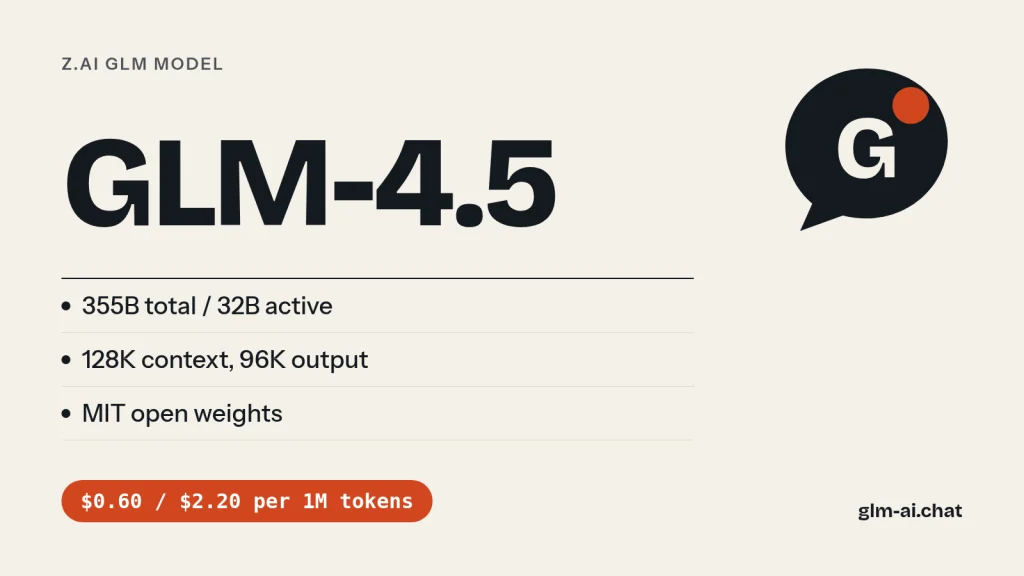
GLM 4.5 is the open-weight model that started Z.ai’s current run of agent-focused GLM releases. Launched on July 28, 2025, it is a Mixture-of-Experts model with 355B total and 32B active parameters, a 128K-token context window, up to 96K output tokens and hybrid reasoning that you switch on or off per request. The weights are MIT-licensed, and the API price is $0.60 per million input tokens and $2.20 per million output tokens. It shipped with a smaller sibling, GLM-4.5-Air (106B total, 12B active), and a set of speed and free variants.
Z.ai (formerly Zhipu AI) built GLM-4.5 as a single model that combines reasoning, coding and agent skills, and at launch reported that it ranked second overall and first among open-source models on the average of 12 benchmarks. A year on, newer models such as GLM-4.6, GLM-4.7 and the GLM-5 line have moved past it, and this page explains exactly how. You can still talk to it directly: Chat with GLM-4.5 now in GLM Chat, free and without signing up.
Below you will find what GLM-4.5 does well, the whole GLM-4.5 family (Air, X, AirX, Flash and the vision model GLM-4.5V), Z.ai’s benchmark claims, a clear account of how the model has aged, pricing, working API code with the model ID glm-4.5, and how to download and serve the weights.
What GLM-4.5 is good at
Z.ai describes GLM-4.5 and GLM-4.5-Air as foundation models for agent applications, optimised for tool calling, web browsing, software engineering and front-end development. Four things stand out.
Coding inside agents
GLM-4.5 was designed to plug into coding agents such as Claude Code and Roo Code, and Z.ai’s release notes highlighted one-click compatibility with Claude Code. To measure real-world coding rather than leaderboard scores, Z.ai ran 52 programming and development tasks across six domains inside Claude Code, in isolated containers with multi-turn interaction, and compared GLM-4.5 with Claude 4 Sonnet, Kimi-K2 and Qwen3-Coder. Z.ai’s summary: a strong lead over the other open models in tool-calling reliability and task completion, and a largely comparable experience to Claude 4 Sonnet in most scenarios, with room to improve against it. All 52 problems and full agent trajectories are public in the CC-Bench-trajectories dataset.
Hybrid reasoning
GLM-4.5 has two modes: a thinking mode for complex reasoning and tool use, and a non-thinking mode for instant answers. You toggle them with thinking.type (enabled or disabled). With thinking enabled, which is the default, the model applies dynamic thinking: it decides how much reasoning a request deserves. Z.ai’s guidance is practical: skip thinking for fact lookups and classification, let the default handle moderate questions, and keep it on for advanced maths, networking questions and coding problems. GLM-4.5 was also the first GLM model with interleaved thinking, where the model reasons between tool calls and after reading each tool result.
Parameter efficiency
Z.ai’s central claim for GLM-4.5 was efficiency: it has half the parameters of DeepSeek-R1 and a third of Kimi-K2, yet Z.ai reports that it beat both on several standard benchmarks. On SWE-bench Verified charts, Z.ai placed the GLM-4.5 series on the Pareto frontier of performance against parameter count. Because only 32B of its 355B parameters are active for each token, the compute per token is far below what the total size suggests.
How it was trained
GLM-4.5 and GLM-4.5-Air share one training pipeline. Z.ai pre-trained them on 15 trillion tokens of general-domain data, then trained further on targeted datasets for code, reasoning and agent tasks, extended the context length to 128K, and applied reinforcement learning to strengthen reasoning, coding and agent behaviour. Z.ai’s later GLM-5 materials put GLM-4.5’s total pre-training data at 23T tokens. The full recipe is in the technical report, arXiv 2508.06471.
Everyday work: writing, slides, translation, role-play
Z.ai also lists web development, task-planning assistants, slide-deck generation, multi-turn question answering, translation of long and informal text (with preliminary coverage of 26 languages), creative writing and consistent role-play characters. It is a multilingual model with strong structured-output support: JSON mode, function calling, streaming and context caching all work with it.

We tested it: 5 tasks
Here is how GLM-4.5 handles GLM Chat’s five standard tasks. Every model runs three times through the same fixed prompts in our own test harness, with the settings the public chat uses: temperature 0.7, a 2,048-token output cap and the lightest reasoning setting available, which for GLM-4.5 means thinking disabled. The harness records the full response, the latency and the token counts, and an editor scores each answer 0, 1 or 2, for a maximum of 10.
- Python: remove duplicate rows from a large CSV while streaming it, with selectable key columns, first occurrence kept and header preserved.
- JavaScript: a
debounce(fn, wait, { leading, trailing })function withcancel(), plus tests for Node’s built-in test runner. - PHP refactor: turn a messy 60-line PHP function into clean PHP 8 without changing behaviour, and explain the changes.
- Explanation: transformer attention for a complete beginner in about 150 words.
- Extraction: a messy product description converted to valid JSON with exact keys, dimensions in centimetres and
nullfor missing fields.
How the current GLM models scored in our test
| Model | Task 1 | Task 2 | Task 3 | Task 4 | Task 5 | Total /10 | Avg latency | Why (across runs) |
|---|---|---|---|---|---|---|---|---|
| GLM-5.3 | 2 | 2 | 1 | 1 | 1 | 7 | 7.6 s | Task 3: output not escaped (2/3 runs) · Task 4: no queries/keys/values (2/3 runs) · +1 more |
| GLM-5.3-Flash | 2 | 0 | 1 | 2 | 2 | 7 | 12.9 s | Task 2: fails our debounce behaviour checks (2/3 runs) · Task 3: output not escaped (3/3 runs) |
| GLM-5.2 | 2 | 1 | 1 | 1 | 2 | 7 | 6.6 s | Task 2: its own tests fail (2/3 runs) · Task 3: output not escaped (3/3 runs) · +1 more |
| GLM-5.1 | 2 | 2 | 1 | 1 | 2 | 8 | 14.3 s | Task 3: output not escaped (3/3 runs) · Task 4: no queries/keys/values (2/3 runs) |
| GLM-4.7 | 2 | 1 | 1 | 2 | 2 | 8 | 14.4 s | Task 2: fails our debounce behaviour checks (1/3 runs) · Task 3: output not escaped (3/3 runs) |
| GLM-4.7-Flash | 2 | 0 | 0 | 1 | 1 | 4 | 38.5 s | Task 2: fails our debounce behaviour checks (2/3 runs) · Task 3: changes the function’s behaviour (3/3 runs) · +2 more |
For an older model, the interesting question is where it holds up. The CSV task rewards solid fundamentals: streaming with the csv module, keeping memory constant apart from the set of seen keys. The debounce task punishes sloppy edge cases, especially leading and trailing both set to true. The PHP refactor tests whether the model can clean up duplicated loops, escape HTML output and parameterise SQL without quietly changing a discount rule.
The last two tasks test restraint. The explanation must stay between 120 and 180 words and still be accurate about queries, keys, values and weights. The extraction must return only JSON and must not invent the missing field. When you compare GLM-4.5 with GLM-4.6 or GLM-4.7 on this site, those format and constraint checks are where newer models tend to separate themselves. Scores of 2 mean correct and complete, 1 means usable with small fixes, and 0 means wrong or unusable; the full rubric is in our editorial policy.
The GLM-4.5 family: Air, X, AirX, Flash and GLM-4.5V
“GLM-4.5” on the Z.ai API is really a family of five text models plus a vision model. The two open-weight text models are GLM-4.5 and GLM-4.5-Air; X and AirX are high-speed API variants of them, and Flash is the free tier.
| Model | Model ID | Z.ai positioning | Input / cached / output |
|---|---|---|---|
| GLM-4.5 | glm-4.5 | Strong reasoning, versatile | $0.60 / $0.11 / $2.20 |
| GLM-4.5-X | glm-4.5-x | Good performance, ultra-fast | $2.20 / $0.45 / $8.90 |
| GLM-4.5-Air | glm-4.5-air | Cost-effective, high performance | $0.20 / $0.03 / $1.10 |
| GLM-4.5-AirX | glm-4.5-airx | Lightweight, ultra-fast | $1.10 / $0.22 / $4.50 |
| GLM-4.5-Flash | glm-4.5-flash | Free, lightweight | Free |
| GLM-4.5V | glm-4.5v | Vision reasoning | $0.60 / $0.11 / $1.80 |
- GLM-4.5 (355B total, 32B active): the full model, 128K context. The one to use for hard reasoning and agentic coding within this family.
- GLM-4.5-Air (106B total, 12B active): the compact open model, 128K context, about a third of the price. Z.ai’s model card gives it a 12-benchmark average of 59.8 against 63.2 for GLM-4.5.
- GLM-4.5-X and GLM-4.5-AirX: high-speed versions for low-latency, high-concurrency deployments. Z.ai says the high-speed version exceeded 100 tokens per second in real-world tests. You pay roughly four to five times more per token for the speed.
- GLM-4.5-Flash: free on the API, input and output. A good default for prototypes and hobby projects, though GLM-4.7-Flash is the newer free model.
- GLM-4.5V (released August 11, 2025): a 100B-scale open vision reasoning model for image and video understanding, visual grounding and GUI agents. It has a 64K context and 16K maximum output, and it always thinks. Its weights are on Hugging Face as
zai-org/GLM-4.5Vandzai-org/GLM-4.5V-FP8.
GLM-4.5 vs GLM-4.6, GLM-4.7 and GLM-5.2
The table shows GLM-4.5 against the models that replaced it. Note that GLM-4.6 and GLM-4.7 cost exactly the same per token.
| Spec | GLM-4.5 | GLM-4.6 | GLM-4.7 | GLM-5.2 |
|---|---|---|---|---|
| Release | Jul 28, 2025 | Sep 30, 2025 | Dec 22, 2025 | Jun 16, 2026 |
| Parameters | 355B / 32B active | ~357B (HF) | 355B-class / 32B active | 744B / 40B active |
| Context | 128K | 200K | 200K | 1M |
| Max output | 96K | 128K | 128K | 128K |
| Input / output price | $0.60 / $2.20 | $0.60 / $2.20 | $0.60 / $2.20 | $1.40 / $4.40 |
| Cached input price | $0.11 | $0.11 | $0.11 | $0.26 |
| OpenRouter listed price | $0.60 / $2.20 | $0.43 / $1.75 | $0.40 / $1.75 | ~$0.65 / $2.04 |
| Modality | Text | Text | Text | Text |
| Streaming tool calls | No | Yes | Yes | Yes |
| Turn-level thinking | No | No | Yes | Yes |
| Thinking control | On/off, dynamic | On/off, hybrid | On by default, per turn | Effort high/max |
| Default temperature | 0.6 | 1.0 | 1.0 | 1.0 |
| Weights | MIT | MIT | MIT | MIT |
How GLM-4.5 aged
GLM-4.5 was a strong model in mid-2025. Since then Z.ai has shipped a new flagship roughly every two months, and each one fixed something GLM-4.5 lacked. Here is what changed, in the order it matters to most users.
Context: 128K, then 200K, then 1M
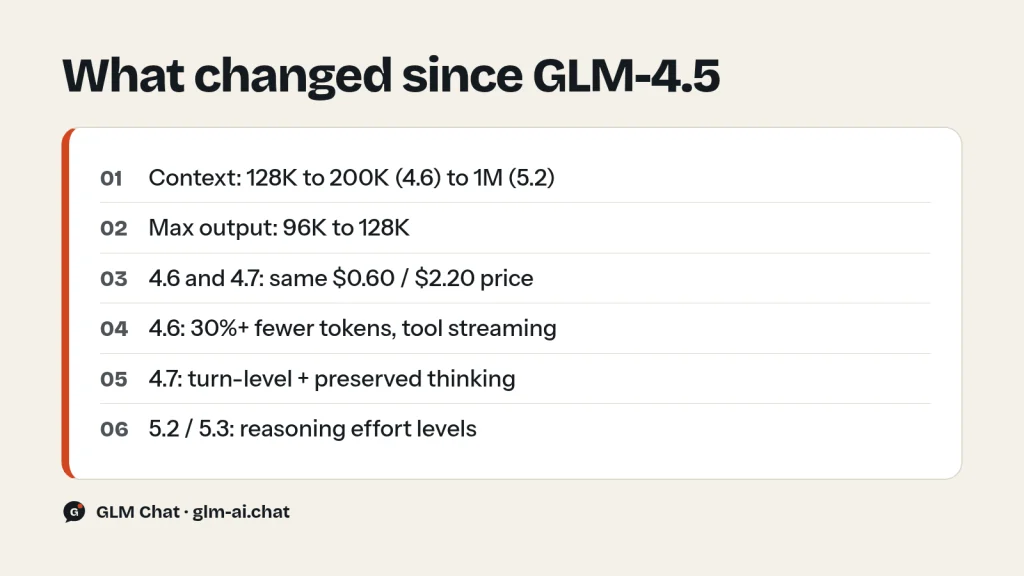
GLM-4.5’s 128K window was generous at launch. GLM-4.6 raised it to 200K, which GLM-4.7, GLM-5 and GLM-5.1 kept. GLM-5.2 jumped to 1M tokens, and GLM-5.3 and GLM-5.3-Flash also offer 1M. Maximum output grew from 96K to 128K at the same time. For agents that read large codebases or long document sets, this is the single biggest gap.
Price: same money, more model
GLM-4.6 and GLM-4.7 kept GLM-4.5’s exact price of $0.60 input, $0.11 cached and $2.20 output per million tokens. GLM-4.6 also used over 30% fewer tokens on Z.ai’s coding runs, so the same task costs less. At the low end, GLM-5.3-Flash costs $0.15 input and $0.50 output, below even GLM-4.5-Air, and adds image and video input plus a 1M context. And GLM-4.7-Flash is free on the API.
Thinking controls
GLM-4.5 offers one switch: thinking on (dynamic) or off. GLM-4.7 added turn-level thinking, so you can enable reasoning on hard turns and disable it on easy ones within one session, and preserved thinking, which keeps earlier reasoning in context for coding agents. The GLM-5 line added explicit effort levels: GLM-5.2 accepts reasoning_effort high or max, and GLM-5.3 accepts low, high or max. GLM-4.6 also introduced streaming tool calls (tool_stream), which GLM-4.5 does not support.
Coding and scale
Z.ai reports GLM-4.7 at 73.8% on SWE-bench Verified and GLM-5 at 77.8%. GLM-5 also moved to a much larger design, 744B total and 40B active parameters, and its pre-training data grew from GLM-4.5’s 23T tokens to 28.5T. Z.ai’s GLM-5.3-Flash blog compares base models directly and reports that GLM-5.3-Flash-Base outperforms GLM-4.5-Base overall, despite GLM-5.3-Flash’s smaller 320B-total, 18B-active size.
Vision: from a separate model to native input
In the GLM-4.5 generation, images and video needed a separate model, GLM-4.5V, with a 64K context and a 16K output cap. GLM-4.6V doubled that context to 128K, raised output to 32K, added native function calling and cut the price to $0.30 input and $0.90 output. GLM-5.3-Flash goes further: one model accepts text, images, video and files with a 1M context, so many applications no longer need to route requests between a text model and a vision model at all.
When GLM-4.5 still makes sense
- You already run it. If your prompts, evaluations and parsers are tuned to GLM-4.5, switching costs testing time. Plan a move, but there is no emergency:
glm-4.5is still listed in Z.ai’s API reference and pricing. - You fine-tune from a base model. Z.ai open-sourced the GLM-4.5 base models alongside the chat models, which gives researchers a documented starting point with a published technical report.
- You need reproducibility. The technical report (arXiv 2508.06471) and the public Claude Code trajectories make GLM-4.5 a well-documented baseline for research comparisons.
- You want the Air size. GLM-4.5-Air at 106B total parameters is far easier to self-host than the 355B-class models, and there is no Air version of GLM-4.6 or GLM-4.7.
- You want a free API model from this family. GLM-4.5-Flash is free, although GLM-4.7-Flash is the newer free option.
For a new project, start with GLM-4.7 at the same price, or GLM-5.3-Flash if cost matters most. The GLM models comparison helps you pick.
Which GLM model should you pick instead?
If you are choosing a model today rather than maintaining a GLM-4.5 deployment, one of these is usually the better fit. The table starts from what you need and names the model that delivers it.
| Your situation | Pick | Why |
|---|---|---|
| Minimal change from GLM-4.5 | GLM-4.6 | Same price, same hybrid thinking, 200K context, 30%+ fewer tokens in Z.ai’s coding runs |
| Best coding at the same price | GLM-4.7 | $0.60 / $2.20, 73.8% SWE-bench Verified in Z.ai’s results |
| Lower cost, strong model | GLM-5.3-Flash | $0.15 / $0.50, 1M context, multimodal input |
| Lower cost, same family | GLM-4.5-Air | $0.20 / $1.10, same API parameters and hybrid reasoning |
| Free API access | GLM-4.7-Flash or GLM-4.5-Flash | Zero per-token price; GLM-4.7-Flash is newer with 200K context |
| Lowest latency in the 4.5 family | GLM-4.5-X | High-speed serving, $2.20 / $8.90 |
| Vision tasks | GLM-4.6V instead of GLM-4.5V | Cheaper ($0.30 / $0.90 vs $0.60 / $1.80), 128K vs 64K context, native function calling |
| Top quality for agents and coding | GLM-5.3 | Current flagship, 1M context, reasoning effort control |
For most GLM-4.5 users the honest recommendation is GLM-4.7: identical price, a bigger context window, stronger coding and better thinking control, with only a handful of parameter differences listed in the migration notes below.
GLM 4.5 benchmarks and Z.ai’s claims
Z.ai evaluated GLM-4.5 on 12 benchmark suites chosen to cover reasoning, coding and agent work: MMLU Pro, AIME24, MATH 500, SciCode, GPQA, HLE, LiveCodeBench, SWE-Bench, Terminal-bench, TAU-Bench, BFCL v3 and BrowseComp. In Z.ai’s published results:
- The Hugging Face model card gives GLM-4.5 an average of 63.2 across the 12 benchmarks and GLM-4.5-Air 59.8.
- Z.ai’s API documentation says that on the aggregated average GLM-4.5 ranked second among all models and first among open-source models at launch.
- Z.ai says GLM-4.5-Air surpassed Gemini 2.5 Flash, Qwen3-235B and Claude 4 Opus on reasoning benchmarks such as those tracked by Artificial Analysis.
- In the 52-task Claude Code evaluation, Z.ai reports GLM-4.5 ahead of Kimi-K2 and Qwen3-Coder, and close to Claude 4 Sonnet in most scenarios.
Z.ai publishes the per-benchmark results as charts in its blog and model card rather than as a table, so this page does not list individual scores. Treat any single number as one data point and weigh it against how the model performs on your own tasks, which is what the five-task test above is for.
Pricing and free access
GLM-4.5 is pay-as-you-go on the Z.ai API at $0.60 per million input tokens, $0.11 per million cached input tokens and $2.20 per million output tokens. Caching is automatic when requests repeat the same context, such as a shared system prompt, and cached-input storage is free for a limited time. Reasoning tokens are billed as output, so switching thinking off for simple requests lowers the bill.
A worked example: 1,000 requests with 2,000 input tokens and 500 output tokens each come to 2M input and 0.5M output tokens. On GLM-4.5 that is 2 × $0.60 + 0.5 × $2.20 = $2.30. The same job costs $0.40 + $0.55 = $0.95 on GLM-4.5-Air, 2 × $0.15 + 0.5 × $0.50 = $0.55 on GLM-5.3-Flash, and nothing on GLM-4.5-Flash or GLM-4.7-Flash. Speed has a price too: on GLM-4.5-X the same job costs 2 × $2.20 + 0.5 × $8.90 = $8.85, almost four times the standard model, so reserve X for traffic where latency really matters. Full tables are on our GLM pricing page.
Free ways to use GLM-4.5
- GLM Chat: GLM-4.5 is one of the models in this site’s chat, with no account needed. Paid models allow 40 messages per day per visitor, up to 8,000 characters each, and your history stays in your browser. Chat with GLM-4.5 now.
- GLM-4.5-Flash on the API: the free member of the family. Create a key and call
glm-4.5-flashat no per-token cost; your account’s rate limits still apply. - chat.z.ai: Z.ai’s own free web chat for GLM models at chat.z.ai.
- Self-hosting: the MIT weights are free to download and use commercially.
OpenRouter lists z-ai/glm-4.5 with a 131,072-token context at a listed price of $0.60 input and $2.20 output, and z-ai/glm-4.5-air at $0.13 and $0.85. OpenRouter prices change often; confirm on the GLM-4.5 page on OpenRouter. The GLM Coding Plan is now built around GLM-5.3 and GLM-5.3-Flash, so if you want GLM-4.5 specifically, use the pay-as-you-go API.
Using GLM-4.5 via API
GLM-4.5 uses Z.ai’s OpenAI-compatible endpoint at https://api.z.ai/api/paas/v4/chat/completions. Create a key on the API Keys page at z.ai/manage-apikey/apikey-list, store it as ZAI_API_KEY, and use the model ID glm-4.5 (or glm-4.5-air, glm-4.5-x, glm-4.5-airx, glm-4.5-flash). Our GLM API quickstart covers setup step by step.
curl
curl -X POST "https://api.z.ai/api/paas/v4/chat/completions" \
  -H "Content-Type: application/json" \
  -H "Authorization: Bearer $ZAI_API_KEY" \
  -d '{
    "model": "glm-4.5",
    "messages": [
      {"role": "user", "content": "Explain the difference between a process and a thread in five sentences."}
    ],
    "thinking": {"type": "enabled"},
    "max_tokens": 4096,
    "temperature": 0.6
  }'
Python with the OpenAI SDK
import os
from openai import OpenAI

client = OpenAI(
    api_key=os.environ["ZAI_API_KEY"],
    base_url="https://api.z.ai/api/paas/v4/",
)

# Non-thinking mode for a quick, cheap answer
quick = client.chat.completions.create(
    model="glm-4.5",
    messages=[{"role": "user", "content": "Classify this ticket as bug, feature or question: 'Export button does nothing.'"}],
    extra_body={"thinking": {"type": "disabled"}},
)
print(quick.choices[0].message.content)

# Thinking mode, streamed, for a harder problem
stream = client.chat.completions.create(
    model="glm-4.5",
    messages=[{"role": "user", "content": "Explain how experts in a Mixture-of-Experts model share work."}],
    stream=True,
    temperature=0.6,
    extra_body={"thinking": {"type": "enabled"}},
)
for chunk in stream:
    delta = chunk.choices[0].delta
    if getattr(delta, "reasoning_content", None):
        print(delta.reasoning_content, end="", flush=True)
    if delta.content:
        print(delta.content, end="", flush=True)
Parameters that matter for GLM-4.5
| Parameter | GLM-4.5 series behaviour |
|---|---|
thinking.type | enabled (default, dynamic) or disabled |
temperature | Range 0.0 to 1.0, default 0.6 |
top_p | Default 0.95 |
max_tokens | Default 65,536; maximum 98,304 (96K) |
response_format | {"type": "json_object"} for JSON mode |
tools | Function calling supported; tool_stream is not |
Reasoning streams in delta.reasoning_content and the answer in delta.content. In tool loops, send earlier reasoning_content back unchanged with tool results so interleaved thinking stays coherent. Our guides to GLM thinking mode and function calling and structured output show complete examples, and the rate limits and error codes guide explains 400 and 429 responses.
JSON mode
GLM-4.5 supports structured output. Set response_format to json_object, list the keys you want in the system prompt, and switch thinking off for short extraction jobs so you are not billed for reasoning you do not need.
curl -X POST "https://api.z.ai/api/paas/v4/chat/completions" \
  -H "Content-Type: application/json" \
  -H "Authorization: Bearer $ZAI_API_KEY" \
  -d '{
    "model": "glm-4.5",
    "messages": [
      {"role": "system", "content": "Return only JSON with keys language, sentiment (positive, neutral or negative) and topics (array of strings)."},
      {"role": "user", "content": "The new update made exports twice as fast, but the settings page is now confusing."}
    ],
    "response_format": {"type": "json_object"},
    "thinking": {"type": "disabled"},
    "temperature": 0.2
  }'
Error handling with plain HTTP
If you call the API without an SDK, read the business code from the error body. Z.ai returns errors as {"error": {"code": "...", "message": "..."}}. Retry only rate limits (1302), temporary overload (1305) and network errors (1234). Do not retry authentication failures (401 with 1000, 1001 or 1003), an unknown model (1211, usually a typo in glm-4.5), invalid parameters (1210, 1213, 1214, such as a temperature above 1.0), a prompt that is too long for the 128K window (1261) or an empty balance (1113).
import os, time, requests

URL = "https://api.z.ai/api/paas/v4/chat/completions"
HEADERS = {"Authorization": "Bearer " + os.environ["ZAI_API_KEY"]}
RETRY_CODES = {"1302", "1305", "1234"}

def chat(messages, model="glm-4.5", attempts=5):
    delay = 1
    for attempt in range(attempts):
        r = requests.post(URL, headers=HEADERS, timeout=180,
                          json={"model": model, "messages": messages, "temperature": 0.6})
        if r.ok:
            return r.json()["choices"][0]["message"]["content"]
        try:
            err = r.json().get("error", {})
        except ValueError:
            err = {}
        code = str(err.get("code", ""))
        if code in RETRY_CODES and attempt < attempts - 1:
            time.sleep(delay)
            delay *= 2
            continue
        raise RuntimeError(f"HTTP {r.status_code}, code {code}: {err.get('message')}")

print(chat([{"role": "user", "content": "List three uses of a hash map."}]))
With stream=true, an abnormal stop mid-answer does not produce an error code. Check finish_reason on the final chunk instead: stop and tool_calls are normal, while length, sensitive, model_context_window_exceeded and network_error mean the answer is incomplete. The stream itself ends with data: [DONE]. Your account’s concurrency limits per model are shown at z.ai/manage-apikey/rate-limits.
When to switch thinking on or off
Z.ai sorts requests into three tiers, and they make a good rule. Simple requests such as fact lookups, classification or a one-line translation need no thinking, so send disabled. Moderate requests that need a few steps, such as comparing two options, can use the default dynamic thinking. Difficult requests, including advanced maths, networking questions and coding problems, should keep thinking on with a generous max_tokens, because the reasoning is billed as output and counts toward the limit.
Downloading the weights
Z.ai open-sourced the base models, the hybrid reasoning models and FP8 versions of the hybrid reasoning models for both GLM-4.5 and GLM-4.5-Air, under the MIT license, which allows commercial use and secondary development. Read Is GLM open source? for how MIT compares with the newer GLM-5.3 License. Official locations:
zai-org/GLM-4.5: BF16, about 358B parameters in the checkpoint files.zai-org/GLM-4.5-FP8: the FP8 version.zai-org/GLM-4.5-Air: the 106B-total sibling.- Code, tool parser and reasoning parser details: github.com/zai-org/GLM-4.5; the ZhipuAI organization on ModelScope also hosts Z.ai models.
The model class is glm4_moe, with 8 experts routed per token, and it is implemented in Hugging Face transformers, vLLM and SGLang, including the tool-call and reasoning parsers. The chat template appends /nothink to the user turn when you set enable_thinking=False, which is how you get non-thinking mode on your own server.
Hardware is the hard part. A rough estimate for the weights alone: 358B parameters × 2 bytes (BF16) ≈ 716 GB; × 1 byte (FP8) ≈ 358 GB. KV cache, activations and serving overhead are extra. That means a multi-GPU server. If you need something smaller, GLM-4.5-Air needs roughly a third of that, and GLM-4.7-Flash (31B total) is smaller still.
Migrating from GLM-4.5 to GLM-4.6 or GLM-4.7
Both successors use the same endpoint, message format and price, so migration is mostly about defaults. These are the settings that change:
| Setting | GLM-4.5 | GLM-4.6 | GLM-4.7 |
|---|---|---|---|
model | glm-4.5 | glm-4.6 | glm-4.7 |
Default temperature | 0.6 | 1.0 | 1.0 |
Default top_p | 0.95 | 0.95 | 0.95 |
max_tokens maximum | 98,304 | 131,072 | 131,072 |
max_tokens default | 65,536 | 65,536 | 65,536 |
| Context | 128K | 200K | 200K |
Thinking when enabled | Dynamic | Hybrid: model decides | Always thinks |
| Per-turn thinking control | No | No | Yes |
tool_stream | No | Yes | Yes |
- Pin the temperature. If your GLM-4.5 code relied on the default, add
"temperature": 0.6before switching, or outputs will become more varied under the new 1.0 default. - Revisit thinking. GLM-4.6 behaves like GLM-4.5 here. GLM-4.7 always reasons when thinking is enabled, so send
disabledon simple turns to control cost; turn-level thinking lets you choose per request inside one conversation. - Raise output caps where useful. Long generations capped at 98,304 tokens can now go to 131,072.
- Adopt streaming tool calls if you show tool activity to users: add
tool_stream=truewithstream=trueand concatenatedelta.tool_calls[*].function.arguments. - Re-run your evals and watch randomness, latency with long contexts, and tool-call completeness, the three checks Z.ai lists in its own migration checklist.
Skipping straight to the GLM-5 line is also an option. GLM-5.3 and GLM-5.3-Flash always think and cannot switch thinking off, so replace disabled with reasoning_effort: "low". Our thinking mode guide has the per-model details.
Prompt tips for GLM-4.5
- Match thinking to the task. Use the three-tier rule above. It is the biggest lever on both latency and cost.
- Keep the default temperature for chat and writing, lower it for exact work. GLM-4.5’s 0.6 default is already moderate; go lower for extraction and code, or set
do_sample: falseto remove sampling. Tune temperature or top_p, not both. - Structure the prompt for caching. Put the system prompt, tool schemas and reference text first and identical across requests. Cached input costs $0.11 instead of $0.60 per million tokens.
- Spell out slide and document structure. Z.ai’s slide use case organises content into introduction, body and conclusion; asking for that structure and a slide count explicitly gives cleaner decks.
- For translation, name the register. Z.ai highlights style retention and informal text. Say whether you want the tone preserved or adapted to the target language’s usual style.
- Give agents tools with tight descriptions. GLM-4.5 was optimised for tool invocation; a clear function description and required-parameter list does more than extra instructions in the prompt.
- Budget the 128K window. Send the relevant files and a summary of older turns rather than everything. If you regularly run out of room, that alone is a reason to move to GLM-4.6 or GLM-4.7.
GLM-4.5 FAQ
Is GLM-4.5 free?
The weights are free under the MIT license, and you can chat with GLM-4.5 in GLM Chat without an account. On the Z.ai API, GLM-4.5 costs $0.60 input and $2.20 output per million tokens, while GLM-4.5-Flash from the same family is free.
How many parameters does GLM-4.5 have?
355B total with 32B active per token. GLM-4.5-Air has 106B total and 12B active. The Hugging Face checkpoint metadata lists slightly higher totals than the headline figures: about 358B for GLM-4.5 and 110B for GLM-4.5-Air.
What is GLM-4.5’s context window?
128K tokens of context, with up to 96K output tokens (98,304). GLM-4.6 and GLM-4.7 raised context to 200K, and GLM-5.2 to 1M.
What is the difference between GLM-4.5 and GLM-4.5-Air?
Size and price. GLM-4.5 is 355B/32B and costs $0.60/$2.20 per million tokens; GLM-4.5-Air is 106B/12B and costs $0.20/$1.10. Both share the training pipeline, the 128K context, hybrid reasoning and the MIT license. Z.ai’s 12-benchmark averages are 63.2 and 59.8.
Is GLM-4.5 still worth using?
For new work, GLM-4.7 gives you more context and stronger coding at the same price, and GLM-5.3-Flash is cheaper with a 1M context. GLM-4.5 still makes sense for existing tuned pipelines, fine-tuning from its open base model, research baselines, or when you want the Air size for self-hosting.
How do I turn off thinking in GLM-4.5?
Send "thinking": {"type": "disabled"} in the request (in extra_body with the OpenAI SDK). When self-hosting, pass enable_thinking=False to the chat template.
When was GLM-4.5 released?
Z.ai announced the GLM-4.5 series on July 28, 2025; the Hugging Face repositories were created on July 20, 2025. GLM-4.5V followed on August 11, 2025. See the GLM release timeline for everything since.
Can GLM-4.5 be used in Claude Code?
Yes. Z.ai designed GLM-4.5 for coding agents such as Claude Code and Roo Code and ran its 52-task evaluation inside Claude Code. Today the Coding Plan’s Claude Code setup uses GLM-5.3 and GLM-5.3-Flash; our GLM in Claude Code guide walks through the configuration.
GLM-4.5 set the pattern the newer GLM models follow: open MIT weights, hybrid reasoning and agent-first training. The quickest way to see how it compares with its successors is to ask it something real. Chat with GLM-4.5 now, then run the same prompt on GLM-4.7.