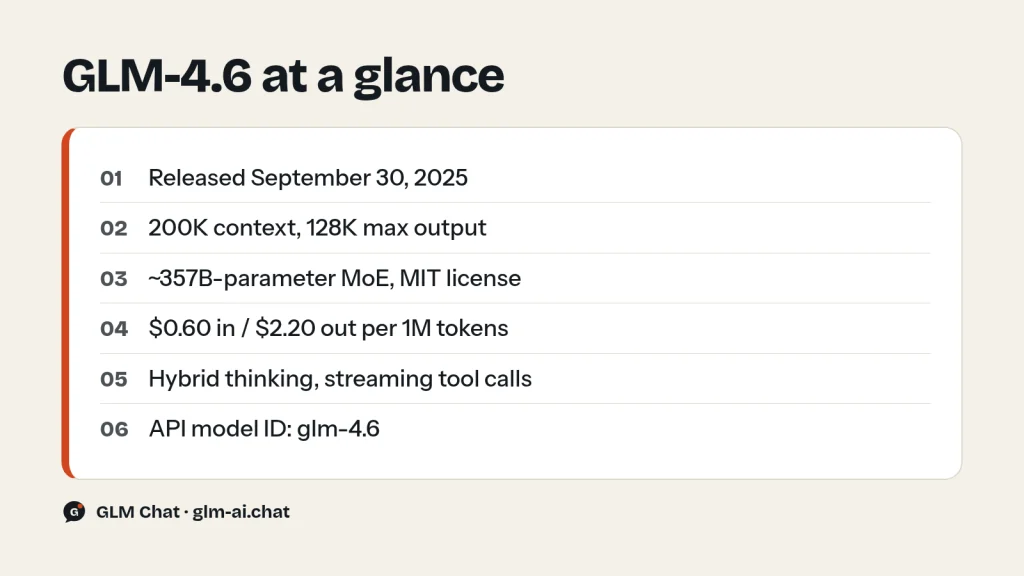
GLM 4.6 is Z.ai’s open-weight coding and agent model from September 30, 2025. It is a Mixture-of-Experts model of roughly 355B-class size (the Hugging Face checkpoint lists about 357B parameters), released under the MIT license, with a 200K-token context window and up to 128K output tokens. On the Z.ai API it costs $0.60 per million input tokens, $0.11 per million cached input tokens and $2.20 per million output tokens. It uses hybrid thinking by default: the model decides on its own whether a request needs step-by-step reasoning, and you can switch reasoning off per request.
GLM-4.6 sits between GLM-4.5 (July 2025) and GLM-4.7 (December 2025) in the flagship line. Z.ai, the company formerly known as Zhipu AI, built it mainly for real-world coding inside agents such as Claude Code, Cline, Roo Code and Kilo Code, and reports that it uses more than 30% fewer tokens than GLM-4.5 for the same work. It also gained a vision sibling, GLM-4.6V, in December 2025. If you want to try it before reading further, Chat with GLM-4.6 now in GLM Chat, free and without an account.
This page covers what GLM-4.6 does well, how it compares with the models before and after it, the full price picture, working API code with the exact model ID glm-4.6, how to download and serve the weights, and the question many people search for: whether a “GLM-4.6 Air” exists. (It does not. The short answer and the alternatives are below.)

What GLM-4.6 is good at
Z.ai positions GLM-4.6 as a broad upgrade to GLM-4.5 across coding, long-context work, reasoning, search, writing and agent tasks. In practice its strengths group into five areas.
Agentic coding in real tools
Coding is the headline. Z.ai ran 74 real-world coding tasks inside Claude Code and reports that GLM-4.6 came out ahead of Claude Sonnet 4 on that set. Unusually, Z.ai published every test question and every agent trajectory in the CC-Bench-trajectories dataset on Hugging Face, so you can read exactly what the model did rather than trusting a single score. Z.ai also says GLM-4.6 produces more visually polished front-end pages than GLM-4.5, and that it works better as the engine of coding agents such as Cline, Roo Code and Kilo Code.
On general benchmarks, Z.ai evaluated GLM-4.6 on eight suites including AIME 25, GPQA, LiveCodeBench v6, HLE and SWE-bench Verified, and reports performance on par with Claude Sonnet 4 on several of those leaderboards. Z.ai’s GLM-4.6 page shows these results as charts rather than a numeric table, so this page does not repeat individual scores.
Token efficiency
Z.ai reports that GLM-4.6 is over 30% more efficient than GLM-4.5 in average token consumption on those coding runs, the lowest consumption among the models it compared. Because GLM-4.6 and GLM-4.5 cost exactly the same per token, fewer tokens per task translates directly into a lower bill for the same job.
Long context: 200K tokens
The context window grew from 128K tokens in GLM-4.5 to 200K tokens in GLM-4.6, and maximum output rose from 96K to 128K tokens. That extra room matters most for agents: a coding agent keeps file contents, tool results and its own plan in context, and long sessions run out of space fast. With 200K tokens you can fit a larger slice of a codebase or a longer research trail before the agent has to summarize or drop history.
Tool use, search agents and reasoning with tools
GLM-4.6 supports tool use during inference and, according to Z.ai, integrates more cleanly into agent frameworks than GLM-4.5, with stronger results in tool-using and search-based agents. It is also the model for which Z.ai introduced streaming tool calls (tool_stream=true), which lets your application display function names and arguments as they are generated instead of waiting for the whole call to finish. For deep-research style products, Z.ai highlights better intent understanding, tool retrieval and synthesis of search results.
Writing, office documents and translation
Beyond code, Z.ai lists refined writing that better matches human preferences in style and readability, more natural role-play with consistent character tone across long conversations, better-structured slide decks for office automation, and improved translation for less common languages and informal text such as social media posts, product listings and short-drama scripts. It is a multilingual model and handles long passages while keeping style consistent.
We tested it: 5 tasks
Here is how GLM-4.6 handles GLM Chat’s five standard tasks. Every model we cover goes through the same fixed prompts in our own test harness, using the same settings as the public chat: temperature 0.7, a 2,048-token output cap and the lightest reasoning setting the model allows (for GLM-4.6 that means thinking disabled). The harness records the full answer, latency and token counts, and an editor scores each answer from 0 to 2 for a maximum of 10.
- Python: a function that removes duplicate rows from a large CSV while streaming the file, supporting key columns, keeping the first occurrence and preserving the header.
- JavaScript: a
debounce(fn, wait, { leading, trailing })function with acancel()method, plus unit tests for Node’s built-in test runner. - PHP refactor: a deliberately messy 60-line PHP function rewritten as clean PHP 8 without changing behaviour.
- Explanation: transformer attention explained to a complete beginner in about 150 words.
- Extraction: a messy product description turned into valid JSON with fixed keys, units converted to centimetres and
nullfor anything the text does not state.
How the current GLM models scored in our test
| Model | Task 1 | Task 2 | Task 3 | Task 4 | Task 5 | Total /10 | Avg latency | Why (across runs) |
|---|---|---|---|---|---|---|---|---|
| GLM-5.3 | 2 | 2 | 1 | 1 | 1 | 7 | 7.6 s | Task 3: output not escaped (2/3 runs) · Task 4: no queries/keys/values (2/3 runs) · +1 more |
| GLM-5.3-Flash | 2 | 0 | 1 | 2 | 2 | 7 | 12.9 s | Task 2: fails our debounce behaviour checks (2/3 runs) · Task 3: output not escaped (3/3 runs) |
| GLM-5.2 | 2 | 1 | 1 | 1 | 2 | 7 | 6.6 s | Task 2: its own tests fail (2/3 runs) · Task 3: output not escaped (3/3 runs) · +1 more |
| GLM-5.1 | 2 | 2 | 1 | 1 | 2 | 8 | 14.3 s | Task 3: output not escaped (3/3 runs) · Task 4: no queries/keys/values (2/3 runs) |
| GLM-4.7 | 2 | 1 | 1 | 2 | 2 | 8 | 14.4 s | Task 2: fails our debounce behaviour checks (1/3 runs) · Task 3: output not escaped (3/3 runs) |
| GLM-4.7-Flash | 2 | 0 | 0 | 1 | 1 | 4 | 38.5 s | Task 2: fails our debounce behaviour checks (2/3 runs) · Task 3: changes the function’s behaviour (3/3 runs) · +2 more |
A score of 2 means the answer is correct and complete and meets every constraint; 1 means it is usable after a small fix; 0 means it fails the task, invents data or breaks the format. The three coding tasks are the ones to watch for GLM-4.6, since coding is what Z.ai tuned it for. The debounce task is a good trap: handling leading and trailing together, and making cancel() really cancel a pending call, separates careful code from plausible-looking code. The PHP refactor checks whether the model keeps behaviour identical (including the VIP discount) while escaping output and switching to parameterised SQL.
The explanation and extraction tasks test discipline rather than raw capability. A good answer to task 4 stays within 120 to 180 words and gets queries, keys, values and weights right. A good answer to task 5 returns only JSON with the exact keys and uses null for the missing field instead of guessing. Remember that the chat runs GLM-4.6 with thinking off; in your own API calls you can leave hybrid thinking on for harder problems. Our editorial policy documents the full rubric.
GLM-4.6 vs GLM-4.5, GLM-4.7 and GLM-5.2
GLM-4.6 is a middle step in a fast-moving family. The table puts it next to its predecessor, its direct successor and a current flagship so you can see what changed.
| Spec | GLM-4.5 | GLM-4.6 | GLM-4.7 | GLM-5.2 |
|---|---|---|---|---|
| Release | Jul 28, 2025 | Sep 30, 2025 | Dec 22, 2025 | Jun 16, 2026 |
| Parameters | 355B / 32B active | ~357B (HF) | 355B-class / 32B active | 744B / 40B active |
| Context | 128K | 200K | 200K | 1M |
| Max output | 96K | 128K | 128K | 128K |
| Input / output price | $0.60 / $2.20 | $0.60 / $2.20 | $0.60 / $2.20 | $1.40 / $4.40 |
| Cached input price | $0.11 | $0.11 | $0.11 | $0.26 |
| OpenRouter listed price | $0.60 / $2.20 | $0.43 / $1.75 | $0.40 / $1.75 | ~$0.65 / $2.04 |
| Modality | Text | Text | Text | Text |
| Default temperature | 0.6 | 1.0 | 1.0 | 1.0 |
| Thinking | Hybrid, on/off | Hybrid, on/off | On by default, turn-level | On, effort high/max |
| Streaming tool calls | No | Yes | Yes | Yes |
| Weights | MIT | MIT | MIT | MIT |
What GLM-4.6 improved over GLM-4.5
Against GLM-4.5, the upgrade is clear and costs nothing extra: 200K instead of 128K context, 128K instead of 96K maximum output, streaming tool calls, over 30% lower token use on Z.ai’s coding runs, and stronger coding and agent results. Both use hybrid thinking and both are MIT-licensed. One practical difference trips people up: GLM-4.5’s default temperature is 0.6, while GLM-4.6 defaults to 1.0. If you swap model IDs in a pipeline that relied on defaults, set the temperature explicitly.
What GLM-4.7 improved over GLM-4.6
GLM-4.7 kept the same price and context size but moved the coding bar further. Z.ai reports GLM-4.7 at 73.8% on SWE-bench Verified (5.8 points above GLM-4.6), 66.7% on SWE-bench Multilingual (12.9 points higher) and 41% on Terminal Bench 2.0 (16.5 points higher). It also tested 100 real programming tasks in Claude Code and reports clear gains over GLM-4.6 in stability and deliverability. GLM-4.7 changed the thinking model too: thinking is on by default instead of hybrid, and it added turn-level thinking so you can switch reasoning on or off per turn within a session.
Where the GLM-5 line leaves it
The GLM-5 generation moved to a 744B-total, 40B-active architecture. GLM-5.2 offers a 1M-token context and effort levels for reasoning, at $1.40 input and $4.40 output per million tokens. At the cheap end, GLM-5.3-Flash is natively multimodal, has a 1M context and costs $0.15 input and $0.50 output, which is less than GLM-4.6 on both sides. For most new projects, one of those two, or GLM-4.7 at the same price as GLM-4.6, is the better starting point. GLM-4.6 remains a sound choice when you have prompts and evaluations already tuned for it, or when you self-host and its size fits your hardware plan. The full GLM model comparison covers every option.
Which GLM model should you pick instead?
GLM-4.6 is a good model, but in late 2026 it is rarely the best default for a new project. Newer GLM models cost the same or less and add longer context, finer thinking control or image input. Use this table to find the right replacement for what you actually need.
| Your situation | Pick | Why |
|---|---|---|
| Same budget, better coding | GLM-4.7 | Same $0.60 / $2.20 price, 73.8% SWE-bench Verified in Z.ai’s results, turn-level thinking |
| Lowest cost for real work | GLM-5.3-Flash | $0.15 / $0.50, 1M context, image, video and file input |
| Zero per-token cost | GLM-4.7-Flash | Free on the Z.ai API, 200K context, MIT weights |
| Hardest coding and agent tasks | GLM-5.3 | Current flagship, 1M context, reasoning effort low / high / max |
| Open MIT weights with 1M context | GLM-5.2 | 744B / 40B MoE under MIT, same base model as GLM-5.3 |
| Screenshots, documents or video | GLM-4.6V or GLM-4.6V-Flash | Same generation, 128K multimodal context, Flash variant is free |
| Coding agents on a subscription | GLM Coding Plan | GLM-5.3 and GLM-5.3-Flash from $18 per month inside supported tools |
| Prompts and evals already tuned to 4.6 | Stay on GLM-4.6 | Still listed on Z.ai’s API and pricing; migrate when you have time to re-test |
Two rules of thumb cover most cases. If you pay per token and want a drop-in upgrade, move to GLM-4.7: the API shape, price and context are the same, and the migration notes below list the only settings that change. If cost is your main constraint, test GLM-5.3-Flash, which is cheaper than GLM-4.6 on input and output and handles a far larger context.
Is there a GLM 4.6 Air?
No. Z.ai never released a model called GLM-4.6-Air. There is no glm-4.6-air model ID on the Z.ai API, no GLM-4.6-Air price on Z.ai’s pricing page and no GLM-4.6-Air repository in the zai-org organization on Hugging Face. GLM-4.6 shipped as a single full-size text model, plus the GLM-4.6V vision family that followed in December.
If you are searching for “GLM-4.6 Air” because you want a smaller open model you can run on less hardware, these are the real options:
- GLM-4.5-Air: the lightweight open model of that generation. 106B total and 12B active parameters, 128K context, MIT license, $0.20 input and $1.10 output per million tokens on the API.
- GLM-4.7-Flash: the later lightweight open model. A 30B-A3B MoE (31B total), 200K context, 128K output, MIT license, and completely free on the Z.ai API.
- GLM-4.6V-Flash: a free, lightweight vision model from the GLM-4.6V family, if you need image or video input.
Be wary of third-party pages or downloads labelled “GLM-4.6-Air”. Official GLM weights live under huggingface.co/zai-org, and official API model IDs are listed in Z.ai’s docs.
GLM-4.6V: the vision sibling
On December 8, 2025, Z.ai released GLM-4.6V, a multimodal model that accepts video, images, text and files and answers in text. It has a 128K-token context and up to 32K output tokens. Z.ai says it reached state-of-the-art visual understanding among models of similar size across more than 20 multimodal benchmarks, including MMBench, MathVista and OCRBench. It is also the first GLM vision model with native function calling: images, screenshots and document pages can be passed straight into tool calls, and the model can read images that tools return.
Z.ai’s examples show what 128K of multimodal context means in practice: roughly 150 pages of complex documents, 200 slides or a one-hour video in a single request. Typical uses are turning mixed text-and-image reports into structured articles, visual web search with illustrated reports, and front-end replication, where you upload a screenshot or design and get HTML, CSS and JavaScript back. GLM-4.6V also powers the Vision MCP Server included with the GLM Coding Plan.
| Model | Model ID | Input | Cached | Output |
|---|---|---|---|---|
| GLM-4.6V | glm-4.6v | $0.30 | $0.05 | $0.90 |
| GLM-4.6V-FlashX | glm-4.6v-flashx | $0.04 | $0.004 | $0.40 |
| GLM-4.6V-Flash | glm-4.6v-flash | Free | Free | Free |
The GLM-4.6V weights are open under the MIT license on Hugging Face as zai-org/GLM-4.6V (about 108B parameters in the checkpoint), zai-org/GLM-4.6V-FP8 and zai-org/GLM-4.6V-Flash. Its API defaults differ from the text model: temperature 0.8 and top_p 0.6. To send an image, put an image_url part in the message content:
curl -X POST "https://api.z.ai/api/paas/v4/chat/completions" \
  -H "Authorization: Bearer $ZAI_API_KEY" \
  -H "Content-Type: application/json" \
  -d '{
    "model": "glm-4.6v",
    "messages": [{
      "role": "user",
      "content": [
        {"type": "image_url", "image_url": {"url": "https://example.com/screenshot.png"}},
        {"type": "text", "text": "Rebuild this page layout as HTML and CSS."}
      ]
    }],
    "thinking": {"type": "enabled"}
  }'
Pricing and free access
GLM-4.6 uses simple pay-as-you-go pricing on the Z.ai API. Cached input (repeated context such as a shared system prompt, which the platform recognises automatically) is billed at a lower rate, and cached-input storage is currently free for a limited time.
| Model | Input | Cached input | Output | Context |
|---|---|---|---|---|
| GLM-4.6 | $0.60 | $0.11 | $2.20 | 200K |
| GLM-4.5 | $0.60 | $0.11 | $2.20 | 128K |
| GLM-4.7 | $0.60 | $0.11 | $2.20 | 200K |
| GLM-4.5-Air | $0.20 | $0.03 | $1.10 | 128K |
| GLM-5.3-Flash | $0.15 | $0.03 | $0.50 | 1M |
| GLM-4.7-Flash | Free | Free | Free | 200K |
What a real workload costs
Take 1,000 requests, each with 2,000 input tokens and 500 output tokens. That is 2M input tokens and 0.5M output tokens. On GLM-4.6: 2 × $0.60 = $1.20 for input plus 0.5 × $2.20 = $1.10 for output, so $2.30 in total. If 1,500 of each request’s 2,000 input tokens are a shared system prompt that hits the cache, the input side becomes 1.5 × $0.11 = $0.165 cached plus 0.5 × $0.60 = $0.30 uncached, and the total drops to about $1.57. Reasoning tokens count as output, so leaving thinking on for simple requests raises the output side of the bill. Our GLM pricing guide and context caching guide go deeper.
Free ways to use GLM-4.6
- GLM Chat: GLM-4.6 is one of the models on this site’s chat. No sign-up; up to 40 messages per day on paid models, up to 8,000 characters per message, with history kept only in your browser. Chat with GLM-4.6 now.
- chat.z.ai: Z.ai’s own free web chat for GLM models, at chat.z.ai.
- Free API models: GLM-4.6 itself is not free on the API, but GLM-4.7-Flash, GLM-4.5-Flash and GLM-4.6V-Flash cost nothing per token. If you only need a free model, start with GLM-4.7-Flash.
- Self-hosting: the MIT weights are free to download and use commercially. You pay only for your hardware.
OpenRouter and the Coding Plan
OpenRouter lists GLM-4.6 as z-ai/glm-4.6 with a 204,800-token context at a listed price of $0.43 input and $1.75 output per million tokens. OpenRouter routes across providers and its prices change often, so confirm on the GLM-4.6 page on OpenRouter before you budget.
The GLM Coding Plan (Lite $18, Pro $80, Max $168 per month) is now built around GLM-5.3 and GLM-5.3-Flash. Z.ai’s published routing sends GLM-5.2 and GLM-5.1 requests to GLM-5.3 and GLM-4.7 requests to GLM-5.3-Flash. If you specifically need GLM-4.6 behaviour, for example to reproduce results from an earlier evaluation, use the pay-as-you-go API with the model ID glm-4.6. See the GLM Coding Plan guide for tiers and credits.
Using GLM-4.6 via API
GLM-4.6 runs on Z.ai’s OpenAI-compatible Chat Completions endpoint at https://api.z.ai/api/paas/v4/chat/completions. Create a key on the API Keys page at z.ai/manage-apikey/apikey-list, export it as ZAI_API_KEY and use the model ID glm-4.6. The GLM API quickstart covers keys and SDKs in more detail.
curl
curl -X POST "https://api.z.ai/api/paas/v4/chat/completions" \
  -H "Content-Type: application/json" \
  -H "Authorization: Bearer $ZAI_API_KEY" \
  -d '{
    "model": "glm-4.6",
    "messages": [
      {"role": "system", "content": "You are a senior Python reviewer."},
      {"role": "user", "content": "Review this function for bugs: def avg(xs): return sum(xs)/len(xs)"}
    ],
    "thinking": {"type": "enabled"},
    "max_tokens": 4096,
    "temperature": 1.0
  }'
Python with the OpenAI SDK
Install the SDK with pip install --upgrade 'openai>=1.0' and point it at Z.ai’s base URL. Parameters the OpenAI SDK does not know, such as thinking, go in extra_body.
import os
from openai import OpenAI

client = OpenAI(
    api_key=os.environ["ZAI_API_KEY"],
    base_url="https://api.z.ai/api/paas/v4/",
)

# Fast answer: switch thinking off for a simple request
resp = client.chat.completions.create(
    model="glm-4.6",
    messages=[{"role": "user", "content": "Give me three names for a CLI tool that renames photos."}],
    temperature=0.7,
    extra_body={"thinking": {"type": "disabled"}},
)
print(resp.choices[0].message.content)

# Harder task: stream with thinking enabled
stream = client.chat.completions.create(
    model="glm-4.6",
    messages=[{"role": "user", "content": "Design a retry strategy for a flaky payment webhook."}],
    stream=True,
    extra_body={"thinking": {"type": "enabled"}},
)
for chunk in stream:
    delta = chunk.choices[0].delta
    reasoning = getattr(delta, "reasoning_content", None)
    if reasoning:
        print(reasoning, end="", flush=True)   # the model's reasoning
    if delta.content:
        print(delta.content, end="", flush=True)  # the final answer
Python with the official zai-sdk and streaming tool calls
Z.ai’s own SDK (pip install zai-sdk) exposes the same API. The example below turns on tool_stream, which GLM-4.6 supports, so tool-call arguments arrive piece by piece and you assemble them yourself.
import os
from zai import ZaiClient

client = ZaiClient(api_key=os.environ["ZAI_API_KEY"])

tools = [{
    "type": "function",
    "function": {
        "name": "get_order_status",
        "description": "Look up the shipping status of an order",
        "parameters": {
            "type": "object",
            "properties": {"order_id": {"type": "string"}},
            "required": ["order_id"],
        },
    },
}]

response = client.chat.completions.create(
    model="glm-4.6",
    messages=[{"role": "user", "content": "Where is order A-1042?"}],
    tools=tools,
    stream=True,
    tool_stream=True,
)

calls = {}
for chunk in response:
    if not chunk.choices:
        continue
    delta = chunk.choices[0].delta
    if delta.tool_calls:
        for tc in delta.tool_calls:
            if tc.index not in calls:
                calls[tc.index] = tc
            else:
                calls[tc.index].function.arguments += tc.function.arguments

for tc in calls.values():
    print(tc.function.name, tc.function.arguments)
Parameters that matter for GLM-4.6
| Parameter | GLM-4.6 behaviour |
|---|---|
thinking.type | enabled (default, hybrid: model decides) or disabled |
temperature | Range 0.0 to 1.0, default 1.0 |
top_p | Default 0.95 |
max_tokens | Default 65,536; maximum 131,072 |
response_format | {"type": "json_object"} for JSON mode |
tool_stream | Supported, with stream=true |
clear_thinking | Set false to keep earlier reasoning in context |
With thinking enabled, the reasoning arrives in reasoning_content and the answer in content. In tool-calling loops, return the earlier reasoning_content blocks unmodified along with tool results so the model keeps its chain of thought across calls; this is interleaved thinking, supported since GLM-4.5. Our guides to GLM thinking mode and function calling and JSON mode show full loops. If you hit 400 or 429 errors, the rate limits and error codes guide lists every code.
JSON mode for structured output
When your code parses the answer, turn on JSON mode with response_format and still name the exact keys in the prompt. JSON mode makes the output valid JSON; your prompt decides which fields appear. Validate the result before you use it.
import os, json
from openai import OpenAI

client = OpenAI(api_key=os.environ["ZAI_API_KEY"], base_url="https://api.z.ai/api/paas/v4/")

resp = client.chat.completions.create(
    model="glm-4.6",
    messages=[
        {"role": "system", "content": "Reply only with JSON: {\"severity\": low|medium|high, \"component\": string, \"summary\": string}"},
        {"role": "user", "content": "Checkout page throws a 500 error when the cart has more than 50 items."},
    ],
    response_format={"type": "json_object"},
    temperature=0.3,
    extra_body={"thinking": {"type": "disabled"}},
)
ticket = json.loads(resp.choices[0].message.content)
assert set(ticket) == {"severity", "component", "summary"}
print(ticket)
Error handling and retries
Z.ai returns errors as JSON with an HTTP status and a business code, for example {"error": {"code": "1302", "message": "..."}}. Only some of them are worth retrying:
| HTTP / code | Meaning | What to do |
|---|---|---|
| 401 / 1000, 1001, 1003 | Authentication failed, header missing or token expired | Fix the key or header; do not retry |
| 400 / 1211 | Unknown model | Check the spelling: glm-4.6 |
| 400 / 1210, 1213, 1214 | Invalid, missing or out-of-range parameter | Fix the request (for example temperature above 1.0) |
| 400 / 1261 | Prompt too long | Trim input to fit the 200K context |
| 429 / 1113 | Insufficient balance or no resource package | Top up; retrying will not help |
| 429 / 1302 | Request rate limit | Retry with exponential backoff |
| 429 / 1305 | Service temporarily overloaded | Retry with backoff |
| 500 / 1234 | Network error | Retry later |
import os, time
from openai import OpenAI, APIStatusError

client = OpenAI(api_key=os.environ["ZAI_API_KEY"], base_url="https://api.z.ai/api/paas/v4/")
RETRYABLE = {"1302", "1305", "1234"}

def ask(messages, attempts=5):
    delay = 1.0
    for attempt in range(attempts):
        try:
            return client.chat.completions.create(model="glm-4.6", messages=messages)
        except APIStatusError as e:
            try:
                code = str(e.response.json().get("error", {}).get("code", ""))
            except ValueError:
                code = ""
            if code in RETRYABLE and attempt < attempts - 1:
                time.sleep(delay)
                delay *= 2          # 1s, 2s, 4s, 8s
                continue
            raise                   # auth, balance or bad-request errors: fix, don't retry

print(ask([{"role": "user", "content": "Say hello in one word."}]).choices[0].message.content)
Streaming behaves differently: if a streamed response stops abnormally mid-generation, you do not get an error code. Instead, check finish_reason on the last chunk. Z.ai documents the values stop, tool_calls, length (hit max_tokens), sensitive (content filter), model_context_window_exceeded and network_error. Treat anything other than stop or tool_calls as an incomplete answer. Rate limits on your account are concurrency based and per model; the console shows yours at z.ai/manage-apikey/rate-limits.
Thinking on or off: a quick rule
GLM-4.6’s default hybrid thinking already skips reasoning on many easy prompts, but you pay for every reasoning token it does produce, and they add latency. Send disabled explicitly for classification, short rewrites, lookups and extraction. Leave it enabled for debugging, multi-file changes, planning, maths and any tool-calling loop where the model must interpret results. When thinking is on, raise max_tokens so the reasoning does not crowd out the answer.
Downloading the GLM-4.6 weights
GLM-4.6 is open under the MIT license, which allows commercial use, modification and redistribution. See Is GLM open source? for how that compares with the newer GLM-5.3 License. The official repositories are:
zai-org/GLM-4.6: BF16 weights, about 357B parameters in the checkpoint.zai-org/GLM-4.6-FP8: FP8 weights for lower memory use.- Z.ai also publishes models under the ZhipuAI organization on ModelScope.
GLM-4.6 uses the glm4_moe architecture (Glm4MoeForCausalLM), the same model class as GLM-4.5, with 8 experts routed per token. That class is implemented in Hugging Face transformers, vLLM and SGLang, which are the practical ways to serve it. The chat template supports switching reasoning off: when you pass enable_thinking=False to the template, it appends /nothink to the user turn.
Plan the hardware honestly. A rough estimate for the weights alone: 357B parameters × 2 bytes (BF16) ≈ 714 GB, and × 1 byte (FP8) ≈ 357 GB. The KV cache for long contexts, activations and framework overhead come on top of that. In practice this means a multi-GPU server node, not a workstation. If that is out of reach, GLM-4.5-Air (106B) or GLM-4.7-Flash (31B total) are the realistic self-hosting choices in the GLM family.
Migrating from GLM-4.6 to a newer model
Moving off GLM-4.6 is mostly a one-line change, but a few defaults differ. This table lists every setting that changes when you switch to GLM-4.7 (same price) or GLM-5.3-Flash (cheaper, multimodal).
| Setting | GLM-4.6 | GLM-4.7 | GLM-5.3-Flash |
|---|---|---|---|
model | glm-4.6 | glm-4.7 | glm-5.3-flash |
Thinking when enabled | Hybrid: model decides | Always thinks | Always on |
| Turning thinking off | disabled | disabled, per turn | Not possible; use reasoning_effort: "low" |
reasoning_effort | Not used | Not used | low / high / max (default max) |
temperature / top_p defaults | 1.0 / 0.95 | 1.0 / 0.95 | 1.0 / 0.95 |
max_tokens maximum | 131,072 | 131,072 | 131,072 |
| Context | 200K | 200K | 1M |
| Image input | No | No | Yes, image_url parts |
| Price (in / out per 1M) | $0.60 / $2.20 | $0.60 / $2.20 | $0.15 / $0.50 |
- Change the model ID and nothing else first. Run your existing test prompts before you tune anything.
- Mind the thinking change. GLM-4.6 often skips reasoning on easy prompts by itself. GLM-4.7 always reasons when thinking is enabled, so send
disabledon turns that do not need it, or your output-token bill rises. - On GLM-5.3-Flash, remove any
"thinking": {"type": "disabled"}and setreasoning_efforttolowfor light tasks. Z.ai recommends temperature 1, top_p 0.95 andclear_thinking: falsefor agents. - Keep only one sampling knob. Z.ai’s migration checklist recommends tuning either
temperatureortop_p, not both. - Re-test what Z.ai flags: randomness of output, latency and cost with long contexts and deep thinking, and completeness of streamed tool-call arguments.
If you use GLM-4.6 through the Coding Plan’s tools today, there is nothing to migrate: the plan serves GLM-5.3 and GLM-5.3-Flash. For step-by-step setup in agents, see GLM in Claude Code and GLM in Cline.
Prompt tips for GLM-4.6
These habits get better answers from GLM-4.6 and keep costs down. Most apply to the newer GLM models as well.
- Put stable content first. System prompt, tool definitions and reference documents go at the top; the changing question goes last. Caching recognises repeated context automatically, and cached input costs $0.11 instead of $0.60 per million tokens.
- Give coding tasks a finish line. Name the files, the language version, the test command and what counts as done, so the model aims for a result you can check instead of a plausible-looking one.
- Ask for a plan on big changes. For multi-file work, ask for a short plan first, approve it, then ask for the code. With thinking enabled the model plans internally, but a visible plan lets you catch a wrong approach early.
- Use a system prompt for voice and format. Z.ai highlights GLM-4.6’s style control and role-play consistency; a short system prompt describing tone, audience and length keeps long conversations on track.
- Lower the temperature for exact work. The default of 1.0 suits writing and brainstorming. For extraction, classification and code, a lower value gives steadier output;
do_sample: falseturns sampling off entirely. - Leave room for the answer. Z.ai recommends
max_tokensof at least 1,024. With thinking on, go higher, because reasoning tokens count toward the limit. - Keep reasoning in tool loops. Return each assistant turn’s
reasoning_contentunchanged with the tool results. Dropping or editing it weakens interleaved thinking. - Use the full 200K sparingly. Long context is powerful but every token is billed. Send the files that matter rather than the whole repository, and summarise old turns in long sessions.
GLM-4.6 FAQ
Is GLM-4.6 free?
The weights are free under the MIT license, and you can chat with GLM-4.6 free in GLM Chat without an account. On the Z.ai API it is a paid model at $0.60 per million input tokens and $2.20 per million output tokens. If you need a free API model, use GLM-4.7-Flash, GLM-4.5-Flash or GLM-4.6V-Flash.
What is GLM-4.6’s context window?
200K tokens of context, up from 128K in GLM-4.5, with a maximum of 128K output tokens (131,072). The default max_tokens on the API is 65,536.
Does GLM-4.6 Air exist?
No. There is no GLM-4.6-Air model, API ID or official repository. The lightweight open models in the family are GLM-4.5-Air (106B total, 12B active) and the later GLM-4.7-Flash (30B-A3B), which is free on the API.
When was GLM-4.6 released?
Z.ai released GLM-4.6 on September 30, 2025. The vision model GLM-4.6V followed on December 8, 2025, and the next text model, GLM-4.7, arrived on December 22, 2025. The GLM release timeline lists every model since.
How do I turn off thinking in GLM-4.6?
Send "thinking": {"type": "disabled"} in the request body (with the OpenAI SDK, put it in extra_body). With thinking left at the default enabled, GLM-4.6 decides by itself whether a request needs reasoning.
Is GLM-4.6 better than GLM-4.5?
By Z.ai’s measurements, yes: longer context, higher maximum output, stronger coding and agent results, streaming tool calls and over 30% lower token use, all at the same price. The only reasons to stay on GLM-4.5 are prompts tuned for it or a need for its smaller sibling, GLM-4.5-Air.
Can GLM-4.6 read images?
GLM-4.6 itself is text-in, text-out. For images, video and documents use GLM-4.6V (glm-4.6v), its free variant GLM-4.6V-Flash, or the newer GLM-5.3-Flash, which is natively multimodal.
Can I use GLM-4.6 commercially?
Yes. The MIT license permits commercial use, modification and redistribution of the weights. When you use it through the Z.ai API, Z.ai’s usage policies apply as well.
GLM-4.6 is still a capable, fairly cheap open model for coding and agents, and the easiest way to judge it is to give it a real task from your own work. Chat with GLM-4.6 now, then try the same prompt on GLM-4.7 or GLM-5.3-Flash to see what the newer models add.